Best Audio & Video Selector Boxes Under $100 (2026)
We scored products by value using supported formats (HDMI version, HDR, refresh rate), input/output count, control features (remote/auto), build quality, and price under $100
The Verdict
- Best Overall: Kinivo HDMI Switch 4K HDR 501BN (5 In 1 Out) | 4K 30Hz — Best for simple HDMI switching: solid 5-in-1 input choice with compact design and auto-switching convenience
- Best Value: J-Tech Digital HDMI Splitter 4K 60Hz 1x4 — Best for distributing one source to many displays: 1x4 4K@60Hz splitter that supports HDR and multiple outputs
This roundup covers audio and video selector boxes under $100, prioritizing multi-input HDMI and coax switches that add inputs, split signals, or extract audio for home AV setups. Picks were chosen for value using feature relevance (HDMI version, passthrough/resolution support, remote or auto switching, and build quality) weighted against price and user-rated reliability
Top Picks
-
1

Best Overall Kinivo HDMI Switch 4K HDR 501BN (5 In 1 Out) | 4K 30Hz
Best for simple HDMI switching: solid 5-in-1 input choice with compact design and auto-switching convenience
Kinivo 5-in, 1-out HDMI switch supporting 4K 30Hz HDR with 1080p support. Auto-switching based on active input plus IR remote for manual control. Customers note easy setup and reliable automatic switching
- 5-in, 1-out HDMI switch
- auto input switching
- IR remote and manual switch
-
2

Daiwa CS-201A 2 Position Coax Switch
Best for antenna and RF setups: durable coax switch aimed at ham and HF radio or OTA antenna routing
Two-position coax switch for antennas with wide frequency range and low insertion loss. Customers note reliable performance and solid build. "Heavy-duty construction" with smooth switching
- 2-position operation
- low insertion loss
- durable construction
-
3

Best Value J-Tech Digital HDMI Splitter 4K 60Hz 1x4
Best for distributing one source to many displays: 1x4 4K@60Hz splitter that supports HDR and multiple outputs
HDMI splitter with 1 input and 4 outputs supporting 4K@60Hz and HDR formats. Delivers clear picture and sound quality for various sources; some users report occasional audio issues
- 4K@60Hz support
- multi-resolution output
- easy installation
-
4

3x1 HDMI 2.1 Switch 4K 120Hz aluminum
Best for high-refresh HDMI switching on a budget: HDMI 2.1-capable metal switch that handles 4K@120Hz and 8K signals
A 3-in-1 HDMI 2.1 switch with 8K/60Hz and 4K/120Hz support for multiple devices to one display. Enables easy switching between sources with a solid aluminum build. Customers note ease of setup and good value, with some compatibility and flicker issues
- hdmi 2.1 switch with 8k/60hz and 4k/120hz support
- 3x1 input, 1 output
- low-profile aluminum alloy enclosure
-
5

UGREEN HDMI Switch 5×1 with Remote, 4K@60Hz, HDR, 3D
Best multi-input value: five-in-one HDMI switch with remote control and 4K@60Hz support for small home theaters
HDMI switch with 5 input ports and 1 output, supporting 4K@60Hz and HDR. Includes remote for convenient switching; compatible with multiple devices. Customers note easy setup and value, with some compatibility and picture quality variances
- remote-controlled input switching
- 5 input ports to 1 output
- 4K@60Hz with HDR support
-
6

SGEYR 5x1 HDMI Switch with IR Remote
Best remote-controlled hub alternative: 5x1 HDMI switch offering simple input selection and ultra-HD passthrough
HDMI hub connects up to five sources to one display with IR remote control. Supports 4K@30Hz, 3D, and HDCP 1.4 for clear picture and sound. Some users report mixed compatibility and occasional input switching issues
- 5-in, 1-out HDMI hub
- IR remote included
- 4K@30Hz and HDCP 1.4 support
-
7

ROOFULL 4-Port 8K HDMI 2.1 Switch with Remote
Best for future-proofing: 8K-capable 4-port HDMI 2.1 switch that supports high refresh rates for modern consoles
ROOFULL 4-in-1 HDMI switcher supports up to 8K@60Hz and 4K@120Hz, enabling seamless switching between devices. Plug-and-play, no drivers required. Customer insight: ease of use and quality, with some mixed feedback on auto-switching
- 8K@60Hz / 4K@120Hz compatibility
- 5 input ports flexibility
- remote control for switching
-
8

Kinivo HDMI Switch with Audio Extractor 3-in-1 out
Best for audio setups: HDMI switch with integrated audio extractor and optical out for external sound systems
HDMI switch with audio extractor and remote. Supports 4K 60Hz, Toslink SPDIF, and auto-switching. Some users report mixed results on compatibility and auto-switching performance
- 4K 60Hz video support
- audio extract via Toslink SPDIF
- 3-in HDMI, 1-out with remote
-
9
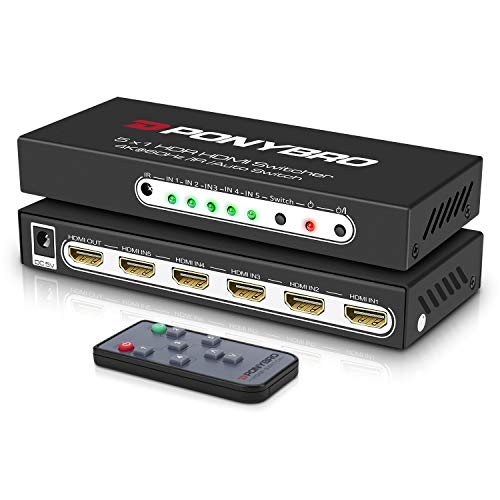
HDMI 2.0 Switch 5 Port 4K@60Hz Auto-Switching
Best straightforward 4K switch: five-port HDMI 2.0 unit with auto-switching and HDR10 support for multiple sources
HDMI switch with 5 inputs and 1 output supporting 4K@60Hz and HDR10. Auto-switching with remote control; compatible with HDMI 2.0/1.4 devices. One customer notes ease of setup and solid build quality
- 4K@60Hz HDR10 support
- 5-in/1-out with remote
- auto-switching between inputs
-
10

Kinivo HDMI Switch 4K HDR 350BN (3 in 1 out) 60Hz HDMI 2.0
Best compact 3-input setup: small HDMI switch designed for 4K@60Hz HDR systems needing three inputs
Kinivo HDMI switch converts three input devices to one output display with 4K 60Hz and HDR support. Easy setup with a physical remote; mixed feedback on auto-switching performance
- 3-in-1 to 1-out HDMI
- true 4K 60Hz with HDR
- HDMI 2.0, 18Gbps bandwidth