Best Computer DisplayPort Cables Under $100 (2026)
We ranked cables under $100 by a combined value score that factors DP version support, certified bandwidth, cable type and length options, construction, and price
The Verdict
- Best Overall: Capshi 8K/4K DisplayPort Cable 1.4, 25FT, VESA Certified, 32.4Gbps — Best for long copper runs: VESA-certified DP 1.4 performance at 25 ft with robust bandwidth for high-refresh 4K and 8K-ready setups
Top Picks
-
1

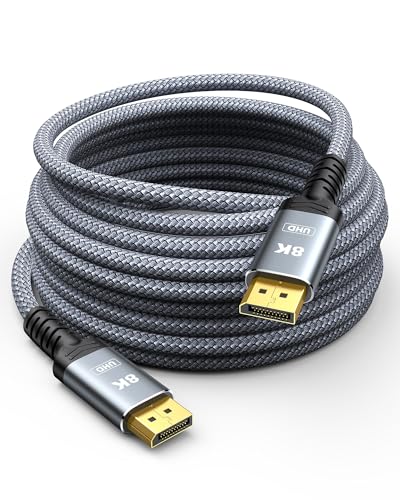
Best Overall Capshi 8K/4K DisplayPort Cable 1.4, 25FT, VESA Certified, 32.4Gbps
Best for long copper runs: VESA-certified DP 1.4 performance at 25 ft with robust bandwidth for high-refresh 4K and 8K-ready setups
DP 1.4 cable supporting up to 8K@60Hz and 4K@144Hz with HD audio/video transmission. Braided, grey, 25ft length. Customer insight: none provided
- 8K@60Hz support
- HD audio/video over DP
- 25ft braided cable
-
2

IVANKY DisplayPort 2.1 Cable 15ft
Best for future-proofing: DP 2.1 support at 15 ft provides higher bandwidth headroom for upcoming high-resolution, high-refresh systems
DisplayPort 2.1 cable supporting high resolutions up to 16K@60Hz and 4K@240Hz. Compatible with multiple devices and built with durable construction. Customers note strong picture quality and good value, with some reliability variability
- extremely high resolution support
- long 15ft length
- HDCP 2.2 and HDR support
-
3

DisplayPort 1.2 cable 10-pack, 6 ft, gold-plated plugs
Best bulk option: multiple 6 ft DP 1.2 cables for straightforward desktop connections and basic 4K@60 workflows
A 10-pack of 6-foot DisplayPort to DisplayPort cables for HD video and audio transmission. Ideal for streaming, gaming, or extending a workstation; durable with gold-plated connectors. Some users note mixed connectivity and length issues, with occasional G-Sync compatibility problems
- gold-plated connectors
- 6-foot cables
- 10-pack
-
4
Capshi 8K/4K DisplayPort Cable 1.4, 30FT, VESA Certified
Best for very long DP 1.4 copper runs: 30 ft length with VESA-certified bandwidth suitable for 4K/144Hz-capable displays
Capshi DisplayPort 1.4 cable supports up to 8K@60Hz and 4K high refresh rates with HDR and audio transmission. Users report solid build and good picture quality, with some noting occasional connectivity or durability concerns
- 8K@60Hz and 4K@144Hz support
- VESA certified, HDCP 2.2/1.4
- long 30ft braided cable
-
5

DisplayPort to HDMI cable, uni-directional, 6 ft (pack of 10)
Best for DP-to-HDMI setups: uni-directional DP-to-HDMI cables for converting a DisplayPort source to HDMI displays with audio support
DisplayPort (computer) to HDMI (display) cable supporting audio/video up to 4K@30Hz. One-way signal direction; unidirectional from DP to HDMI. Customers note long cord length and mixed picture quality insights
- audio and video transmission
- 6-foot length
- pack of 10 cables
-
6
Capshi 8K/4K DisplayPort Cable 1.4, 35ft, DP 1.4, VESA Certified
Best mid-range long copper: 35 ft DP 1.4 cable offering extended reach with VESA-certified support for high-refresh 4K modes
DisplayPort 1.4 cable supporting up to 8K@60Hz and 4K@144Hz with audio, suitable for gaming monitors. Customers note good picture quality and reliable build, with some connectivity and durability mixed reviews
- supports multiple high refresh rates
- VESA certified
- braided, durable design
-
7
Capshi Fiber Optic DisplayPort Cable 1.4, 50FT, 8K/4K/2K, HDR
Best for extreme distance: fiber-optic DP 1.4 cable at 50 ft that preserves 8K/4K signals and HDR over long runs
Fiber optic DP 1.4 cable supports 8K@60Hz, 4K@144Hz, and 2K@240Hz/165Hz for gaming monitors with HDR and audio. Flexible, slimmer than copper; suitable for connecting DP-equipped desktops or laptops to displays
- 8K@60Hz support
- fiber optic, flexible and slim
- HDCP 2.2/1.4 and audio/video transmission
-
8

DisplayPort to DisplayPort Cable 6 Ft, Gold Plated DP to DP 4K@60HZ (Male to Male) for Desktops and Laptops
Best simple DP-to-DP option: 6 ft gold-plated DP cable focused on reliable 4K@60 performance for standard desktop use
Cable that connects DP-equipped computers to displays supporting 4K@60Hz and 1080p with audio pass-through. customers note good cable quality and value for money, while some report functionality issues over time
- 4K@60Hz video support
- audio pass-through
- gold plated connectors
-
9

DisplayPort Cables 10-Pack braided 6ft
packed braided set: ten braided 6 ft DP cables for multiple-station setups with durable construction
10-pack DisplayPort cables with braided 6ft length. supports 4K@60Hz and 2K@144Hz workflows, with HDR and ARC audio. user insight notes mixed sentiment
- 6ft braided DisplayPort cables
- 4K@60Hz + 2K@144Hz supported
- HDR and ARC audio capable
-
10

BENFEI 4K DP to HDMI Cable 6ft, 5 Pack
Best budget DP-to-HDMI multi-pack: five 6 ft DP-to-HDMI cables for compact HDMI conversion needs with braided jackets
DisplayPort to HDMI cable transmits audio and video from a computer to an HDMI display. Uni-directional DP 1.2 to HDMI 1.4, supports up to 3840x2160@30Hz. Includes 5 cables with aluminum shell and nylon braid
- 5-pack set
- 4K-ready up to 30Hz
- durable build with aluminum shell