Best Computer DisplayPort Cables (2026 Guide)
We shortlisted cables with high aggregate ratings and review volume, then prioritized certified standards, length variety, fiber options, and durable construction
The Verdict
- Best Overall: Capshi 8K/4K DisplayPort Cable 1.4, 25FT, VESA Certified, 32.4Gbps — Great for long desktop setups: VESA-certified DP 1.4 over 25 ft for high-resolution, high-refresh displays
This guide compares top-rated DisplayPort cables for PCs and monitors, focusing on signal standard, length, and build type to match desktops, gaming rigs, and workstations. Picks were selected by aggregated star ratings and review volume, then filtered for certified standards (DP 1.2/1.4/2.1), fiber options, and common lengths
Top Picks
-
1

Best Overall Capshi 8K/4K DisplayPort Cable 1.4, 25FT, VESA Certified, 32.4Gbps
Great for long desktop setups: VESA-certified DP 1.4 over 25 ft for high-resolution, high-refresh displays
DP 1.4 cable supporting up to 8K@60Hz and 4K@144Hz with HD audio/video transmission. Braided, grey, 25ft length. Customer insight: none provided
- 8K@60Hz support
- HD audio/video over DP
- 25ft braided cable
-
2

IVANKY DisplayPort 2.1 Cable 15ft
Best for high-bandwidth rigs needing DP 2.1 support over a 15 ft run for future-proof resolutions and refresh rates
DisplayPort 2.1 cable supporting high resolutions up to 16K@60Hz and 4K@240Hz. Compatible with multiple devices and built with durable construction. Customers note strong picture quality and good value, with some reliability variability
- extremely high resolution support
- long 15ft length
- HDCP 2.2 and HDR support
-
3

DisplayPort 1.2 cable 10-pack, 6 ft, gold-plated plugs
Ideal for bulk provisioning: ten 6 ft DP 1.2 cables with gold-plated plugs for reliable basic 4K connectivity
A 10-pack of 6-foot DisplayPort to DisplayPort cables for HD video and audio transmission. Ideal for streaming, gaming, or extending a workstation; durable with gold-plated connectors. Some users note mixed connectivity and length issues, with occasional G-Sync compatibility problems
- gold-plated connectors
- 6-foot cables
- 10-pack
-
4
Capshi 8K/4K DisplayPort Cable 1.4, 30FT, VESA Certified
Solid choice for extended runs: VESA-certified DP 1.4 at 30 ft designed for 4K/144Hz and 8K-capable signaling
Capshi DisplayPort 1.4 cable supports up to 8K@60Hz and 4K high refresh rates with HDR and audio transmission. Users report solid build and good picture quality, with some noting occasional connectivity or durability concerns
- 8K@60Hz and 4K@144Hz support
- VESA certified, HDCP 2.2/1.4
- long 30ft braided cable
-
5

DisplayPort to HDMI cable, uni-directional, 6 ft (pack of 10)
Useful for one-way conversions: uni-directional DP-to-HDMI cables for connecting DisplayPort sources to HDMI displays
DisplayPort (computer) to HDMI (display) cable supporting audio/video up to 4K@30Hz. One-way signal direction; unidirectional from DP to HDMI. Customers note long cord length and mixed picture quality insights
- audio and video transmission
- 6-foot length
- pack of 10 cables
-
6
Capshi 8K/4K DisplayPort Cable 1.4, 35ft, DP 1.4, VESA Certified
Suited for long high-refresh setups: 35 ft DP 1.4 cable built for 8K/4K 144Hz over extended distances
DisplayPort 1.4 cable supporting up to 8K@60Hz and 4K@144Hz with audio, suitable for gaming monitors. Customers note good picture quality and reliable build, with some connectivity and durability mixed reviews
- supports multiple high refresh rates
- VESA certified
- braided, durable design
-
7
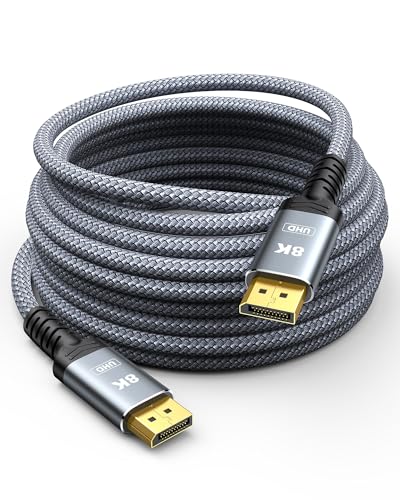
Capshi Fiber Optic DisplayPort Cable 1.4, 50FT, 8K/4K/2K, HDR
Best for very long runs: fiber-optic DP 1.4 cable at 50 ft to maintain HDR and high-resolution signals without degradation
Fiber optic DP 1.4 cable supports 8K@60Hz, 4K@144Hz, and 2K@240Hz/165Hz for gaming monitors with HDR and audio. Flexible, slimmer than copper; suitable for connecting DP-equipped desktops or laptops to displays
- 8K@60Hz support
- fiber optic, flexible and slim
- HDCP 2.2/1.4 and audio/video transmission
-
8

DisplayPort to DisplayPort Cable 6 Ft, Gold Plated DP to DP 4K@60HZ (Male to Male) for Desktops and Laptops
Good everyday DP-to-DP option: 6 ft gold-plated cable designed for stable 4K@60Hz connections
Cable that connects DP-equipped computers to displays supporting 4K@60Hz and 1080p with audio pass-through. customers note good cable quality and value for money, while some report functionality issues over time
- 4K@60Hz video support
- audio pass-through
- gold plated connectors
-
9

DisplayPort Cables 10-Pack braided 6ft
Great for workstations needing many leads: ten braided 6 ft DisplayPort cables offering durable, organized connectivity
10-pack DisplayPort cables with braided 6ft length. supports 4K@60Hz and 2K@144Hz workflows, with HDR and ARC audio. user insight notes mixed sentiment
- 6ft braided DisplayPort cables
- 4K@60Hz + 2K@144Hz supported
- HDR and ARC audio capable
-
10

BENFEI 4K DP to HDMI Cable 6ft, 5 Pack
Practical pack for HDMI conversion: five 6 ft DP-to-HDMI cables that simplify connecting DisplayPort sources to HDMI displays
DisplayPort to HDMI cable transmits audio and video from a computer to an HDMI display. Uni-directional DP 1.2 to HDMI 1.4, supports up to 3840x2160@30Hz. Includes 5 cables with aluminum shell and nylon braid
- 5-pack set
- 4K-ready up to 30Hz
- durable build with aluminum shell