Best Computer Keyboard & Mouse Combos Under $50 (2026)
We ranked combos by a composite value score that weights price, user rating, connectivity, battery/charging features, and key functionality such as numeric keypad or RGB
The Verdict
- Best Overall: Logitech wireless keyboard and mouse combo with SilentTouch — Best for quiet use: a wireless combo built for low-noise typing and clicking ideal for shared workspaces
- Best Value: Rechargeable Wireless Keyboard and Mouse (Ultra-Thin) - 2.4G USB — Best slim rechargeable option: ultra-thin wireless keyboard and mouse with a USB dongle for compact, battery-friendly setups
This page collects value-focused keyboard and mouse combos under $50, highlighting options for quiet typing, rechargeable wireless sets, and gaming-ready wired kits. Picks were ranked by a value score combining price, user rating, key features (wireless, rechargeable, RGB, numeric keypad), and overall versatility
Top Picks
-
1

Best Overall Logitech wireless keyboard and mouse combo with SilentTouch
Best for quiet use: a wireless combo built for low-noise typing and clicking ideal for shared workspaces
Wireless keyboard and mouse combo with SilentTouch for 90% less noise and a full numpad. One-touch access to play/pause, volume, mute, and internet; positive feedback on quiet typing and crisp tactile feel
- SilentTouch with 90% less noise
- Full numpad for data entry
- One-touch media controls
-
2

Best Value Rechargeable Wireless Keyboard and Mouse (Ultra-Thin) - 2.4G USB
Best slim rechargeable option: ultra-thin wireless keyboard and mouse with a USB dongle for compact, battery-friendly setups
Rechargeable wireless keyboard and mouse with 280mAh batteries and 2-3 hour quick charge. Ultra-slim design with brushed aluminum finish; includes silicone cover. Plug & play via USB dongle. "Nice battery life" noted by customers
- rechargeable batteries for both devices
- ultra-slim, durable design
- ease of use with plug & play
-
3

MageGee K1 Gaming Keyboard and Mouse Combo
Best entry gaming kit: wired gaming combo with RGB backlight and gaming-oriented key layout for responsive play
Ergonomic wired 104-key keyboard with RGB backlight and matching mouse. Plug-and-play, no software needed, accommodates long use with comfortable key design. Customers note good quality, colorful lighting, and smooth keys
- rgb backlight with 8 light colors
- 104-key full-size keyboard
- plug-and-play without drivers
-
4

Gaming keyboard and mouse combo K1 with RGB backlight
Best plug-and-play gaming: full-size wired gaming combo with RGB lighting and straightforward setup for casual gamers
K1 wired keyboard with 104-key layout and RGB backlight, plus mouse. Ergonomic design and plug-and-play setup with no driver needed. Customers note good quality, smooth feel, and colorful backlighting as a key appeal
- rgb backlight with 8 light colors
- ergonomic key layout for comfort
- no driver required
-
5

JOYACCESS Wireless Keyboard and Mouse (Slim, with Numeric Keypad)
Best numeric-keypad wireless choice: slim wireless set that includes a number pad for spreadsheets and compact desks
Wireless keyboard and mouse set with a slim, low-profile keyboard and quiet mouse. Includes a built-in numeric keypad and compatible with iMac, Mac, PC, laptop, and tablet. Users note quiet operation and compact design, with some concerns about build durability
- low-profile scissor-cross keys
- built-in mouse with quiet switches
- wide device compatibility
-
6
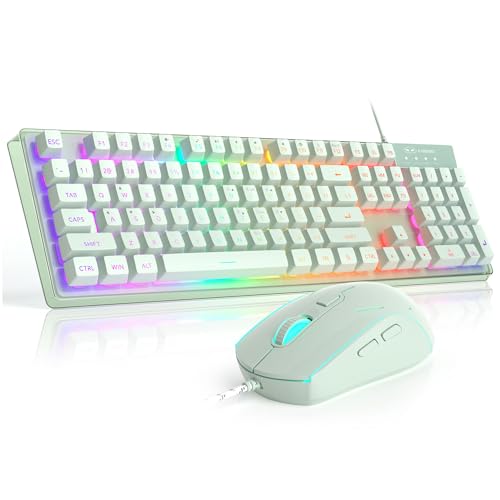
MageGee K1 RGB 104-key gaming keyboard and mouse combo
Best 104-key gaming layout: wired gaming combo offering full 104-key coverage and RGB for standard gaming setups
104-key wired keyboard with RGB backlight and ergonomic design. Includes removable floating keycaps and plug-and-play setup with no software needed; praised for keyboard quality, design, and vibrant lights
- rgb backlight with multiple colors
- 104-key full-size layout
- plug-and-play without drivers
-
7

J JOYACCESS Wireless Keyboard and Mouse set
Best scissor-switch wireless: wireless set with scissor switches and nano receiver for a balance of typing comfort and portability
Wireless keyboard and mouse combo with 2.4G nano receiver and silent scissor-switch keys. One customer insight notes easy iMac pairing and compact size for comfortable use
- 2.4GHz wireless with up to 10m range
- scissor-switch keyboard for quiet, responsive typing
- built-in nano receiver storage
-
8

Seenda Rechargeable Wireless Keyboard & Mouse (Low Profile, Full-Size)
Best rechargeable full-size: rechargeable low-profile keyboard and mouse offering full-size layout for everyday use
Rechargeable wireless keyboard and mouse combo with USB connectivity and full-size layout. Compact, quiet keys, and long battery life; praised for quality and design, with some mixed feedback on mouse buttons
- rechargeable battery
- low-profile keys
- wide Windows compatibility
-
9

Rechargeable wireless keyboard & mouse with number pad
Best rechargeable with numpad: rechargeable wireless combo that includes a number pad and low-profile keys for efficiency
Rechargeable wireless keyboard and mouse set with low profile keys and a number pad. Includes auto-sleep and USB charging; compatible with Windows systems. Users note good battery life and slim design with quiet operation
- rechargeable via micro USB
- auto-sleep power saving
- full-size keyboard with numeric keypad
-
10
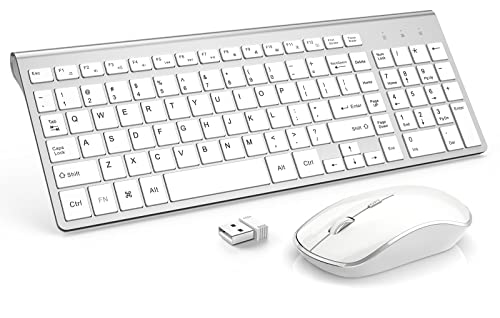
JOYACCESS Wireless Keyboard and Mouse (USB) with Numeric Numpad
Best compact wireless with numpad: wireless USB set that pairs a compact footprint with a usable numeric keypad for small desks
Wireless keyboard and mouse combo with nano receiver, plug-and-play setup, and slim low-profile keys. Compact design saves desk space and supports up to 10m connectivity. Customer insight unavailable
- nano receiver stored in mouse
- nickel-silver-white color scheme
- numpad included for extended input