Best Computer Keyboards Under $50 (2026)
We selected keyboards under $50 by a composite value score that balances connectivity, feature set, build quality, ergonomics, and overall user utility
The Verdict
- Best Overall: Logitech K400 Plus Wireless Touch TV Keyboard — Best for TV use: integrated touchpad and wireless link simplify couch-to-TV navigation
- Best Value: Bluetooth multi-device keyboard K480 with easy-switch dial — Best easy-switch budget pick: dial-based multi-device switching makes pairing simple across gadgets
This page compares compact, wireless, wired, and specialty keyboards chosen for value under $50, focusing on usability, features, and build quality. Picks were ranked by a value score that weights features like connectivity, layout, portability, and user-focused extras (backlight, touchpad, multi-device support)
Top Picks
-
1

Best Overall Logitech K400 Plus Wireless Touch TV Keyboard
Best for TV use: integrated touchpad and wireless link simplify couch-to-TV navigation
Wireless touch TV keyboard with built-in touchpad for PC-to-TV entertainment. Features plug-and-play setup and long battery life. Users highlight compatibility with media centers and easy-to-use touchpad
- built-in touchpad for navigation
- long battery life
- wireless convenience with media controls
-
2
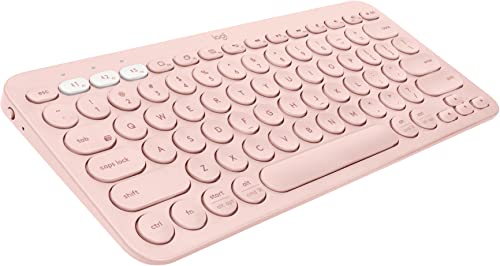
Logitech K380 Multi-Device Bluetooth Keyboard (Rose)
Best for multi-device typing: compact Bluetooth layout with solid cross-device switching
Compact, multi-device Bluetooth keyboard compatible with Windows, iOS, Android and more. Lets you switch between up to three devices with ease, and features a lightweight, space-saving design. Users praise its connectivity, size, and color options
- connects to multiple devices
- compact and portable
- easy device switching
-
3

Elgato Stream Deck Mini for shortcuts and productivity
Best for shortcuts and streaming: programmable pad delivers quick macro and shortcut access
Compact keypad to assign app shortcuts for quick control. Helps streamline Zoom, Teams, PowerPoint, and Office tasks. Users note easy setup and broad app compatibility
- quick access to shortcuts
- strong app compatibility
- customizable profiles
-
4

Azio Vision Mac USB-C Keyboard with large-print backlit keys
Best for Mac users needing visibility: large-print backlit keys and USB-C connectivity aid clarity
USB-C keyboard with large-print, backlit keys and three color options. Designed to reduce eyestrain and aid visibility. Customers note easy readability and good value for money
- 4x larger font than conventional keyboards
- IP66 waterproof and washer-ready
- three backlight colors
-
5
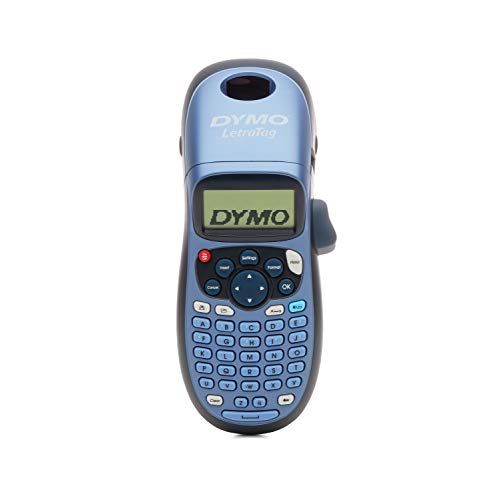
DYMO Letratag LT-100H label maker
Best for labeling workflows: dedicated label-maker design simplifies fast monochrome label creation
Compact label maker with multiple font sizes, styles, and on-screen preview. One customer notes ease of use and quality for daily labeling
- on-screen font preview
- varied print styles
- memory for labels
-
6

Arteck 2.4G Wireless Keyboard with Numeric Keypad
Best full-size wireless: includes numeric keypad and 2.4GHz receiver for extended desktop use
Wireless stainless steel keyboard with rechargeable battery and full-size layout. Easy setup, quiet low-profile keys, and a long battery life. Customers praise its slim design and value for money
- full-size with numeric keypad
- rechargeable battery
- stainless steel, slim profile
-
7

Best Value Bluetooth multi-device keyboard K480 with easy-switch dial
Best easy-switch budget pick: dial-based multi-device switching makes pairing simple across gadgets
Wireless keyboard that switches typing between multiple Bluetooth devices. Works with Windows, macOS, Chrome OS, and Android. Users note quick switch and easy setup, with some concerns about key size and weight
- easy-switch dial for 3 devices
- multi-device bluetooth connectivity
- compatibility across major OS families
-
8

Logitech Pebble Keys 2 K380s multi-device keyboard
Best compact multi-device option: slim profile and Bluetooth multi-device support suit mobile setups
Slim, multi-device Bluetooth keyboard with Easy-Switch. Great for small spaces and travel, easy setup and use, compatible with Windows, macOS, iPadOS, Android, and Chrome OS
- multi-device connectivity
- slim portable design
- easy device switching
-
9

Arteck USB wired full-size keyboard with backlight and media hotkeys
Best wired budget backlight: USB connection with backlit keys and media hotkeys for low-cost customization
Arteck's wired full-size keyboard offers 7 backlight colors and multiple brightness levels for comfortable typing. Customers note tactile, quiet keys and compact size with full-size layout; some report mixed functionality
- backlit keys with 7 colors
- 3 brightness levels
- full-size keys in a slim footprint
-
10
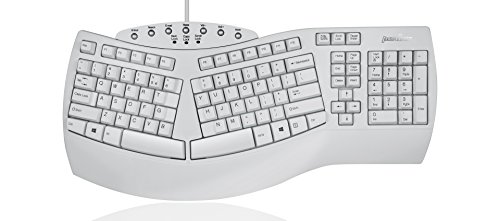
PERIBOARD-512W Ergonomic Split Keyboard (US) by Perixx
Best ergonomic choice: split layout reduces wrist deviation for more comfortable extended typing
Ergonomic split-keyboard with integrated palm rest for natural arm and hand positions. Tactile keystroke aims to reduce pressure for comfortable typing; includes 7 multimedia hot keys and USB plug-and-play. One customer insight notes ease of adaptation and comfort
- split-key ergonomic design
- integrated palm rest
- plug-and-play USB with multimedia keys