Best Computer Memory Card Adapters (2026 Guide)
We selected adapters by combining average customer rating and review volume, prioritizing varied connector types, real-world compatibility and clear feature descriptions
The Verdict
- Best Overall: USB C to IDE/SATA external adapter kit for 2.5/3.5 HDD/SSD — Best for general drive conversion: USB-C kit that lets you connect 2.5"/3.5" HDDs and SSDs to IDE/SATA devices for repairs and cloning
- Best Value: UHS-II Aluminum microSD Adapter for M1 MacBook Pro (Silver) — Best for M1 MacBook Pro users needing UHS-II microSD speed in a durable aluminum adapter form factor
This guide covers top-rated computer memory card adapters and interface converters for desktops, laptops, cameras and game accessories, selected for compatibility and real-world reviews. Picks were chosen by combining average rating and review volume, with attention to connector type, form factor and build features so you can match adapters to your device and workflow
Top Picks
-
1
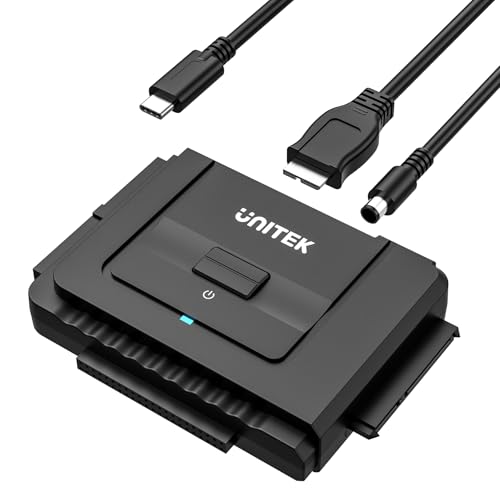
Best Overall USB C to IDE/SATA external adapter kit for 2.5/3.5 HDD/SSD
Best for general drive conversion: USB-C kit that lets you connect 2.5"/3.5" HDDs and SSDs to IDE/SATA devices for repairs and cloning
External hard drive adapter supporting 2.5/3.5 HDD/SSD with USB 3.0 data transfer. One touch backup and dual IDE connectors plus a SATA II port for versatile drives. Customers note easy setup and solid performance, though compatibility may vary
- universal IDE/SATA support
- usb 3.0 speeds
- one touch backup
-
2

Best Value UHS-II Aluminum microSD Adapter for M1 MacBook Pro (Silver)
Best for M1 MacBook Pro users needing UHS-II microSD speed in a durable aluminum adapter form factor
Aluminum UHS-II microSD adapter for 2021 M1 MacBook Pro 14/16, fits flush and adds up to 2TB storage. Compatible with UHS-I/II cards and Time Machine. Customers note fit and quality, but some report slow transfer speeds and removal difficulty
- flush, hidden integration with MacBook Pro
- supports UHS-I and UHS-II microSD cards
- time machine compatibility
-
3

StarTech PEX4SFF8639 U.2 to PCIe Adapter
Best for U.2 NVMe upgrades: a PCIe adapter that converts U.2 drives to a standard PCIe slot for server and workstation use
Mount a 2.5" U.2 NVMe SSD into a desktop or server via a PCIe expansion slot. Provides PCIe NVMe performance with no cables. Customers note easy installation and reliable speed
- direct U.2 to PCIe mounting
- PCIe 4.0 x4 host adapter
- no driver requirement note from user feedback
-
4

BASEQI UHS-II microSD adapter for 2021 M1 MacBook Pro
Best alternative MacBook microSD adapter: UHS-II support in an aluminum adapter tailored for 2021 M1 MacBook Pro compatibility
Compact aluminum microSD adapter fits flush on 2021 M1 MacBook Pro, enabling extra storage and compatibility with UHS-II/UHS-I cards. Customer note: solid functionality and fit, with some concerns about removal and transfer speed
- flush, hidden fit on MacBook Pro
- UHS-I/UHS-II compatibility
- up to 2TB expansion
-
5

M.2 to SATA3.0 Adapter Card (M.2 M-Key to SATA) ASM1166
Best for SATA-based M.2 drives: M.2 M-Key to SATA adapter using ASM1166 for connecting M.2 SSDs to SATA3 ports
M.2 M-Key to SATA adapter card converting PCIe 3.0 x2 to SATA ports. Enables multiple SATA connections with smart indicator for active interfaces. Customers note easy installation and good speed
- asm1166 chip solution
- pcie 3.0 x2 upstream
- sata 3.0 downstream 6Gbps
-
6

CFexpress B to NVMe SSD Adapter for Nikon Canon Panasonic Fuji
Best for photographers using CFexpress B cards: an adapter that maps CFexpress B to NVMe SSDs for camera media expansion
CFexpress B to NVMe 2230 SSD adapter with high-speed 1300 MB/s write and 1800 MB/s read. Compatible with CFexpress type B cards and supports 8K/4K video; suitable for Nikon Canon Panasonic Fuji cameras. Customer insight: mixed/none
- up to CFexpress speed
- 1300 MB/s write
- 1800 MB/s read
-
7

PSVR2 PC Adapter – Accessories Kit for PSVR2
Best for PSVR2 PC conversion: an accessories kit providing adapters to connect the headset to PCs for SteamVR use
Adapter kit to expand PSVR2 compatibility with PC/Steam. Enables browsing, buying, and playing thousands of Steam VR games. Customer notes potential compatibility with official IC module
- Expands PSVR2 compatibility
- SteamVR access
- Official IC module compatibility
-
8
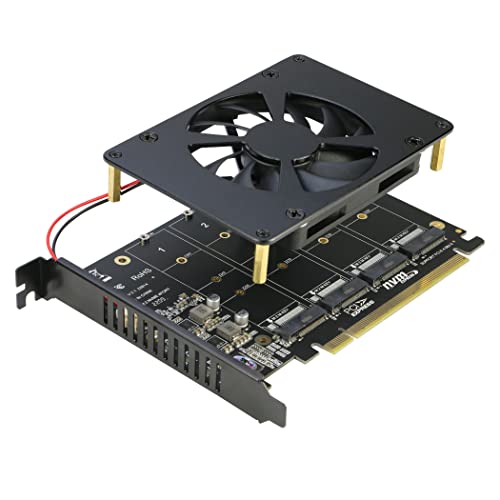
RIITOP Quad NVMe PCIe Adapter — 4x M.2 NVMe on PCIe x16
Best for multi-NVMe builds on a single slot: quad M.2 PCIe adapter that supports four NVMe drives via x16 bifurcation
RIITOP Quad NVMe PCIe Adapter adds 4x M.2 NVMe SSDs via a single PCIe x16 slot with bifurcation support. Includes a fan and per-SSD indicators for status. Customer insight notes solid functionality but size and noise can be drawbacks
- 4x NVMe SSDs on one PCIe card
- bifurcation-enabled PCIe x16
- active cooling and status LEDs
-
9

Quad NVMe PCIe Adapter with 4x NVMe SSDs (M.2, PCIe x16) heatsink
Best for dense NVMe storage with cooling: quad M.2 PCIe adapter that adds a heatsink for sustained multi-drive performance
RIITOP Quad PCIe NVMe Adapter adds 4x M.2 NVMe SSDs via a PCIe x16 slot with bifurcation. Heatsink design manages temperature and indicators show each drive status. Customer insight notes easy installation and speed, with mixed results on compatibility
- 4x NVMe via one PCIe x16 slot
- bifurcation-aware design
- built-in heatsink and per-drive indicators
-
10

FIP02 Dual Micro SD Adapter for iPod
Best for legacy iPod expansion: a dual microSD adapter designed to replace original storage in classic iPod models
Dual micro SD card adapter for iPod Video/Classic models, enabling use of two micro SD cards. One customer notes mixed experiences with SD card slot and battery life after use
- dual micro SD compatibility
- multi-gen iPod support
- clear model range guidance