Best Computer Microphones Under $200 (2026)
We selected microphones under $200 by calculating a value score that combines sound quality, connectivity, feature set, included accessories, and user feedback consistency
The Verdict
- Best Overall: FIFINE USB Microphone with Boom Arm for Gaming — Best for streamers: boom arm and mount package simplifies desk setup while offering reliable USB performance
- Best Value: Aokeo USB Condenser Microphone with Arm and Accessories — Best budget kit: bundled arm and accessories make it a practical starter option for streaming and podcast setups
This roundup covers computer microphones under $200 chosen for overall value, utility, and feature set for gaming, streaming, podcasting, and conferencing. Picks were ranked by a value score that weights sound quality, connectivity, included accessories, and user-focused features
Top Picks
-
1

Best Overall FIFINE USB Microphone with Boom Arm for Gaming
Best for streamers: boom arm and mount package simplifies desk setup while offering reliable USB performance
USB condenser mic set with boom arm, pop filter, and mute button for streaming and gaming. Easy plug-and-play compatibility across Windows, Mac OS, PS4/PS5, and PC. Customers note good sound quality and simple setup
- plug-and-play USB setup
- boom arm with pop filter
- RGB lighting aesthetics
-
2
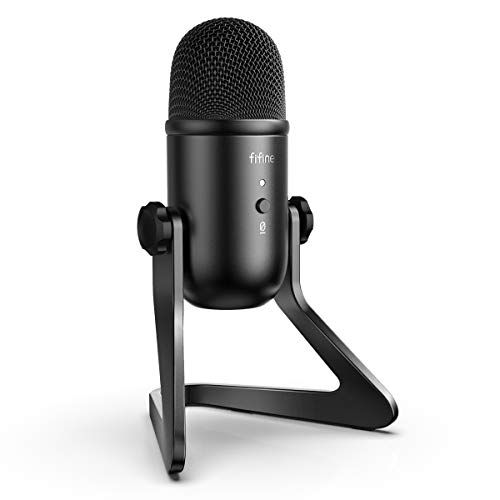
FIFINE USB Podcast Microphone K678 for PC/Mac with headphone output
Best for podcasters: straightforward cardioid capture and headphone output for easy monitoring during recordings
USB condenser microphone with cardioid pattern for clear sound and noise suppression; includes gain and headphone volume controls and a mute button. Users report crisp, clear voice reproduction and solid build, suitable for streaming and meetings
- cardioid sound capture
- built-in headphone out
- gain and mute controls
-
3

FIFINE USB Gaming Microphone Kit with RGB Lights
Best for gamers who want flair: RGB-equipped kit that pairs visual style with plug-and-play USB convenience
USB condenser mic kit for gaming, streaming, and recording with plug-and-play setup. Notable for RGB lighting, white finish, and easy mute via pop filter. Customers praise sound quality and ease of use
- plug-and-play USB microphone
- gradient RGB lights
- white aesthetic design
-
4

FIFINE USB Gaming Microphone with RGB, mute touch, headset jack
Best for livestreamers who need controls: touch mute and headset jack let you manage audio on the fly
USB condenser mic for streaming, podcasts, and gaming with RGB lighting, headphone monitoring, and mute touch. Noted for clear voice reproduction and value for money
- intuitive mic control with mute
- intelligent RGB lighting options
- monitoring via 3.5mm headset jack
-
5

Best Value Aokeo USB Condenser Microphone with Arm and Accessories
Best budget kit: bundled arm and accessories make it a practical starter option for streaming and podcast setups
USB condenser mic kit optimized for PC streaming and podcasts, delivering clear sound and easy setup. Customers note strong sound quality and value, with some concerns about build durability and background noise
- driver-free setup
- includes boom arm and accessories
- compatible with multiple PC platforms
-
6
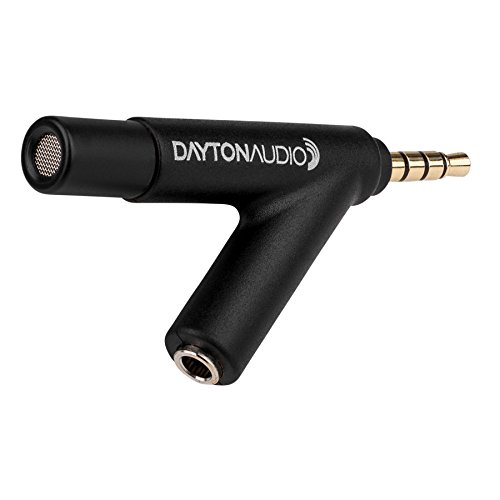
Dayton Audio calibrated measurement microphone for iOS and Android
Best for measurements: calibrated condenser design intended for accurate level capture on iOS and Android devices
Calibrated condenser microphone for critical measurement. Works with iPad, iPhone, iPod touch via TRRS jack and compatible Android/WindowsPhone devices. Customers praise accuracy and easy calibration setup
- Calibrated measurement microphone
- Cross-platform compatibility
- Pass-through jack for signals
-
7

FIFINE USB Microphone with 4 polar patterns
Best for versatile recording: four polar patterns give flexibility for solo streams, interviews, and group recordings
USB condenser microphone for PC with selectable polar patterns, monitoring via headphone jack, and RGB options. Users note clear voice reproduction and easy setup, with mixed feedback on noise reduction
- Four selectable polar patterns
- Headphone jack monitoring
- RGB aesthetic and easy setup
-
8

Razer Seiren V3 Mini USB Condenser Microphone
Best compact option: small-footprint USB condenser suited to tight desks while maintaining clear vocal capture
Compact USB condenser mic with supercardioid pickup for focused voice capture and low room noise. Tap-to-mute with LED indicator; easy setup and solid performance noted by users
- supercardioid pickup pattern
- tap-to-mute with LED
- compact USB condenser mic
-
9

Razer Seiren V3 Mini USB Microphone
Best compact option: compact USB condenser designed for minimal desk space with consistent voice clarity
Compact condenser mic with supercardioid pickup for focused voice and reduced room noise. Tap-to-mute with LED indicator enhances control; praised for easy setup and solid value
- supercardioid pickup pattern
- tap-to-mute with LED
- compact condenser mic
-
10

TONOR USB Conference Microphone TM20
Best for conference calls: omnidirectional pickup with noise-reduction features tailored to multi-person meetings
USB condenser mic with 360° pickup and mute button for online meetings. Delivers clear sound with built-in noise reduction; suitable for Zoom/Skype, up to 5m pickup. Users cite easy plug-and-play setup and good coverage in small groups
- 360° voice capture
- noise reduction tech
- easy USB plug-and-play