Best Computer Monitor Stands Under $100 (2026)
We selected stands priced under $100 and scored them on durability, ergonomic adjustability, storage features, and overall value
The Verdict
- Best Overall: Bontec Wood Monitor Stand Riser, 2-Tier Desk Organizer — Best for minimalist desks: wooden riser that raises your screen while providing a two-tier organizer surface
- Best Value: Monitor stand riser with drawer — Best for hidden storage: compact riser with a built-in drawer to keep small accessories out of sight
This roundup covers well-reviewed computer monitor stands under $100 chosen for practical value, storage, and ergonomic impact. Picks were ranked by a value score that weights build quality, useful features (drawers, USB ports, multi-height options), and broad compatibility with monitors and laptops
Top Picks
-
1

Best Overall Bontec Wood Monitor Stand Riser, 2-Tier Desk Organizer
Best for minimalist desks: wooden riser that raises your screen while providing a two-tier organizer surface
Eco-friendly MDF monitor stand riser with two tiers for desk organization and cable management. Elevates screen height for better posture; sturdy construction noted by users
- eye-level screen elevation
- two-tier storage and organization
- eco-friendly material
-
2

Best Value Monitor stand riser with drawer
Best for hidden storage: compact riser with a built-in drawer to keep small accessories out of sight
Sturdy mesh monitor stand with a pull-out storage drawer for desk organization. Raises monitors to eye level to aid posture; includes two drawers for small items
- drawer storage for small items
- eye-level monitor height
- sturdy H-shaped construction
-
3

WALI Dual Monitor Stand with Storage (2 Pack) STT003D-2B
Best for dual setups: two matching risers that support two displays while adding under-stand storage
Dual monitor stand with storage and 3 height adjustments. Supports devices up to 44lbs with a stable, non-slip base and under-shelf storage. Customers note sturdy construction, easy assembly, and useful space saving
- 3-height adjustable monitor lift
- under-shelf storage for accessories
- durable metal frame with non-slip base
-
4
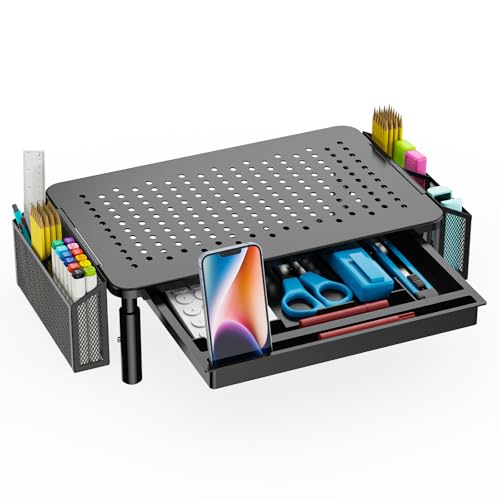
WALI Monitor Stand with Storage (STT003DH-B) – 3-height
Best for variable height needs: three-height riser that adapts to sitting and standing workflows
Sturdy monitor stand with a metal shelf and storage drawer, supporting up to 44 lbs. Ergonomic riser with adjustable heights and under-shelf storage; easy assembly with no tools required. Customers note good value and space-saving design
- large metal shelf with storage
- three height adjustments
- non-slip rubber pads
-
5
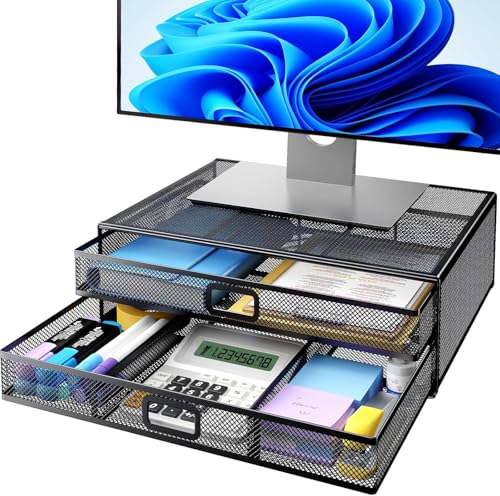
HUANUO 2-Tier Monitor Stand with Drawer
Best for small offices: two-tier stand with a drawer that combines elevation and accessible storage
Sturdy metal monitor riser with two drawers for desk organization. Raises monitors to eye level for better posture and provides storage for office supplies
- 2 drawers for organization
- eye-level monitor elevation
- sturdy desk stand for heavier devices
-
6

Simple Trending 2-Tier Monitor Stand with USB 2.0 and Storage
Best for connectivity: two-tier riser with built-in USB 2.0 ports to simplify peripheral connections
2-tier monitor stand with two drawers and USB 2.0 access for organized desktop setup. Customers note easy assembly, sturdy build, and space-saving benefits
- two-tier design for elevation
- built-in storage drawers
- usb 2.0 access on stand
-
7
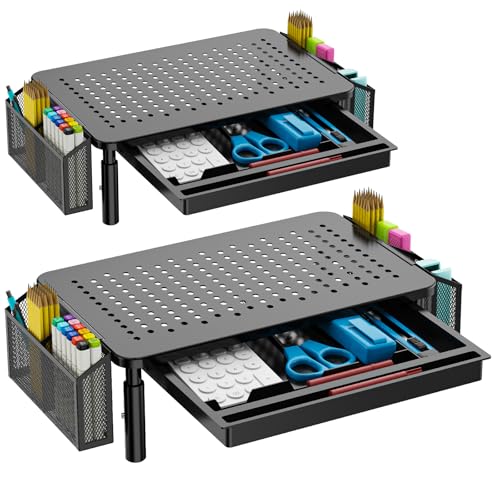
WALI Dual Monitor Stand with Storage, 2 Pack
Best for balanced dual use: two-pack risers that provide symmetry and storage for dual-monitor desks
Desk monitor riser with storage and drawer for organizing workspace. Sturdy, adjustable height with under-shelf storage; customers cite easy assembly and space-saving design
- under-shelf storage
- adjustable height
- two-pack for multi-monitor setups
-
8

Dual Monitor Stand Riser for 2 Monitors by AMERIERGO
Best for cable management: dual-monitor riser that elevates two screens and helps route cables neatly
Dual monitor stand with 2-slot design for desk organization and cable management. Provides storage beneath and sturdy metal pegs for stability; suitable for laptops and printers as well
- dual-monitor support
- built-in storage below
- stable, easy assembly
-
9

AMERIERGO Dual Monitor Stand Riser
Best for compact dual displays: low-profile dual riser that keeps two monitors aligned without taking extra desk depth
Dual monitor stand with 3 shelves and adjustable length/angle. Provides under-stand storage and slot organizers for cables, devices, and office supplies. Customers cite easy assembly and sturdy stability
- multi-slot organization
- easy assembly
- stable, sturdy build
-
10
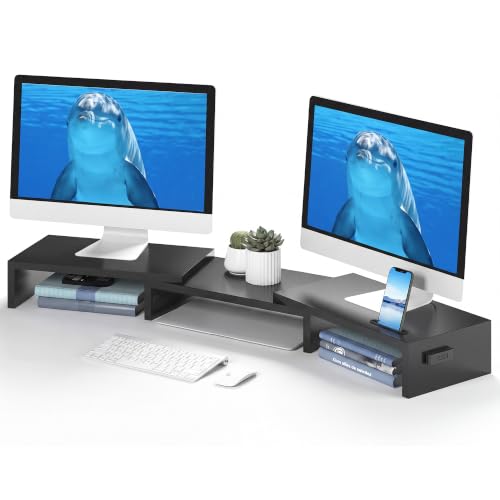
BONTEC Dual Monitor Stand Riser with Smartphone Holder
Best for phone-first desks: dual riser that includes a smartphone holder for easy viewing and access
Ergonomic dual monitor stand with adjustable length and angle for improved posture. Includes a smartphone holder and desktop organizer for workspace efficiency. Customers note easy assembly, sturdy build, and extra desk space
- dual-monitor height and angle adjustability
- ergonomic eye-level elevation
- built-in smartphone holder and storage