Best Computer Monitor Stands Under $50 (2026)
We selected products under $50 with high value scores based on features, construction, user-focused design, and affordability
The Verdict
- Best Overall: Bontec Wood Monitor Stand Riser, 2-Tier Desk Organizer — Best for warm aesthetics: wooden riser that raises your screen and adds a tidy two-tier desk surface
- Best Value: Monitor stand riser with drawer — Best for hidden storage: riser with a built-in drawer that keeps small items out of sight and within reach
This roundup identifies well-reviewed computer monitor stands under $50 that improve ergonomics and desk organization. Picks are ranked by a value score combining feature set, build materials, user-friendly design, and price
Top Picks
-
1

Best Overall Bontec Wood Monitor Stand Riser, 2-Tier Desk Organizer
Best for warm aesthetics: wooden riser that raises your screen and adds a tidy two-tier desk surface
Eco-friendly MDF monitor stand riser with two tiers for desk organization and cable management. Elevates screen height for better posture; sturdy construction noted by users
- eye-level screen elevation
- two-tier storage and organization
- eco-friendly material
-
2

Best Value Monitor stand riser with drawer
Best for hidden storage: riser with a built-in drawer that keeps small items out of sight and within reach
Sturdy mesh monitor stand with a pull-out storage drawer for desk organization. Raises monitors to eye level to aid posture; includes two drawers for small items
- drawer storage for small items
- eye-level monitor height
- sturdy H-shaped construction
-
3

WALI Dual Monitor Stand with Storage (2 Pack) STT003D-2B
Best for paired setups: two matching risers designed to elevate and organize dual displays or a laptop and monitor
Dual monitor stand with storage and 3 height adjustments. Supports devices up to 44lbs with a stable, non-slip base and under-shelf storage. Customers note sturdy construction, easy assembly, and useful space saving
- 3-height adjustable monitor lift
- under-shelf storage for accessories
- durable metal frame with non-slip base
-
4
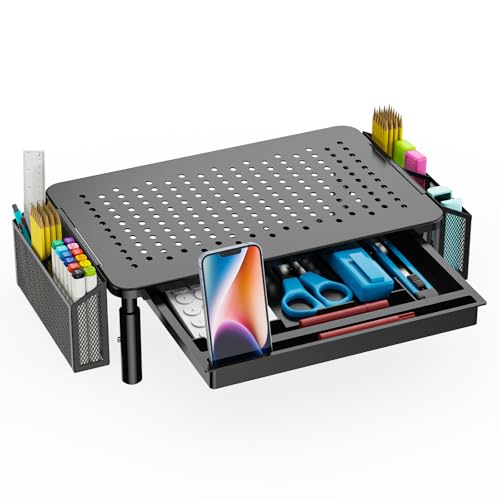
WALI Monitor Stand with Storage (STT003DH-B) – 3-height
Best for simple adjustability: three-height riser offering straightforward elevation options and under-platform storage
Sturdy monitor stand with a metal shelf and storage drawer, supporting up to 44 lbs. Ergonomic riser with adjustable heights and under-shelf storage; easy assembly with no tools required. Customers note good value and space-saving design
- large metal shelf with storage
- three height adjustments
- non-slip rubber pads
-
5
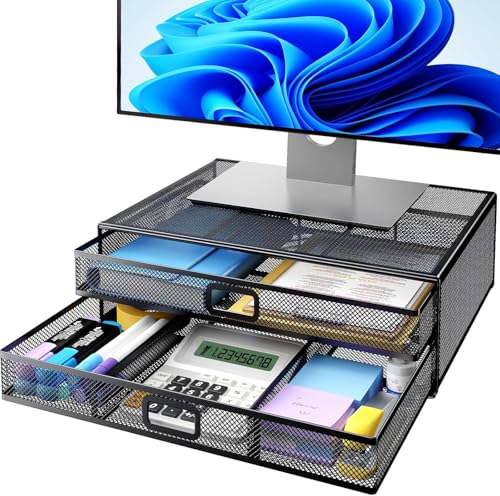
HUANUO 2-Tier Monitor Stand with Drawer
Best for layered organization: two-tier design with drawer storage to separate peripherals and desk clutter
Sturdy metal monitor riser with two drawers for desk organization. Raises monitors to eye level for better posture and provides storage for office supplies
- 2 drawers for organization
- eye-level monitor elevation
- sturdy desk stand for heavier devices
-
6

Simple Trending 2-Tier Monitor Stand with USB 2.0 and Storage
Best for connectivity: two-tier riser that includes USB 2.0 ports alongside storage for accessories
2-tier monitor stand with two drawers and USB 2.0 access for organized desktop setup. Customers note easy assembly, sturdy build, and space-saving benefits
- two-tier design for elevation
- built-in storage drawers
- usb 2.0 access on stand
-
7
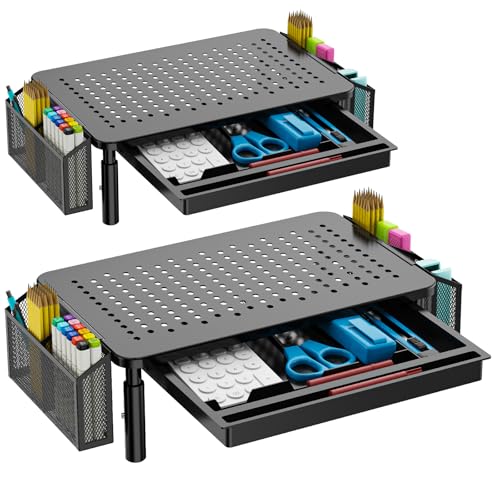
WALI Dual Monitor Stand with Storage, 2 Pack
Best for full dual layouts: two-pack risers designed to raise and organize two monitors or hybrid workstation setups
Desk monitor riser with storage and drawer for organizing workspace. Sturdy, adjustable height with under-shelf storage; customers cite easy assembly and space-saving design
- under-shelf storage
- adjustable height
- two-pack for multi-monitor setups
-
8

Dual Monitor Stand Riser for 2 Monitors by AMERIERGO
Best for compact dual displays: low-profile dual riser that organizes two monitors while offering cable management
Dual monitor stand with 2-slot design for desk organization and cable management. Provides storage beneath and sturdy metal pegs for stability; suitable for laptops and printers as well
- dual-monitor support
- built-in storage below
- stable, easy assembly
-
9

AMERIERGO Dual Monitor Stand Riser
Best for consistent elevation: dual monitor riser built to keep two screens aligned and free up desk space
Dual monitor stand with 3 shelves and adjustable length/angle. Provides under-stand storage and slot organizers for cables, devices, and office supplies. Customers cite easy assembly and sturdy stability
- multi-slot organization
- easy assembly
- stable, sturdy build
-
10
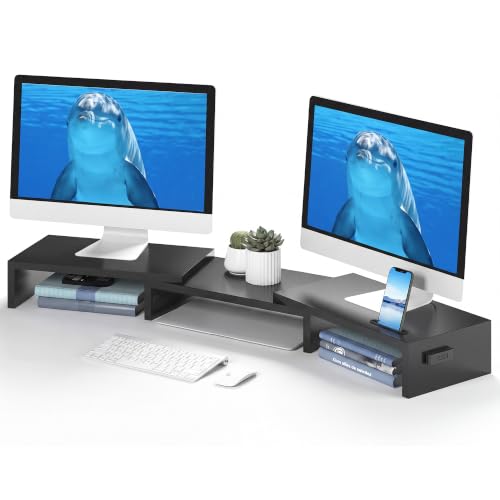
BONTEC Dual Monitor Stand Riser with Smartphone Holder
Best for device placement: dual riser that includes a smartphone holder to keep a phone visible and off the desk
Ergonomic dual monitor stand with adjustable length and angle for improved posture. Includes a smartphone holder and desktop organizer for workspace efficiency. Customers note easy assembly, sturdy build, and extra desk space
- dual-monitor height and angle adjustability
- ergonomic eye-level elevation
- built-in smartphone holder and storage