Best Computer Networking Switches Under $200 (2026)
Selections were ranked by a value score combining hardware specs (ports, speeds, PoE), manageability level, and overall cost-effectiveness under $200
The Verdict
- Best Overall: TP-Link 8-Port Gigabit Switch – Easy Smart Managed — Best for simple expansions: compact 8-port gigabit switch with easy smart management for small networks
This roundup highlights reliable computer networking switches under $200, focusing on value, port count, and real-world features like PoE and multi-gig support. Picks were chosen by scoring hardware specs, manageability, and feature-to-price ratio to surface strong options for home and small-office networks
Top Picks
-
1

Best Overall TP-Link 8-Port Gigabit Switch – Easy Smart Managed
Best for simple expansions: compact 8-port gigabit switch with easy smart management for small networks
8-port gigabit switch with easy smart management via web interface. Supports VLANs, QoS, IGMP, LAG, and monitoring features. Customers note plug-and-play setup and solid build quality
- 8 gigabit ports
- easy web-based management
- VLAN and QoS support
-
2

TP-Link 5-Port Multi-Gig Switch 2.5G Unmanaged
Best for faster links: 5-port multi-gig unmanaged switch for connecting higher-speed clients and APs
Five 2.5 Gbps ports for fast multi-gig connections with auto-negotiation. Compact, all-metal build, plug & play setup. Customers note reliable performance and easy out-of-the-box use
- 5 x 2.5 Gbps ports
- Auto-negotiation for compatibility
- Plug & play, silent operation
-
3

TP-Link 16-Port Gigabit Switch – Easy Smart Managed
Best for mid-size networks: 16-port gigabit switch offering easy smart management for flexible segmentation
16-port gigabit switch with plug-and-play setup and web-based management. Reliable connections and solid build noted by customers
- 16 gigabit ports
- easy plug-and-play with management
- durable metal case
-
4

TP-Link 24-Port Gigabit Ethernet Switch (TL-SG1024S)
Best for high port density: 24-port gigabit desktop/rackmount switch for numerous wired devices
Plug-and-play 24-port gigabit switch with metal, fanless design for quiet operation and energy-efficient performance. Customers note reliable connections and easy setup
- 24-port gigabit performance
- fanless, silent operation
- durable metal housing
-
5

TP-Link 8-Port Multi-Gigabit 2.5G Ethernet Switch
Best for multi-gig needs: 8-port 2.5G unmanaged switch to upgrade multiple devices beyond gigabit
Unmanaged, plug-and-play switch with eight 2.5 Gbps ports for fast local networking. Auto-negotiation supports 100Mb/1G/2.5G for broad device compatibility. Customers note easy setup and compact, all-metal build
- Eight 2.5 Gbps ports
- Unmanaged, plug-and-play
- Auto-negotiation across 100Mb/1G/2.5G
-
6

TP-Link 9-Port PoE Switch 65W Budget
Best budget PoE hub: 9-port switch with PoE support suitable for powering several network devices
Compact 9-port PoE switch with 8 PoE+ ports and 65W total budget. Plug-and-play setup with Extend Mode for longer PoE transmission; includes Priority mode on ports 1-2. Customer note: easy to set up and reliable
- 8 PoE+ ports
- Extend Mode up to 250m
- Priority mode for critical ports
-
7

TP-Link 6-Port PoE Switch TL-SF1006P
Best small PoE option: 6-port PoE switch for compact setups needing powered devices without extra injectors
Compact 6-port PoE switch with 4 PoE+ ports and 67W total budget. Plug-and-play setup with Extend Mode for longer reach; supports port priority. customers say it’s reliable and easy to use
- PoE budget 67W
- 4 PoE+ ports
- Extend Mode up to 250m
-
8

TP-Link 16-Port Fast Ethernet Switch (TL-SF1016D)
Best for legacy networks: 16-port fast Ethernet switch for many low-speed wired connections
Compact, plug‑and‑play 16-port Ethernet switch with non‑blocking, full‑wire‑speed forwarding. Customers cite easy setup and reliable performance
- non-blocking full-wire-speed forwarding
- fanless, quiet operation
- auto-learning and aging of MAC addresses
-
9
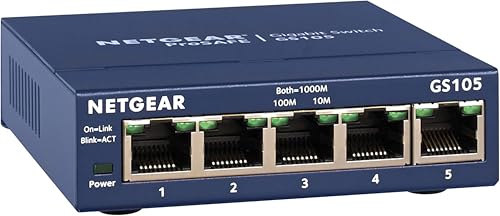
NETGEAR 5-Port Gigabit Unmanaged Switch (GS105NA)
Best compact build: 5-port gigabit unmanaged switch with a small footprint for simple desktop use
Desktop or wall-mount 5-port gigabit switch with plug-and-play setup. Users note reliable performance and easy setup, with solid build quality
- plug-and-play simplicity
- compact desktop or wall-mount design
- hardware warranty with support
-
10

NETGEAR 5-Port Gigabit Smart Managed Switch GS105Ev2
Best entry smart-managed: 5-port gigabit smart-managed switch for basic VLANs and traffic control
5-port gigabit switch with easy smart managed software and adjustable mounting. Customers note reliable setup, solid build, and good value for money
- easy smart managed interface
- compact desktop/wall-mount design
- lifetime hardware warranty