Best Computer Recording Audio Interfaces Under $50 (2026)
We scored products by input/connectivity, preamp and phantom power features, sample rate/bit depth, direct monitoring, and overall value for under $50
The Verdict
- Best Overall: M-AUDIO M-Track Solo USB Audio Interface — Best for solo home recording: compact USB interface with XLR and line input for basic studio setups
Top Picks
-
1

Best Overall M-AUDIO M-Track Solo USB Audio Interface
Best for solo home recording: compact USB interface with XLR and line input for basic studio setups
Compact USB audio interface with XLR/Line and instrument inputs, 48 kHz recording for vocals, guitar, or line signals. Users note ease of use and value, but report occasional crackly audio and noise issues
- XLR/Line input with phantom power
- 48 kHz audio resolution
- portable USB interface with instrument input
-
2

IK Multimedia iRig 2 portable guitar interface
Best for mobile guitarists: portable instrument interface designed for mobile device integration and easy tracking
Portable guitar audio interface with instrument input and headphone/amp outputs, plug-and-play on iPhone, iPad, iPod touch, or Mac. Users praise ease of use and recording quality, with some mixed feedback on compatibility and volume
- instrument input with 1/4 output to amp
- plug-and-play with iOS devices
- built-in gain control
-
3

sktome Podcast Bundle with BM-800 mic, arm, and M8 sound card
Best bundle for beginners: includes a BM-800 mic and arm plus a sound card for an all-in-one podcast starter kit
Compact podcast recording bundle featuring BM-800 mic, mic arm, and integrated M8 sound card for easy setup. Users note good value and sound quality, but mixed results on reliability and connectivity
- all-in-one recording solution
- integrated audio interface
- value-for-money package
-
4

BOMGE USB Audio Interface with XLR/phantom power (32bit/192kHz)
Best budget phantom option: offers XLR plus phantom power and direct monitoring in a compact USB unit
USB audio interface with combo inputs, phantom power, direct monitoring, and loopback. Compatible with common DAWs; easy plug-and-play setup. Customers note solid sound quality and easy setup
- phantom power on input 1
- 32bit/192kHz recording capability
- direct monitoring with loopback
-
5
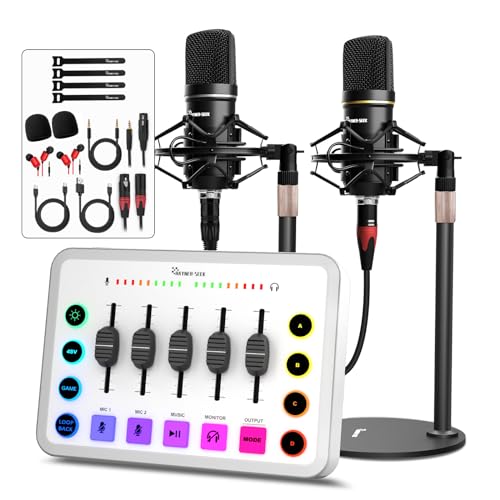
Podcast 2-setup USB audio interface with 48V phantom power
Best for two-mic podcasting: dual-channel USB interface with 48V phantom power geared toward simple interviews
Two-person podcast mic kit with XLR-XLR and 3.5mm to XLR; supports 48V phantom power and dual mic input for clear sound. Users note easy setup and good value for money
- dual-mic interface with phantom power
- condenser-friendly XLR setup
- flexible input adapters
-
6

TONOR TX510 USB audio interface for recording
Best for streamers: USB interface with multiple XLR inputs and routing aimed at podcasting and live streaming
Compact USB audio interface with 2 XLR/6.35mm channels and RGB lighting for gaming and streaming. Delivers studio-like sound quality with clear, faithful reproduction; praised for ease of use and sleek design by customers
- 2 XLR/6.35mm channels
- faithful sound reproduction
- colorful lighting accents
-
7

XTUGA USB Audio Interface for PC
Best ultra-budget pick: very low-cost USB interface with instrument input and mono/stereo switching for simple rigs
USB audio interface for recording music with independent channel volume control and gain halo indicators. users report easy setup and clean sound, with mixed feedback on functionality and USB compatibility
- independent channel volume
- gain halo meters
- front mic preamp input
-
8

Podcast equipment bundle: audio interface mixer with studio mic
Best small studio bundle: audio interface plus studio mic and mixer features designed for podcast setup convenience
Compact podcast bundle with an audio interface, mixer and broadcast mic for live streaming, recording, gaming and singing. Includes multiple voice changes and sound effects for versatile vocal options
- multiple voice options
- built-in sound effects
- independent sound controls
-
9
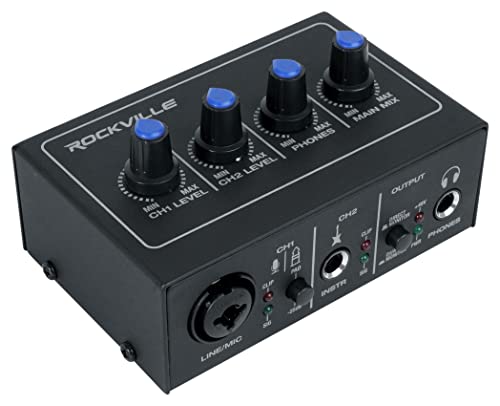
Rockville USB 2x2 audio interface for home studio
Best 2x2 home studio option: offers two inputs with 24-bit/192kHz capability and low-noise preamps for home recording
2x2 USB computer recording interface with 24-bit/192 kHz converters and low-noise preamps for vocals, instruments, and line levels. Includes XLR/1/4" combo input with phantom power on channel 1, dedicated instrument input on channel 2, balanced monitor outputs, and separate headphone jack
- studio-quality sound
- versatile connectivity
- dedicated instrument input with Hi-Z
-
10

YOUSHARES USB audio interface with 2 mic preamps
Best dual-mic functionality: USB interface with two mic preamps and instrument inputs for small-team recording
USB audio interface for recording and streaming with dual instrument inputs and mic preamps. Attain brighter, open sound via dual outputs. Users note good value and audio quality, with some reports of setup issues
- dual mic preamps
- instrument inputs for guitar/bass
- dual outputs for monitoring