Best Digital-Analog Converters Under $200 (2026)
We selected units under $200 by a value score that weights connectivity options, supported audio formats, build quality, and real-world performance reported by users and reviewers
The Verdict
- Best Overall: HDMI 2.1 Audio Extractor with Optical + Analog Audio — Best for HDMI-centric setups: includes HDMI 2.1 passthrough plus optical and analog outputs for flexible TV audio extraction
- Best Value: eARC Audio Extractor to HDMI Optical/3.5mm ARC/eARC to Optical Audio Adapter — Best for ARC/eARC bridging: converts HDMI ARC/eARC to optical and 3.5mm outputs to connect legacy audio gear to modern TVs
- Best Premium: iFi Zen DAC V2 desktop DAC with USB input — Best for desktop listening: USB DAC with headphone-focused features and balanced output for improved personal-audio fidelity
This roundup covers digital-to-analog converters (DACs) and HDMI/TOSLINK audio extractors under $200, selected for balanced value across features, connectivity, and audio quality. Picks were ranked by a value score combining port flexibility, format support (HDMI eARC/ARC, optical, USB), build quality, and reviewer-reported performance
Top Picks
-
1

Best Overall HDMI 2.1 Audio Extractor with Optical + Analog Audio
Best for HDMI-centric setups: includes HDMI 2.1 passthrough plus optical and analog outputs for flexible TV audio extraction
HDMI 2.1 audio extractor that splits audio to optical and analog outputs while passing video up to 8K@60Hz. Includes 4K@120Hz and 1080P@240Hz support; easy setup with HDMI loop output. Customer note: setup is easy with solid functionality, but some report audio or picture inconsistencies
- 8K/60Hz and 4K/120Hz support
- optical and analog audio outputs
- HDMI loop output
-
2

Best Value eARC Audio Extractor to HDMI Optical/3.5mm ARC/eARC to Optical Audio Adapter
Best for ARC/eARC bridging: converts HDMI ARC/eARC to optical and 3.5mm outputs to connect legacy audio gear to modern TVs
eARC audio extractor converts TV ARC/eARC signals to optical, 5.1, and 3.5mm outputs. Easy setup with multiple outputs for non-ARC systems. One customer notes quick 10-minute connection
- multi-output audio extraction
- HDMI eARC/ARC input to optical and analog outputs
- compact adapter for TV-to-sound-system
-
3

J-Tech Digital Audio Extender over single Cat5e/6 (A/V) 1640 ft
Best for long runs: audio extender transmits A/V up to 1640 ft over a single Cat5e/6 cable for distant audio endpoints
Audio extender converts analog to digital signals over a single Cat5e/6 cable with multiple outputs (3.5mm, SPDIF optical, coaxial). Customers note ease of use and effective signal conversion, especially for streaming platforms
- analog to digital conversion over Cat5e/6
- multi-format outputs
- long cable distance support
-
4

HDMI eARC/ARC to Optical Audio Converter (TV to Soundbar) 1.15m
Best for simple TV-to-soundbar feeds: compact eARC/ARC to optical converter designed to extract TV audio for external sound systems
Converts TV eARC/ARC audio to optical SPDIF for a sound system. Plug-and-play setup for home theaters and meetings. Customer insight: unclear text mentions ease of use
- built-in optical SPDIF output
- eARC/ARC compatibility
- plug-and-play installation
-
5
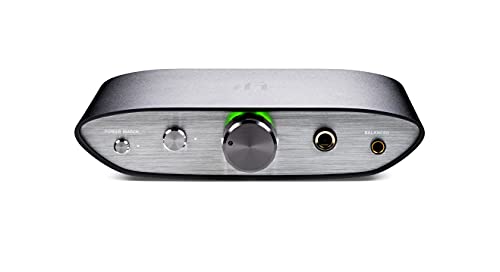
Best Premium iFi Zen DAC V2 desktop DAC with USB input
Best for desktop listening: USB DAC with headphone-focused features and balanced output for improved personal-audio fidelity
Compact DAC with USB 3.0 input and multiple outputs for headphones or speakers. Delivers clear audio with low noise, per user feedback; users note mixed results for volume control and balance
- USB input from computer or DAP
- MQA decoder support
- diverse output jacks (6.3mm, 4.4mm, RCA)