Best Digital Kiosks & Interactive Displays (2026 Guide)
We selected products with high aggregate ratings and substantial review counts, prioritizing touchscreen type, build (open-frame/industrial), IP rating, and relevance to kiosk/signage use cases
The Verdict
- Best Overall: 32 inch infrared touch frame overlay for monitor — Best retrofit overlay: adds infrared multi-touch to an existing monitor for simple touch capability
- Best Premium: GreenTouch 10.1 inch PCAP touch monitor 1280x800 — Best compact industrial monitor: 10.1" PCAP display with IP65-front for rugged touch applications
This roundup covers top-rated digital kiosks, interactive displays, touch overlays, and signage panels selected for strong user ratings and substantial review volume. Picks emphasize touchscreen type, durability (IP rating and industrial/open-frame designs), and real-world use cases like kiosks, signage, and monitor upgrades
Top Picks
-
1

Best Overall 32 inch infrared touch frame overlay for monitor
Best retrofit overlay: adds infrared multi-touch to an existing monitor for simple touch capability
Infrared touch frame overlay (no display) that attaches in front of a monitor or TV. Provides 10-point touch with easy installation and precise response
- 10 finger touch capability
- easy front-install overlay
- works with standard monitors/TVs
-
2
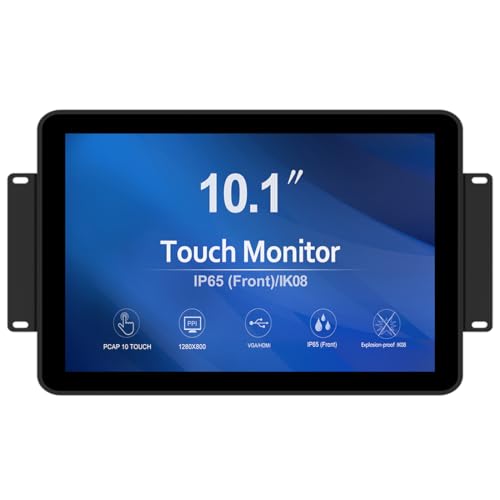
Best Premium GreenTouch 10.1 inch PCAP touch monitor 1280x800
Best compact industrial monitor: 10.1" PCAP display with IP65-front for rugged touch applications
10-point PCAP touch screen with front IP65-rated protection and HDMI/VGA interfaces. Durable, dust- and liquid-sealed display suitable for various applications. Customers note solid build and good touch responsiveness
- 10-point projected capacitive touch
- front IP65 protection
- HDMI and VGA connectivity
-
3

GreenTouch 17 Inch Open Frame Industrial Touch Monitor
Best open-frame industrial display: 17" PCAP monitor built for enclosure integration and multi-touch use
Open-frame touch monitor with 10-point projected capacitive touch, 3mm tempered glass, and IP65 front protection. Durable, versatile for various applications, with responsive controls across operating systems
- 10-point touch
- IP65 front protection
- durable tempered glass
-
4

GreenTouch 15 Inch Open-Frame Touchscreen Monitor
Best mid-size open-frame touchscreen: 15" PCAP panel suited for kiosks and embedded signage
15-inch open-frame touchscreen monitor with capacitive PCAP, 10-point touch, and front IP65 protection. Durable, versatile for various applications, with responsive controls across operating systems
- 10-point PCAP touch
- IP65 front protection
- HDMI and VGA interfaces
-
5

GreenTouch 43 inch infrared touch frame for multi-point interaction
Best large infrared frame: 43" multi-touch overlay for expansive interactive displays
Infrared touch frame for 43 inch displays with 10-point touch. plug-and-play setup and solid quality cited by users. mixed feedback on touch accuracy and occasional false touches
- 10-point infrared touch
- light-resistant design
- suitable for internal and external linked environments
-
6

Chengying 27" Multi-Touch IR Frame (10-point) USB HID
mid-size IR frame: 27" multi-touch USB HID overlay for easy plug-and-play touch
IR touch frame for 27" displays with 10-point touch, USB HID interface, easy integration. Customers praise setup simplicity and precise touch response, with seamless Windows 10 compatibility
- 10-point touch support
- USB HID interface
- easy to install & integrate
-
7

43 inch indoor digital signage LCD screen, Android OS kiosk
Best Android signage panel: 43" indoor display with Android OS for standalone content playback and networked updates
Large 43 inch IPS digital signage with WiFi, HDMI/USB input, and auto ad player. Ideal for attracting attention with multi-screen playback; responsive touch and high-resolution display noted by customers
- multi-screen playback
- HDMI/USB input
- WiFi connectivity
-
8
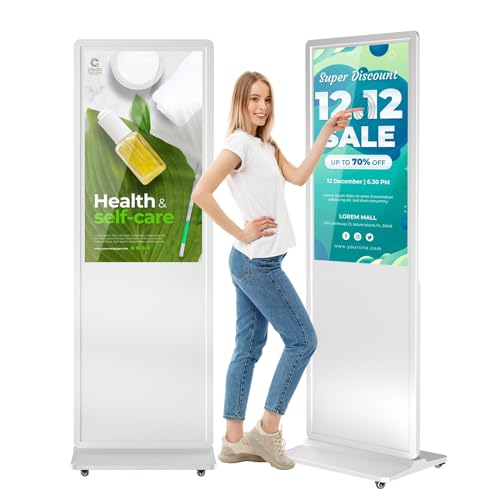
MWE 37 Inch Touchscreen Kiosk (Indoor Floor Standing) - LCD Digital Signage
Best indoor floor kiosk: 37" touchscreen kiosk designed for lobby and retail digital signage interactions
Digital signage kiosk for indoor advertising with auto media player and mobility. Users note high image quality, easy setup, and reliable performance
- automatic media playback
- easy mobility with wheels and brakes
- vivid image quality
-
9

15.6" digital signage display with android 11
Best compact Android signage: 15.6" display running Android 11 for lightweight commercial content delivery
All-in-one 15.6" touch-enabled digital signage with Android 11, HDMI-in, and wireless mirroring. Delivers crisp FHD visuals and built-in connectivity; customers note easy readability and solid build quality
- built-in android 11 ecosystem
- HDMI-in for external sources
- 10mm ultra-narrow bezel with 8.5mm thickness
-
10

43" 4K LCD Digital Signage Display — Indoor Floor Kiosk
Best 4K indoor kiosk: 43" 4K digital signage display built for high-resolution floor-standing installations
Indoor 43" 4K LCD digital signage display with Android 12.0, 4+32GB memory, built-in 85W dual speakers, and remote control for convenient operation. Customer insight highlights ease of use and clear visuals
- 4K IPS visuals
- Android 12.0 platform
- built-in speakers and remote control