Best Digital Pens Under $100 (2026)
We ranked pens under $100 by a composite value score using compatibility, pressure/tilt features, build quality, and user-focused functionality
The Verdict
- Best Overall: Microsoft Surface Pen - Burgundy — Best for Surface users: reliable pen with precise input and broad Surface compatibility
Top Picks
-
1

Best Overall Microsoft Surface Pen - Burgundy
Best for Surface users: reliable pen with precise input and broad Surface compatibility
The Surface Pen offers natural writing and sketching with 4,096 pressure points and real-time ink flow. It works with apps like OneNote, Microsoft Office, and Adobe Suite. Customers note smooth writing and magnetic attachment, with mixed views on value and durability
- 4096 pressure points for precision
- low-latency real-time ink
- magnetic attachment
-
2

Lenovo Digital Pen 2 for IdeaPad/Yoga
Best budget Lenovo pick: affordable stylus suited for IdeaPad and Yoga devices with a responsive tip
Digital pen with 4,096 pressure levels and elastometer tip for natural feel. Compatible with select IdeaPad Flex and Yoga models; mixed feedback on compatibility and connectivity plus durable concerns noted in customer insights
- 4096 pressure levels
- natural elastometer pen tip
- extended battery life
-
3

Lenovo Digital Pen 3 for Laptops with Tilt Recognition
Best for tilt-aware workflows: Lenovo pen with tilt recognition for more natural drawing angles
Lenovo Digital Pen 3 supports multiple protocols and advanced tilt recognition for natural pen-on-paper feel. Useful with drawing and editing apps; some users praise compatibility with Photoshop but report mixed connectivity and durability concerns
- tilt recognition for precision
- supports WGP, MPP2.0, AIT
- pen with versatile connectivity
-
4

Metapen Air8 Pro X Stylus for iPad
Best iPad budget stylus: compact option focused on note-taking and casual sketching on iPad models
A lightweight stylus with retro-inspired design and quiet, smooth writing. Includes an all-new air-flex tip for quiet operation and fast charging. Customers note smooth glide and quietness, with some mixed feedback on battery life and functionality
- retro-inspired design
- quiet operation
- fast charging
-
5

SAMSUNG Galaxy Tab S9 FE S Pen with IP68 water resistance
Best for durability near water: S Pen designed with IP68 resistance for use around moisture-prone environments
S Pen designed for Galaxy Tab S9 FE for precise writing and navigation. IP68 water resistance adds durability; customers note solid pen quality and reliable performance
- precision writing
- pressure-sensitive tip
- water resistant design
-
6

Microsoft Surface Slim Pen 2 — Matte Black with Bluetooth 5.0
Best for haptic-enabled Surface setups: slim Bluetooth pen offering low-latency control and shortcut support
Slim pen with 4,096 pressure points and real-time inking for natural notes on screen. Haptic feedback simulates writing on paper. Mixed feedback on connectivity and charging accessories from user insights
- haptic writing feedback
- high-pressure sensitivity
- real-time inking experience
-
7

Lenovo Slim Pen: Magnetic Stylus for Laptops, 4096 pressure
Best for pressure-sensitive input on Lenovo laptops: magnetic stylus with high-pressure resolution for creatives
Lenovo Slim Pen provides precise writing with 4096 pressure levels and tilt detection, plus magnetic attachment for convenient storage. Some users report compatibility issues and battery/connection concerns
- high-precision input
- tilt-aware
- magnetic storage
-
8

M Pen Black Active Stylus for Surface and more
Best affordable Surface-compatible alternative: active stylus that pairs versatility with straightforward performance
Active stylus with 4096 pressure levels for precise sketching and writing. Palm rejection allows natural resting on screen; tilt support enhances shading. Customers note good functionality but mixed lag and connectivity feedback
- 4096 pressure levels
- palm rejection
- tilt support
-
9
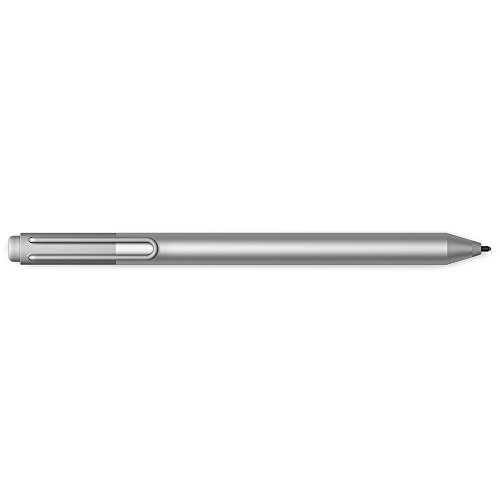
Microsoft Surface Pen for Surface 3/Pro 3/4/Book (Silver)
Best for older Surface models: legacy-compatible pen that provides dependable performance on earlier devices
Surface Pen with Windows Ink compatibility for Surface 3, Pro 3/4, and Surface Book. Interchangeable tips and precise writing experience highlighted by users
- windows ink compatibility
- tip variety
- multi-device compatibility
-
10

Huion PW517 Battery-Free Pen for Kamvas tablets
Best for pen displays: battery-free EMR pen optimized for Huion Kamvas tablets and natural drawing feel
Pen Tech 3.0 battery-free stylus with EMR, 8192 pressure levels and 60 tilt. Stable drawing with lower nib position. Customer insight notes durability with mixed functionality
- battery-free stylus
- high pressure sensitivity
- tilt sensing