Best DVI Cables Under $50 (2026)
We ranked cables by a value score combining connector type support, build features (ferrites/braiding/gold plating), usable lengths, and overall price under $50
The Verdict
- Best Overall: DVI Dual Link Cable with Ferrites – 35ft — Best for long runs: dual-link DVI-D with ferrites for reduced interference on longer 35 ft connections
- Best Value: Mini DisplayPort to DVI Cable 10ft (3m) mDP to DVI-D — Best for mini DisplayPort sources: 10 ft mDP-to-DVI-D cable for simple Mac and laptop video connections
This roundup highlights value-focused DVI and DVI-adjacent cables and adapters priced under $50, selected for signal type support, build quality, and connector compatibility. Picks were chosen by scoring length, connector type (DVI-D, dual-link, DisplayPort/USB-C adapters), shielding/ferrites, and overall value for common monitor and AV setups
Top Picks
-
1

Best Overall DVI Dual Link Cable with Ferrites – 35ft
Best for long runs: dual-link DVI-D with ferrites for reduced interference on longer 35 ft connections
High performance DVI-D dual link cable for connecting a DVI-equipped computer to a monitor or projector. Supports up to high resolutions and 144Hz capability, with durable construction. Customers note strong picture quality and reliable performance at 1080p 144Hz
- dual-link bandwidth for 2560x1600
- 144Hz capable
- 35ft length with ferrites
-
2
Cable Matters DVI-D Dual Link Cable with Ferrites, 50ft
Best for extra reach: 50 ft dual-link DVI-D with ferrites to help preserve signal over longer distances
DVI-D Dual Link cable connects a DVI-equipped computer to an HD monitor or projector. 144Hz capable with high bandwidth for video editing, gaming, or projection. Customer note: good picture quality and durable, with suitable length for multi-monitor setups
- dual-link for higher resolutions
- 50ft length for flexible layouts
- supports 144Hz compatible displays
-
3

DisplayPort to DVI cable bundle, 6 ft, gold-plated plugs
Best for DisplayPort hosts: includes gold-plated plugs and a 6 ft length for short DP-to-DVI connections
DisplayPort to DVI cable for transmitting HD video from computer to display. 6 ft length; gold-plated connectors for reliable connectivity. Customers note solid functionality and good value, with mixed opinions on picture and connection quality
- 10-pack for multiple setups
- 6-foot cables for flexible placement
- gold-plated connectors for reliability
-
4

Best Value Mini DisplayPort to DVI Cable 10ft (3m) mDP to DVI-D
Best for mini DisplayPort sources: 10 ft mDP-to-DVI-D cable for simple Mac and laptop video connections
Mini DisplayPort to DVI cable connects mDP++ sources to DVI displays for 1080p/60Hz or 4K/30Hz. Includes EDID pass-through for compatibility; no software needed
- mDP to DVI single-link cable
- 1080p60 or 4K30 compatibility
- no software drivers required
-
5

DVI-D to DVI-D 6 ft Cable 10-Pack, Male to Male, Black
Best for bulk installs: ten 6 ft DVI-D cables ideal for deploying consistent connections across multiple stations
DVI-D to DVI-D cable set, 6 ft length, high speed up to 9.9 Gbits/sec, supports 1080p, 1600x1200, 1920x1200. Note: no audio output. Customer insight: easy to use and well-made, but some report blur at 1080p120hz and that it is very thin
- high-speed data transfer
- easy plug-and-play
- gold-plated connectors
-
6

DVI to DVI Cable 50Ft Nylon Braided 24+1 Dual Link Gold Plated
Best for durability on a budget: 50 ft nylon-braided dual-link cable that balances length and reinforced jacket
DVI-D dual-link cable, 50 ft length, nylon braided with ferrite core for digital video transmission. Supports high-speed up to 9.9 Gbits/sec. Customer insight notes good quality and build, with mixed functionality in Dual Link mode
- dual-link support
- gold-plated connectors
- ferrite core for interference reduction
-
7
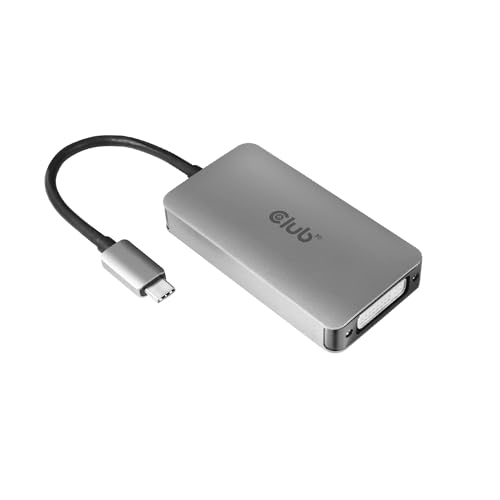
USB-C to DVI-D dual-link adapter for Apple cinema displays
Best for USB-C displays: USB-C to DVI-D dual-link adapter suitable for connecting modern hosts to legacy displays
USB Type-C (or Thunderbolt 3/4) to DVI-D adapter enabling dual-link up to 2560x1600 and 3840x2160 @ 30Hz. Provides simple plug-and-play compatibility with Apple Cinema displays and other DVI displays
- USB-C/Thunderbolt to DVI-D dual-link
- supports 2560x1600 and 3840x2160 @ 30Hz
- compatibility with Apple Cinema Displays
-
8
DVI-D to DVI-D Cable 65ft Nylon Braided Dual Link Gold
Best for very long single runs: 65 ft nylon-braided dual-link DVI-D for extended-distance connections with added protection
DVI-D to DVI-D video cable, 65ft length, nylon braided with ferrite core for digital video transfer. Customers note solid build and long reach, but some report limited Dual Link compatibility
- 65ft nylon braided cable
- dual-link DVI-D compatibility
- gold-plated connectors
-
9
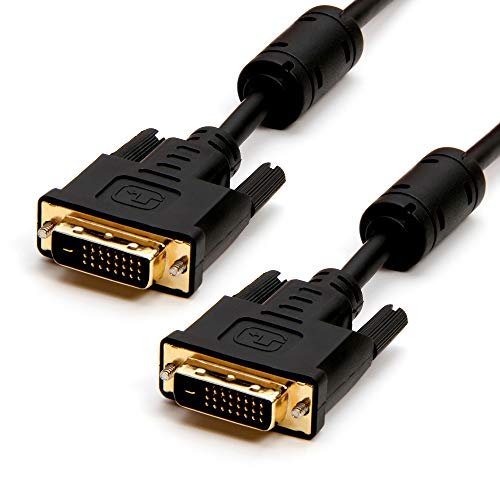
DVI to DVI Dual Link Cable 50ft - Cmple
long cable: 50 ft dual-link DVI cable that emphasizes length and basic dual-link support
DVI-D dual link monitor cable connects DVI-equipped devices to displays for clear digital video. Noted for good picture quality and solid build. One customer highlights compatibility with Mac Mini
- DVI-D dual link interface
- long 50ft طول
- compatible with multiple devices
-
10

DisplayPort to DVI Cable, male-to-male, 10 ft, C2G 54330
Best for standard DP-to-DVI conversion: 10 ft DisplayPort-to-DVI cable for desktop setups needing a reliable connection
DisplayPort to DVI cable for connecting a computer DisplayPort output to a DVI-D input monitor. Delivers a digital video signal with full-molded connectors for strain relief. Customer note indicates reliable connectivity
- digital display signal
- 10-foot cable length
- durable connectors with strain relief