Best Enclosures Under $50 (2026)
We ranked products by value score using connectivity, supported drive formats, sustained performance features, build/cooling, and overall user convenience
The Verdict
- Best Overall: UGREEN external HDD enclosure for 3.5/2.5 inch SATA drives — Best for desktop HDDs: roomy 3.5/2.5 SATA support with USB‑3.0 and UASP for reliable transfers
- Best Value: WEme USB 3.0 to SATA/IDE Adapter — Best for versatile adapters: combines USB‑3.0 to SATA and IDE compatibility for drive recovery and backups
This roundup highlights enclosures and docking solutions under $50 chosen for value, feature set, and real-world compatibility across SATA, M.2 NVMe, and USB interfaces. Picks were scored by connectivity (USB‑C/USB‑3.x), supported drive types, cooling/thermal features, and overall user convenience
Top Picks
-
1

Best Overall UGREEN external HDD enclosure for 3.5/2.5 inch SATA drives
Best for desktop HDDs: roomy 3.5/2.5 SATA support with USB‑3.0 and UASP for reliable transfers
Enclosure to connect 3.5/2.5 inch SATA drives to PC or laptop with USB 3.0 and UASP support. Provides heat dissipation and anti-shock protection with internal chip. Customers cite easy installation and quality, with some power and lid issues
- usb 3.0 with uasp acceleration
- supports up to 20tb drives
- anti-shock and heat-dissipation design
-
2

Best Value WEme USB 3.0 to SATA/IDE Adapter
Best for versatile adapters: combines USB‑3.0 to SATA and IDE compatibility for drive recovery and backups
USB 3.0 external adapter connects SATA/IDE drives to a computer, supporting 2.5/3.5 inch HDD/SSD and optical drives with One Touch Backup. Customers note easy setup and fast transfers, though some report drive recognition issues
- One Touch Backup feature
- USB 3.0 speed
- Supports multiple drive types
-
3
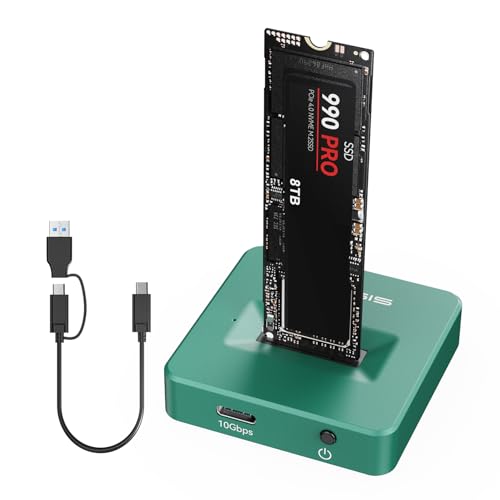
M.2 NVMe to USB C Docking Station
Best for NVMe mobility: compact M.2 NVMe dock with USB‑C that simplifies drive access on the go
Aluminium enclosure that converts M.2 NVMe/SATA drives to USB C with fast 10Gbps transfer. Easy toaster-style design for quick drive insertion and cooling. Customers note easy setup, no tools, and solid speed
- 10Gbps USB-C connectivity
- aluminum heat-dissipation housing
- easy drive insertion with toaster-style design
-
4

ASUS Cobble USB-C NVMe Enclosure
Best for plug‑and‑play NVMe: USB‑C enclosure optimized for NVMe SSDs with a user-friendly design
ASUS Cobble USB-C 3.2 Gen 2x1 NVMe/SATA enclosure with IP55 resistance and aluminum heat-dissipation top. Durable, stylish design with easy installation and fast transfer speeds
- IP55 protection
- high-speed USB-C 3.2 Gen 2x1
- dual M.2 support (NVMe PCIe & SATA)
-
5

M.2 NVMe & SATA to USB-C Docking Station
Best hybrid dock: supports both M.2 NVMe and SATA with USB‑C for flexible single‑tool drive access
M.2 SSD enclosure with USB 3.2 Gen 2 (10 Gbps) for NVMe and SATA drives. Aluminum housing enhances heat dissipation for reliable performance. Customers report easy setup, solid build, and fast data transfers
- 10 Gbps transfer speeds
- NVMe and SATA M.2 compatibility
- aluminum heat-dissipation housing
-
6

M.2 NVMe Enclosure 20Gbps USB-C Gen 2x2
Best for high throughput: M.2 NVMe enclosure with USB‑C Gen2x2 capable of maximizing fast SSD speeds
MOKiN M.2 NVMe enclosure supports 2242/2260/2280 drives with M/B+M keys. Real-time activity LEDs and aluminum case for heat dissipation; cables included for USB-C and USB-A. Customers note easy installation and strong performance
- 20Gbps USB 3.2 Gen 2x2 transfer
- multi-size NVMe support 2242/2260/2280
- LED activity indicators
-
7

Vantec Nexstar GX USB 3.0 Dual 2.5" SATA Enclosure
Best for multi‑drive setups: dual 2.5" bay enclosure that enables RAID-like configurations for extra capacity
Dual-bay USB 3.0 enclosure for 2.5" SSD/HDD with RAID 0/1 and auto rebuild. Built with aluminum housing and front vents for heat dissipation. Users note solid build and straightforward installation
- dual 2.5" SATA support
- RAID 0/RAID 1 with auto rebuild
- USB 3.0 up to 5Gbps
-
8

M.2 NVMe/SATA Enclosure Adapter, Tool-Free USB 3.2 Gen2 10Gbps
Best for tool‑free swaps: M.2 NVMe/SATA enclosure with easy installation and USB 3.2 Gen2 performance
Tool-free M.2 NVMe/SATA enclosure with USB 3.2 Gen2, supporting 2230/2242/2260/2280. Delivers high-speed data transfer and backup; users note solid build and fast cloning capabilities with included USB A/C cables
- supports NVMe and SATA M.2
- high-speed USB 3.2 Gen2
- tool-free assembly
-
9

Sharge M.2 NVMe SSD enclosure with active cooling
Best for sustained loads: M.2 NVMe enclosure including active cooling to keep SSD temperatures down
M.2 NVMe SSD enclosure with built-in active cooling and 10Gbps USB C 3.2 Gen2. Portable, lightweight, supports up to 2TB SSDs. Customers note easy installation and cool appearance, with mixed views on cable quality and noise
- active cooling sustains SSD performance
- fast 10Gbps data transfer
- compact, lightweight design
-
10

Evercool dual 5.25 to triple 3.5 HDD cooling box
Best for mounting and cooling multiple HDDs: converts 5.25" bays to triple 3.5" drives with dedicated cooling
Convert dual 5.25" bays to three 3.5" HDDs with easy demountable filters for dust control. Customers note effective cooling and quiet operation
- three 3.5" drive support
- dust-filtered cooling
- drive protection design