Best External CD & DVD Drives Under $200 (2026)
We selected drives under $200 by a value score that combines connectivity (USB-C/3.0/2.0), media support (CD/DVD/M-DISC), extra ports, portability, and brand reliability
The Verdict
- Best Overall: ASUS ZenDrive external DVD drive with USB-C — Best for USB-C users: compact, bus-powered drive with M-DISC support and modern host compatibility
- Best Value: ASUS ZenDrive Ultra Slim External DVD Drive — Best for slim portable burning: ultra-slim form factor with 8x DVD writing in a pocketable design
This roundup lists reliable external CD and DVD drives under $200, selected for balanced value across connectivity, format support, and portability. Picks were scored by a value metric that weights USB interface options, media compatibility (CD/DVD/M-DISC), and extra ports like SD/TF card slots
Top Picks
-
1

Best Overall ASUS ZenDrive external DVD drive with USB-C
Best for USB-C users: compact, bus-powered drive with M-DISC support and modern host compatibility
External DVD drive with built-in cable storage and USB-C interface. Cross-platform compatibility for Windows and macOS, with M-DISC support. Customers note easy setup and value, though some report macOS compatibility issues on Mac and need for two USB ports
- usb-c interface
- built-in cable storage
- mdisc support
-
2

External CD/DVD drive with USB ports & TF/SD slots
Best for expandability: includes USB ports plus TF/SD card slots for multi-media workflows
External CD/DVD drive with USB 3.0, 4 ports, and TF/SD card slots for laptop, Mac, or PC. Plug and play with broad compatibility and quiet operation. Customers value easy setup and multiple connectivity options
- USB 3.0 external drive
- 4 USB ports + TF/SD card slots
- carrying case included
-
3

ASUS ZenDrive external DVD writer with USB-C & USB 2.0
Best for basic USB-C compatibility: simple external writer that works with recent Macs and Windows PCs
External 13mm slim DVD/Burner with Mac/PC support and Android BackItUp. Includes USB-C and USB 2.0 cables; DISC Encryption II for password-protected files. One customer note highlights compatibility issues on macOS
- slim 13mm profile
- dual USB cable support
- security with encryption and hidden files
-
4

External CD/DVD Drive with USB 3.0, Ethernet, SD/TF Ports
Best for connectivity variety: USB 3.0 plus Ethernet and SD/TF slots for more input options
External CD/DVD drive with USB 3.0, Ethernet adapter, and multiple ports for laptops and desktops. Plug-and-play with no drivers required. Customer insight: easy setup and reliable functionality, but compatibility can vary across systems
- full-feature external drive
- USB 3.0 with multiple ports
- no driver installation required
-
5
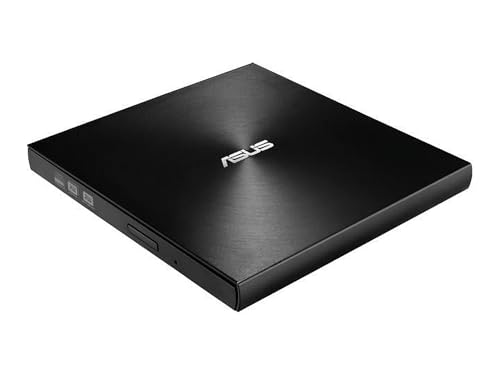
Best Value ASUS ZenDrive Ultra Slim External DVD Drive
Best for slim portable burning: ultra-slim form factor with 8x DVD writing in a pocketable design
External 8X DVD drive with USB 2.0 interface and M-Disc support for Windows and Mac. Easy backup solution with a slim 13mm form factor. Customers note easy setup and good value, though Mac compatibility may vary
- 8X write speed
- ultra-slim 13mm profile
- M-Disc and Nero BackItUp support
-
6

Asus external USB optical drive (DRW SDRW-08U7M-U) with bonus discs
Best for straightforward optical use: reliable external drive with included blank discs for quick setup
External USB CD/DVD drive by ASUS. Compact, portable reading/writing for discs. customer insight: information unavailable in provided data
- asus brand external optical drive
- usb powered operation
- includes bonus discs
-
7

HP USB External DVDRW Drive
Best for trusted OEM support: USB-powered external DVDRW from a major PC brand with simple plug-and-play
External optical drive for reading and writing CDs and DVDs. Compact USB-powered device with straightforward plug-and-play use. Customer insight indicates reliable performance
- external USB optical drive
- CD and DVD read/write
- compact portable form
-
8

External CD DVD Drive with USB 3.0 and 2 TF/SD slots
Best for card-heavy users: USB 3.0 drive with two TF/SD slots to simplify media transfers
External optical drive with USB 3.0 and multiple ports for Mac/PC. Plug and play with no driver installation. Customers note reliable performance and easy setup, with mixed compatibility on newer Macs
- USB 3.0 data transfer
- multi-slot card support
- carry-case included
-
9

ASUS ZenDrive External DVD Burner with USB-C & USB 2.0
Best for cross-platform users: external burner offering both USB-C and USB 2.0 compatibility for Macs and PCs
External 13mm slim DVD/Burner supporting Mac/PC with USB-C and USB 2.0 cables; includes Nero BackItUp for Android. Customers note easy setup, value, and mixed compatibility across systems
- ultra-slim 13mm profile
- dual USB-C and USB 2.0 cables included
- Nero BackItUp integration
-
10

HP External CD/DVD RW Drive USB Black
Best for no-frills reliability: basic external CD/DVD RW drive with a compact design and USB power
External slim CD/DVD drive for Windows and Mac systems. Reads and writes common discs. Customer insight notes mixed feedback on features
- external optical drive
- multi-format DVD support
- USB powered, plug-and-play