Best Hard Drive Docking Stations Under $50 (2026)
We scored units by connectivity, drive compatibility (2.5/3.5/M.2), cloning features, build quality, and overall value under $50
The Verdict
- Best Overall: Sabrent USB 3.0 to SATA Docking Station for 2.5/3.5in HDD/SSD (EC-DFLT) — Great budget single‑bay option: straightforward USB 3.0 SATA docking for everyday HDD and SSD access
- Best Value: Inateck RGB SATA to USB 3.0 Docking Station (2.5/3.5) with Offline Clone — Best for visibility: RGB indicators plus offline clone make drive management and duplication simple
This page highlights the best-value hard drive docking stations under $50, ranked by a value score that balances features, connectivity, and user feedback. Picks were chosen for broad compatibility (2.5/3.5 HDD/SSD, M.2 where noted), cloning options, and USB/USB‑C performance for 2026 workflows
Top Picks
-
1

Best Overall Sabrent USB 3.0 to SATA Docking Station for 2.5/3.5in HDD/SSD (EC-DFLT)
Great budget single‑bay option: straightforward USB 3.0 SATA docking for everyday HDD and SSD access
Docking station for 2.5" or 3.5" SATA drives with USB 3.0, UASP support, and easy cloning software. Customers note ease of use and solid speed with USB 3.0, though compatibility can vary by drive model
- USB 3.0 with UASP
- support for 2.5" and 3.5" drives
- free cloning software
-
2

Sabrent USB 3.0 Dual Bay Docking Station for 2.5/3.5 HDD/SSD
Best for simultaneous use: dual‑bay design lets you access or clone two 2.5/3.5 drives at once
Docking station for 2.5–3.5 inch SATA drives with offline cloning and USB 3.0 transfer. Quick setup with plug and play; supports up to 10TB per drive. Customers praise ease of use and cloning capability
- Offline cloning capability
- USB 3.0 transfer support
- 2.5/3.5 inch SATA compatibility
-
3
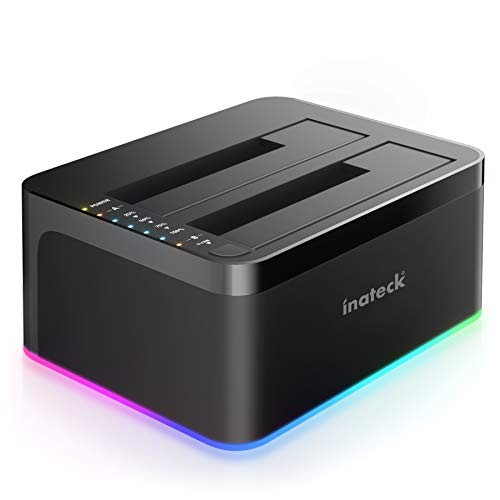
Best Value Inateck RGB SATA to USB 3.0 Docking Station (2.5/3.5) with Offline Clone
Best for visibility: RGB indicators plus offline clone make drive management and duplication simple
RGB-enabled SATA-to-USB 3.0 docking station supporting offline cloning for 2.5" and 3.5" HDDs/SSDs. Easy plug-and-play with UASP support. Users note easy setup and occasional drive disconnects
- offline cloning without computer
- usb 3.0 with uasp
- rgb activity indicators
-
4

Inateck USB-C 2-bay HDD/SSD Docking Station with Offline Cloning
Best USB‑C dual‑bay value: dual drives with offline cloning and modern USB‑C connectivity for newer hosts
Dual-bay USB 3.0 docking station for 2.5/3.5 inch SATA drives with offline cloning and RGB indicators. Helpful for easy drive cloning and hot-swapping; users praise ease of use and plug-and-play, with some noting connectivity issues
- offline cloning without PC
- dual bay for 2.5/3.5 inch HDD/SSD
- UASP supported for faster transfer
-
5

SABRENT USB-C 2.5/3.5 SATA Docking Station DS-UC1B
Solid USB‑C single/dock choice: compact SATA dock with hot‑swap support for quick drive swaps
USB-C SATA dock supports 2.5/3.5 SSD & HDD with hot-swappable design. Includes USB-A and USB-C cables; compatible with high-capacity drives up to 20TB. Customer insight notes ease of use and some drive recognition issues
- 10Gbps USB-C data transfer
- supports 20TB drives
- tool-free, hot-swappable operation
-
6

Inateck RGB SATA to USB 3.0 Docking Station
Good all‑rounder with RGB: full SATA support and cloning features in a visually lit enclosure
Docking station for 2.5/3.5 inch SATA HDD/SSD with USB 3.0, offline cloning, and RGB lighting. Supports UASP and backward USB 2.0/1.1 compatibility; cloner requires source disk <= target disk
- offline cloning without computer
- USB 3.0 up to 5Gbps
- drive compatibility 2.5/3.5 inch SATA
-
7

ORICO USB-C to SATA 2-Bay Docking Station
Well‑rounded dual‑bay USB‑C dock: offline cloning and two‑drive access for routine backups and imaging
Dual-bay docking station for 2.5"/3.5" HDD/SSD with off-line clone function and 5Gbps transfer. Easy plug-and-play with a 2-in-1 USB-C/USB-A cable; supports multiple OS. Customer notes emphasize cloning capability and overall value, with mixed feedback on build and noise
- offline clone with start button
- dual bay support for 2.5/3.5 inch drives
- USB-C to USB-A 2-in-1 cable included
-
8

FIDECO USB 3.2 Gen 1 2.5/3.5in HDD Dock
Reliable USB 3.2 option: versatile SATA docking with USB‑C compatibility for standard HDD/SSD tasks
FIDECO hard drive docking station supports 2.5" or 3.5" SATA HDD/SSD with USB-C and USB-A cables. Enables direct file access and offline clone functionality. Customers note solid build, easy setup, and effective cloning, with mixed speed feedback
- includes two USB cables
- supports UASP for faster transfers
- supports 2.5"/3.5" SATA drives
-
9

MAIWO M.2 NVMe SSD Cloner Docking Station
Best for NVMe cloning: dedicated M.2 NVMe cloner dock for direct SSD replication and high‑speed access
MAIWO dual M.2 NVMe SSD cloner with 10Gbps USB C 3.1 Gen2. Enables concurrent read/write for two NVMe drives; compatible with Windows, macOS, Linux. Customers note fast performance and easy setup
- dual-bay nvme enclosure
- 10gbps usb-c interface
- broad device compatibility
-
10

FIDECO M.2 NVMe to USB Docking Station with Cooling Fan
Compact NVMe USB dock: portable M.2 to USB solution with active cooling for sustained NVMe use
FIDECO docking station supports 2.5/3.5” SATA HDD/SSD and M.2 NVMe/SATA SSD with a cooling fan. Independent fan switch allows cooling on demand; users note effective cooling and NVMe support, with some noise concerns
- built-in cooling fan
- M.2 NVMe and SATA compatibility
- supports both 2.5" and 3.5" drives