Best Hard Drive Docking Stations (2026 Guide)
We prioritized products with high aggregate ratings and review volume, covering varied interfaces (USB‑C/USB‑3.0), bay counts, and cloning features for practical comparisons
The Verdict
- Best Overall: Sabrent USB 3.0 to SATA Docking Station for 2.5/3.5in HDD/SSD (EC-DFLT) — Good budget single-bay pick: compact USB‑3.0 SATA dock for quick HDD/SSD access and easy hot‑swap use
- Best Value: Inateck RGB SATA to USB 3.0 Docking Station (2.5/3.5) with Offline Clone — Best for status clarity: RGB‑accented USB‑3.0 dock with offline clone support and clear cloning indicators
This guide surveys top-rated hard drive docking stations selected by aggregated rating and review volume to help you pick the right dock for cloning, backup, or hot-swapping drives. Picks were chosen for reliability, feature set (offline cloning, USB-C/USB‑3.0 support, bay count), and broad user feedback across brands
Top Picks
-
1

Best Overall Sabrent USB 3.0 to SATA Docking Station for 2.5/3.5in HDD/SSD (EC-DFLT)
Good budget single-bay pick: compact USB‑3.0 SATA dock for quick HDD/SSD access and easy hot‑swap use
Docking station for 2.5" or 3.5" SATA drives with USB 3.0, UASP support, and easy cloning software. Customers note ease of use and solid speed with USB 3.0, though compatibility can vary by drive model
- USB 3.0 with UASP
- support for 2.5" and 3.5" drives
- free cloning software
-
2

Sabrent USB 3.0 Dual Bay Docking Station for 2.5/3.5 HDD/SSD
Best for simultaneous use: dual-bay USB‑3.0 dock designed for frequent cloning and managing two SATA drives
Docking station for 2.5–3.5 inch SATA drives with offline cloning and USB 3.0 transfer. Quick setup with plug and play; supports up to 10TB per drive. Customers praise ease of use and cloning capability
- Offline cloning capability
- USB 3.0 transfer support
- 2.5/3.5 inch SATA compatibility
-
3
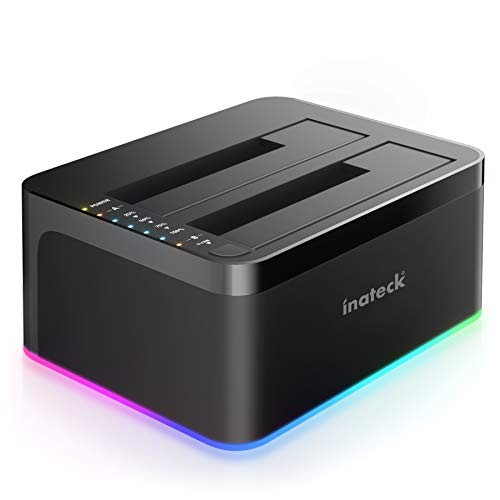
Best Value Inateck RGB SATA to USB 3.0 Docking Station (2.5/3.5) with Offline Clone
Best for status clarity: RGB‑accented USB‑3.0 dock with offline clone support and clear cloning indicators
RGB-enabled SATA-to-USB 3.0 docking station supporting offline cloning for 2.5" and 3.5" HDDs/SSDs. Easy plug-and-play with UASP support. Users note easy setup and occasional drive disconnects
- offline cloning without computer
- usb 3.0 with uasp
- rgb activity indicators
-
4

Sabrent 4-Bay USB 3.0 Docking Station (DS-U3B4)
Best for multi‑drive tasks: four-bay USB‑3.0 dock that streamlines handling several 2.5/3.5 SATA drives at once
Sabrent 4-Bay SATA docking station supports up to four 2.5" or 3.5" SSD/HDD with tool-free trayless design. Fast USB 3.2 Gen 1 interface for data backups and expansion
- four-drive simultaneous access
- trayless, tool-free setup
- cross-platform compatibility
-
5

Inateck USB-C 2-bay HDD/SSD Docking Station with Offline Cloning
Best for modern ports: USB‑C dual‑bay dock with offline cloning for fast, cable‑friendly drive cloning and access
Dual-bay USB 3.0 docking station for 2.5/3.5 inch SATA drives with offline cloning and RGB indicators. Helpful for easy drive cloning and hot-swapping; users praise ease of use and plug-and-play, with some noting connectivity issues
- offline cloning without PC
- dual bay for 2.5/3.5 inch HDD/SSD
- UASP supported for faster transfer
-
6

SABRENT USB-C 2.5/3.5 SATA Docking Station DS-UC1B
Best compact USB‑C solution: single/dock option focused on hot‑swap convenience with a USB‑C host interface
USB-C SATA dock supports 2.5/3.5 SSD & HDD with hot-swappable design. Includes USB-A and USB-C cables; compatible with high-capacity drives up to 20TB. Customer insight notes ease of use and some drive recognition issues
- 10Gbps USB-C data transfer
- supports 20TB drives
- tool-free, hot-swappable operation
-
7

Inateck RGB SATA to USB 3.0 Docking Station
Best budget RGB choice: USB‑3.0 SATA dock offering offline cloning and visual indicators for drive operations
Docking station for 2.5/3.5 inch SATA HDD/SSD with USB 3.0, offline cloning, and RGB lighting. Supports UASP and backward USB 2.0/1.1 compatibility; cloner requires source disk <= target disk
- offline cloning without computer
- USB 3.0 up to 5Gbps
- drive compatibility 2.5/3.5 inch SATA
-
8

ORICO USB-C to SATA 2-Bay Docking Station
Best dual‑bay USB‑C utility: two‑bay SATA dock with offline cloning aimed at desktop and laptop users
Dual-bay docking station for 2.5"/3.5" HDD/SSD with off-line clone function and 5Gbps transfer. Easy plug-and-play with a 2-in-1 USB-C/USB-A cable; supports multiple OS. Customer notes emphasize cloning capability and overall value, with mixed feedback on build and noise
- offline clone with start button
- dual bay support for 2.5/3.5 inch drives
- USB-C to USB-A 2-in-1 cable included
-
9

FIDECO USB 3.2 Gen 1 2.5/3.5in HDD Dock
Best for straightforward USB‑C connectivity: USB‑3.2 Gen‑1 dock built for easy access to 2.5/3.5 SATA drives
FIDECO hard drive docking station supports 2.5" or 3.5" SATA HDD/SSD with USB-C and USB-A cables. Enables direct file access and offline clone functionality. Customers note solid build, easy setup, and effective cloning, with mixed speed feedback
- includes two USB cables
- supports UASP for faster transfers
- supports 2.5"/3.5" SATA drives
-
10

MAIWO M.2 NVMe SSD Cloner Docking Station
Best for NVMe cloning: M.2 NVMe dock tailored to M‑key SSDs with USB‑C connectivity for direct SSD cloning and access
MAIWO dual M.2 NVMe SSD cloner with 10Gbps USB C 3.1 Gen2. Enables concurrent read/write for two NVMe drives; compatible with Windows, macOS, Linux. Customers note fast performance and easy setup
- dual-bay nvme enclosure
- 10gbps usb-c interface
- broad device compatibility