Best Internal Computer Networking Cards Under $100 (2026)
We ranked cards under $100 by value score using wireless generation, interface type, OS and driver support, feature set (Bluetooth, multi‑band), and real‑world throughput
The Verdict
- Best Overall: TP-Link WiFi 6E PCIe Card with Bluetooth 5.3 — Best for modern Wi‑6E upgrades: compact PCIe card with tri‑band support and integrated Bluetooth for versatile desktop use
- Best Value: MSI AX200 WiFi 6 PCIe Network Adapter — Best compact Wi‑6 adapter: AX200 PCIe card that provides Wi‑6 performance and Bluetooth for space‑constrained builds
This roundup covers internal PCIe and M.2 networking cards under $100, focusing on value for desktop and workstation upgrades. Selections prioritize modern wireless standards, multi‑protocol support, and real-world compatibility across Windows and Linux
Top Picks
-
1
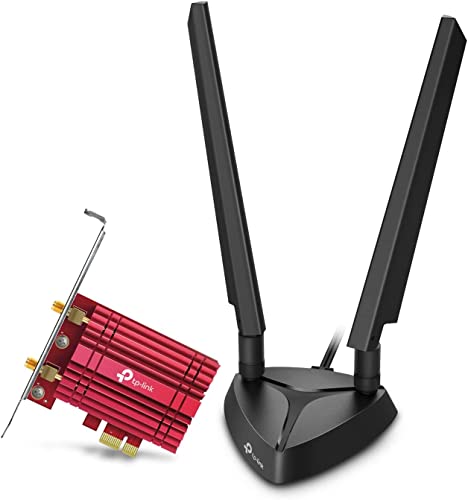
Best Overall TP-Link WiFi 6E PCIe Card with Bluetooth 5.3
Best for modern Wi‑6E upgrades: compact PCIe card with tri‑band support and integrated Bluetooth for versatile desktop use
TP-Link WiFi 6E PCIe card for desktop PCs with Intel AX210 chipset, dual antennas, magnetic base, and Bluetooth 5.3. Improves 6 GHz, 5 GHz, and 2.4 GHz performance for stable connections. Customers note easy installation and strong signal reception
- 6 GHz bandwidth expansion
- Dual antennas for signal strength
- Magnetized base for flexible placement
-
2

TP-Link PCIe WiFi 6 Card Archer TX55E with Bluetooth 5.2
Best budget Wi‑6 option: simple PCIe adapter offering Wi‑6 speeds and Bluetooth 5.2 for inexpensive wireless upgrades
PCIe WiFi 6 card for desktop with dual band 2.4/5 GHz and Bluetooth 5.2. Delivers high-speed wireless with MU-MIMO and OFDMA for reduced latency. Customers note easy plug-and-play on Linux and improved speeds
- WiFi 6 tech with MU-MIMO/OFDMA
- Bluetooth 5.2 enabled
- enhanced range via high-gain antennas
-
3

GIGABYTE WiFi 6E GC-WBAX210 PCIe Card
Best Intel AX210 alternative: PCIe Wi‑6E card that delivers 6E bands and solid driver compatibility for desktops
PCIe expansion card with Intel Wi‑Fi 6E AX210 module, 6GHz spectrum, and Bluetooth 5.2. Delivers high-speed wireless and easy plug-and-play setup, with mixed notes on Bluetooth adapters from users
- 6GHz spectrum for low latency
- PCIe expansion card form factor
- Bluetooth 5.2 support
-
4

WiFi 7 PCIe Card with BE200 | 9.3Gbps, BT 5.4, 4K QAM, 320MHz
Best for cutting‑edge wireless: Wi‑7 capable card with BE200 chipset promising high theoretical throughput and modern Bluetooth
PCIe wireless card with WiFi 7 BE200 module, Bluetooth 5.4, tri-band support, and 4K QAM. Delivers up to 9.3Gbps and higher capacity; plug-and-play on Windows 10/11. Customer insight notes easy installation and improved speed
- WiFi 7 BE200 inside
- 9.3Gbps peak data rate
- BT 5.4 integrated
-
5

TP-Link WiFi 6E PCIe Card with Intel AX210 (Archer TXE72E)
Best balanced Wi‑6E pick: PCIe card using Intel AX210 silicon to combine 6E performance with reliable driver support
WiFi 6E PCIe card for desktop with Intel AX210, Bluetooth 5.3, and MU-MIMO/OFDMA. Delivers low latency and multi-band connectivity for Windows 10/11. Users note plug-and-play on Linux and noticeable speed improvements
- WiFi 6E 6GHz support
- Intel AX210 chipset
- MU-MIMO and OFDMA
-
6

TP-Link 10Gb PCIe Network Card TX401
Best wired 10Gb choice: PCIe NIC delivering multi‑gigabit Ethernet for low‑latency LAN and NAS connections
High-speed 10GBase-T PCIe network card with broad OS support. Delivers fast data transfers for internet and local networks. Customers note easy installation and good value
- 10GBase-T technology
- ultra-low latency
- wide OS support
-
7
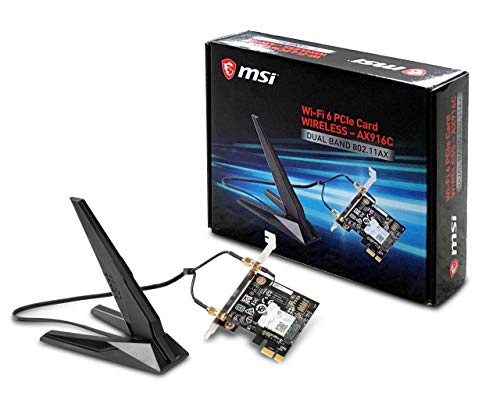
Best Value MSI AX200 WiFi 6 PCIe Network Adapter
Best compact Wi‑6 adapter: AX200 PCIe card that provides Wi‑6 performance and Bluetooth for space‑constrained builds
Wi-Fi 6 (AX200) dual-band PCIe network adapter with Bluetooth 5.0. Upgrades desktops with MU-MIMO and 2x2 160MHz capability. Customers note easy installation and solid WiFi range, with some Bluetooth and driver issues
- Wi-Fi 6 AX200 module
- Bluetooth 5.0
- MU-MIMO with 2x2 160MHz
-
8
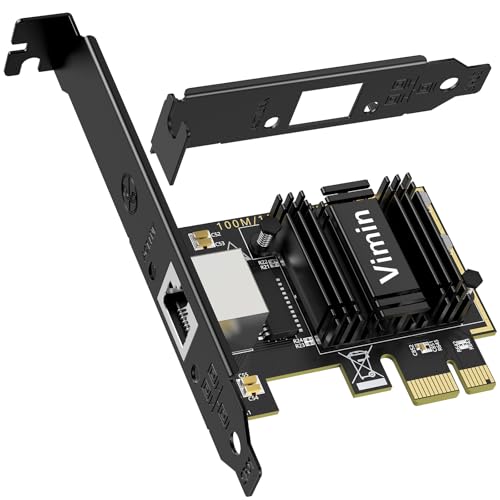
5G PCIe Network Card with RTL8126 (RJ45) for Windows, VMware, Linux
Best for multi‑OS wired networking: PCIe RJ45 card with a Realtek controller suitable for Windows, Linux, and virtualization hosts
5G PCIe network card using RTL8126, offloads checksum and TCP tasks to hardware for lower CPU load. Claims reliable high-speed performance for latency-sensitive apps like virtualization; tested with VMware and Proxmox
- hardware offload acceleration
- multi-rate ethernet support
- VMware/Linux compatibility
-
9

AX411 WiFi 6E CNVio2 M.2 Card
Best M.2 CNVio2 option: AX411 form‑factor card for systems with CNVio2 support seeking Wi‑6E capability without a full PCIe slot
WiFi 6E M.2 CNVio2 card with up to 3.0 Gbps and Bluetooth 5.3. Provides dual-band connectivity for 2.4/5/6 GHz. Customer notes easy installation and driver auto-setup
- ax411 ngw family
- tri-band Wi-Fi 6E with 3.0 Gbps
- bluetooth 5.3 support
-
10
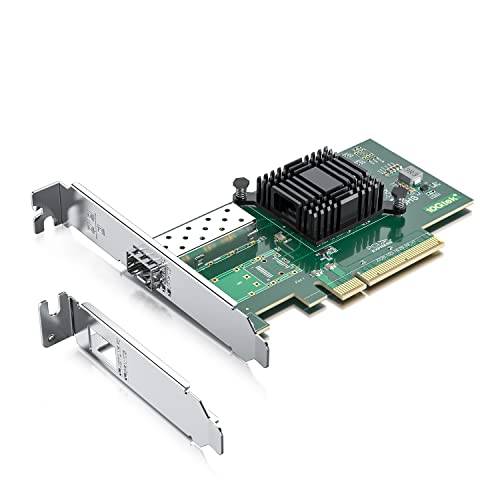
10Gtek 10Gb PCI-E NIC with Single SFP+ Port (Intel 82599EN)
Best SFP+ 10Gb solution: single‑port PCIe NIC using a server‑grade Intel controller for high‑speed fiber or DAC links
10Gtek PCI-E 10Gb Ethernet NIC with a single SFP+ port using the Intel 82599EN. Supports Windows Server, Linux, and VMware; easy driver installation from Intel. Customers note solid performance and value, with some driver compatibility issues on Windows 11
- intel 82599en chipset
- single sfp+ port
- compatible with multiple OS ecosystems