Best Internal Solid State Drives Under $50 (2026)
We ranked drives by a value score combining capacity, interface (SATA vs NVMe), form factor, manufacturer reputation, and price under $50
The Verdict
- Best Overall: PNY CS900 250GB Dual Pack SATA III SSD — Best for bulk upgrades: dual-pack provides two 250GB SATA drives for cloning or multiple systems
- Best Value: WD Green 240GB SATA III SSD — Best balanced SATA option: 240GB capacity in a standard 2.5" SATA III form factor for OS and apps
This roundup covers internal solid state drives priced under $50, focused on value across capacity, interface, and form factor for 2026 builds and upgrades. Selections prioritize objective specs, drive interface (SATA vs NVMe), capacity-per-dollar and real-world compatibility
Top Picks
-
1
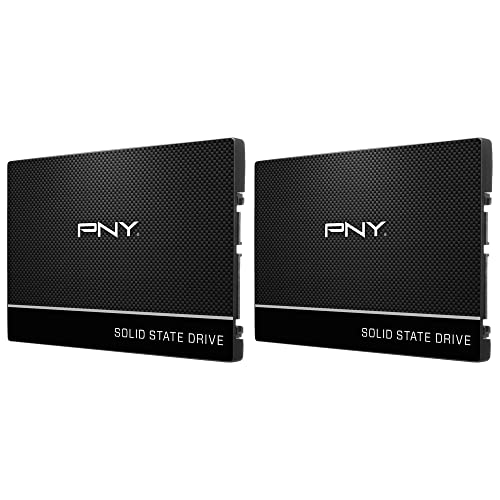
Best Overall PNY CS900 250GB Dual Pack SATA III SSD
Best for bulk upgrades: dual-pack provides two 250GB SATA drives for cloning or multiple systems
PNY CS900 250GB SSD duo for upgrading laptops or desktops with fast OS boot and applications. Customers note easy installation, good value, and faster boot times
- dual-pack 250GB SSDs
- up to 535MB/s read
- up to 500MB/s write
-
2

WD Green 120GB SATA III 2.5" SSD
Best for legacy systems: compact 2.5" SATA drive suited to older laptops and budget desktops
Internal SSD with SLC caching for faster writes, low power draw, and reliable compatibility. Customers cite good read/write speeds, quick boot times, and easy installation
- SLC caching for improved writes
- low power consumption
- 3-year warranty
-
3
Best Value WD Green 240GB SATA III SSD
Best balanced SATA option: 240GB capacity in a standard 2.5" SATA III form factor for OS and apps
WD Green 240GB SSD with SATA III interface for reliable everyday tasks and low power draw. Customers note solid read/write speeds and quick boot times
- SLC caching boosts write performance
- low power consumption
- multiple form factors available
-
4

PNY 2.5" SATA III SSD 240GB internal drive
Best straightforward internal upgrade: 240GB 2.5" SATA drive that fits common laptop and desktop bays
2.5" SATA III SSD with up to 535 MB/s read and 500 MB/s write speeds. Improves OS boot times and app loads; energy-efficient operation. Customers note reliable performance and value, with mixed durability feedback
- up to 535 MB/s read
- up to 500 MB/s write
- low power consumption
-
5

LinkMore XE400 250GB M.2 NVMe PCIe Gen4 SSD
Best entry NVMe performance: M.2 NVMe PCIe Gen4 option that boosts transfer speeds on compatible boards
M.2 2280 NVMe SSD with PCIe Gen4 interface for faster read/write speeds. Customer notes easy installation and speedy performance
- pcie gen 4 nvme interface
- sequential read up to 4650 MB/s
- m.2 2280 form factor
-
6

LinkMore XE400 500GB NVMe SSD, M.2 2280 PCIe 4.0
Best high-capacity NVMe value: 500GB M.2 PCIe Gen4 drive that maximizes storage under (price varies) for NVMe systems
M.2 2280 NVMe SSD with PCIe 4.0 for fast read/write up to 5000/3200 MB/s. A compact upgrade for desktops and laptops. Customers note easy installation and solid performance
- PCIe 4.0 NVMe performance
- M.2 2280 form factor
- high sequential speeds
-
7

Gamerking SSD M.2 2242 500GB
Best small-form M.2 option: 2242 M.2 drive useful where compact module length is required
M.2 2242 500GB solid-state drive with 3D NAND for increased capacity, performance, and durability. Four times faster than traditional hard drives, enabling faster boot/shutdown and quicker app response
- 3D NAND memory
- M.2 2242 form factor
- improved boot/shutdown performance
-
8

Internal Solid State Drive 500GB with aluminum mounting kit
Best included accessory: 500GB SATA drive bundled with an aluminum mounting kit for easy desktop installation
Internal SSD 500GB with aluminum mounting kit. Delivers high transfer speeds, up to 560 MB/s read and 510 MB/s write. Compatible with PC, Mac, and Linux; improves boot times and reliability due to no moving parts
- aluminum mounting kit included
- high sequential read speed
- no moving parts for reliability
-
9

HP 507119-003 146-GB 6G 10K 2.5 DP SAS HDD
Best for legacy servers: 2.5" SAS drive suited to older enterprise hardware requiring SAS connectivity
SAS 2.5-inch hard drive with portable design and high 10K rpm performance for reliable data transfer. 146 GB capacity suitable for structured storage and quick backups. Customer note mentions no additional insights
- 6G SAS interface
- 10K rpm performance
- compact 2.5-inch drive
-
10
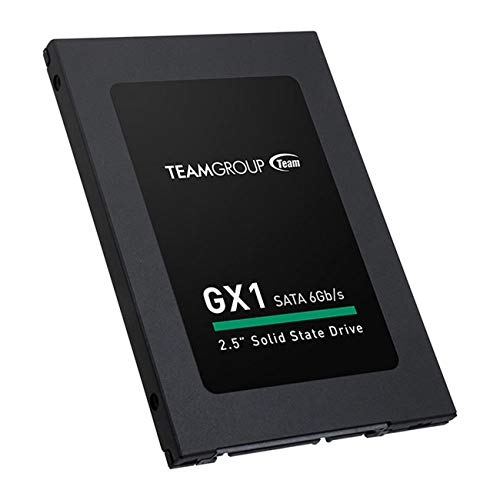
TEAMGROUP 240GB 2.5" SATA III SSD
Best standard budget SSD: 240GB 2.5" SATA drive offering reliable capacity for everyday upgrades
Compact 240GB 2.5" SATA III SSD delivering high performance and faster boot and application load times. Consumers note instant-load performance and improved speed over HDDs
- 2.5" SATA III SSD
- instant-load performance
- faster boot times