Best Internal USB Port Cards (2026 Guide)
We selected cards by combining aggregate product ratings and review volume with key technical features such as port count, USB generation, internal header support, and PCIe lane requirements
The Verdict
- Best Overall: PCIE USB 3.0 Expansion Card (7 ports) — Best for multi-port expansion: adds seven USB ports including Type-C for high device counts in a single PCIe slot
- Best Value: USB 3.0 PCIe Card with 6 USB-A and 2 USB-C ports — Best mixed-port option: combines six USB-A and two USB-C ports to support legacy and modern peripherals together
This guide compares top-rated internal USB port cards for desktops, covering PCIe expansion cards that add USB-A, USB-C, and front-panel header support. Selections were based on aggregated product ratings, review volume, supported USB standards, and practical features like internal headers and port counts
Top Picks
-
1
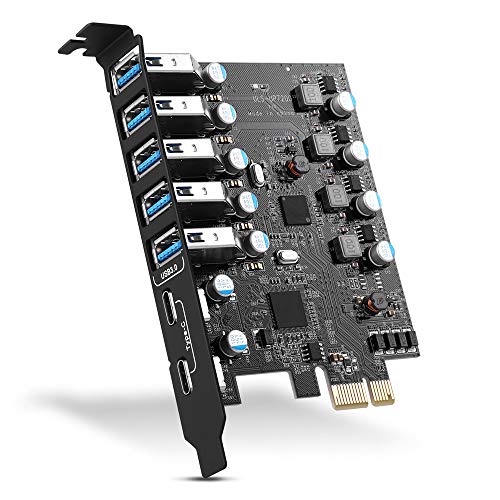
Best Overall PCIE USB 3.0 Expansion Card (7 ports)
Best for multi-port expansion: adds seven USB ports including Type-C for high device counts in a single PCIe slot
A PCIe USB 3.0 expansion card with 7 ports (5 Type-A, 2 Type-C) for Windows, macOS, and Linux. Enables plug-and-play USB expansion with easy installation, valued for quality and versatility, though some users report port and reliability issues
- 7-port USB 3.0 expansion
- 5 Type-A + 2 Type-C ports
- Cross-OS compatibility
-
2

Allegro Type A USB 3.2 PCIe Card (4-Port) for Mac/Windows
Best for Mac/Windows compatibility: four-port PCIe card designed for desktop upgrades with broad OS support
Adds four USB 3.2 ports to PCIe-ready systems, supporting bus-powered drives and devices. Customers note easy installation and no driver need
- four-port usb 3.2 expansion
- mac and windows compatible
- driver-free installation
-
3

Best Value USB 3.0 PCIe Card with 6 USB-A and 2 USB-C ports
Best mixed-port option: combines six USB-A and two USB-C ports to support legacy and modern peripherals together
RIITOP PCIe expansion card adds 6 external USB 3.0 ports and 2 USB-C ports via PCIe x1/x4/x8/x16 for PC connectivity. Easy installation with no driver required, works with multiple devices according to user feedback
- six USB-A 3.0 ports
- two USB-C ports
- driver-free installation
-
4

7-port USB 3.0 PCIe expansion card (FS-U7L-Pro)
Best seven-port USB-A expansion: delivers seven USB 3.0 ports for users needing many downstream USB-A connections
PCIE x1 USB 3.0 expansion card adding 7 USB-A 5Gbps ports for desktops and workstations. Enables high-power USB devices without extra power supply; drivers not required for Windows compatibility
- 7x USB 3.0 ports
- PCIE X1 interface
- self-powered technology
-
5
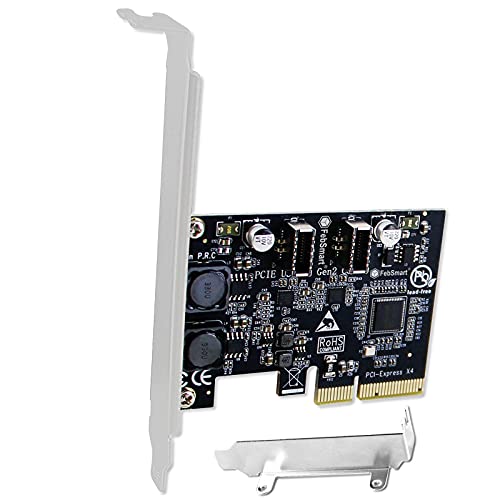
FS-E2C-Pro USB 3.1 Gen2 x4 to 2x USB-C 10Gbps PCIe card
Best for front-panel USB-C: converts a PCIe lane into two 10Gbps USB-C ports with support for case header connections
FebSmart FS-E2C-Pro adds 2x USB 3.1 Gen2 type E key A ports, extending to 2x 10Gbps USB-C front-panel ports for desktops and workstations. Provides up to 10Gbps transfer for USB-C devices; mixed feedback on power delivery and connectivity
- dual usb-c 10gbps expansion
- usb 3.1 gen2 performance
- built-in self-powered technology
-
6

USB C PCIe Card with 4 ports and 19 pin header
Best internal-header focus: four USB-C ports plus a 19-pin header for front-panel integration and device flexibility
PCIe to USB expansion card with 4 ports and 19-pin USB 3.0 header. Enables front-panel USB access and high-speed data transfer up to 10Gbps. One customer notes work with Windows 11; mixed feedback on installation and compatibility
- PCIe to USB expansion with 4 ports
- internal 19-pin USB 3.0 header support
- 10Gbps USB 3.1 Gen 2 performance
-
7

7-Port PCIe USB 3.0 Expansion Card (2x USB-C, 5x USB-A) for Desktop
Best balanced layout: offers two USB-C and five USB-A ports for mixed device setups without sacrificing port count
Internal PCIe USB expansion card adding 7 ports (5 USB-A, 2 USB-C) for PCs with limited USB. Supports speeds up to 5Gbps and is compatible with Windows and macOS. Customer insight notes mixed compatibility and installation experiences
- 7 ports total (5x USB-A, 2x USB-C)
- PCIe expansion for desktop PCs
- 5Gbps transfer rate
-
8

StarTech USB 3.2 Gen 2x2 PCIe Card, USB-C 20Gbps, 4-lane
Best for high-speed USB-C: provides a 20Gbps USB-C PCIe solution for workflows needing faster single-port transfers
Add a USB-C 20Gbps port to a desktop PCIe slot with 4-lane support. Includes power delivery up to 5V 3A and driver support across Windows, macOS, and Linux. Customers note fast transfers and easy installation, with mixed compatibility reports
- 20Gbps USB-C via PCIe x4
- power delivery to devices
- cross-OS compatibility
-
9

Kingwin 7-Port USB 3.0 Front Panel Hub with Fast Charging
Best front-panel hub with charging: seven-port front panel hub that adds accessible ports and a dedicated fast-charge output
Kingwin USB 3.0 front panel hub with 7 ports and a 2.1A fast charging port. Backward compatible with USB 2.0/1.1. Supports up to 5 Gbps for USB 3.0 devices. Customer note: mixed build quality and some port alignment issues
- 7 USB 3.0 ports
- 1 quick charging port
- front-bay compatible
-
10

Sonnet Allegro Max USB-C 20Gbps PCIe Card
Best USB-C 20Gbps alternative: PCIe card focused on higher bandwidth USB-C connections for faster peripheral throughput
USB-C PCIe card enabling high-speed transfers up to 2000 MB/s. Features a custom connector to reduce interference and a resettable overcurrent fuse. Supports bus-powered USB-C SSDs and RAID devices on Mac and Windows
- up to 2000 MB/s transfer speed
- interference-reducing connector design
- bus-powered USB-C SSD/RAID support