Best KVM Switches Under $200 (2026)
We selected models under $200 and ranked them by a value score combining port count, video standard support, USB features, included accessories, and user-focused practicality
The Verdict
- Best Overall: IOGEAR 4-Port USB KVM Switch with Cables — Best for simple multi-computer setups: four-port USB KVM with cables included for easy keyboard/mouse switching
- Best Value: UGREEN USB 3.0 Switch Selector for 2 PCs, 4 Ports — Best for USB peripheral sharing: USB 3.0 switcher to toggle high-speed USB devices between two PCs
This roundup highlights KVM switches under $200 that balance connectivity, display support, and value for multi-PC users. Picks were ranked by a value score weighing port count, video standards (HDMI/DisplayPort/VGA), USB support, and included cabling or extenders
Top Picks
-
1

Best Overall IOGEAR 4-Port USB KVM Switch with Cables
Best for simple multi-computer setups: four-port USB KVM with cables included for easy keyboard/mouse switching
Allows sharing a VGA monitor, USB mouse, and USB keyboard across four computers. Notable for easy setup and remote button control. Customers mention good value and ease of use, with some compatibility mixed feedback
- 4-port sharing across devices
- remote control for switching
- included cables and VGA/USB support
-
2

IOGEAR 2-Port USB DisplayPort KVM Switch (4K 30Hz) GCS52DP
Best for DisplayPort desktops: two-port DisplayPort KVM that preserves high-resolution signal for dual-computer use
2-port DisplayPort KVM switch for dual PC control of keyboard, mouse, and DP monitor. 4K UHD @30Hz and HDCP compliant. Users value easy setup and switchability, though some report keyboard/mouse compatibility issues
- dual-displayport computer control
- 4K 30Hz support
- USB hub and audio passthrough
-
3

IOGEAR 2-Port USB HDMI KVM Switch GCS62HU
Best for HDMI switching: two-port HDMI KVM that shares keyboard, mouse and audio between two systems
Compact 2-port HDMI KVM switch for sharing one keyboard, mouse, and monitor across two computers. Features hotkey or remote button switching and USB hub-capable mouse port. Users note easy setup and responsive switching
- hotkey or remote button switching
- HD monitor sharing via HDMI
- USB hub-capable mouse port
-
4

AV Access USB Extender Over Cat5e/6 196ft, 4 USB 2.0 Ports
Best for extended USB reach: USB extender over Cat5e/6 with four USB ports to place peripherals far from the host
USB extender over Cat5e/6 up to 196 ft with 4 USB 2.0 ports. Plug and play, no driver needed, supports Windows, MacOS, Android, Linux. One customer notes reliable performance and metal build
- long-range USB extension
- multiple-OS compatibility
- no-driver installation
-
5

IOGEAR 2-Port USB VGA KVM Switch GCS72U
Best for legacy displays: two-port VGA KVM offering simple keyboard and mouse sharing for older monitors
Compact KVM switch for USB keyboard, mouse, and VGA monitor that controls two computers. Supports up to 2048 x 1536 resolution with plug-n-play setup and remote push-button switching. Users note easy connection and value, with mixed compatibility reports
- two-attached USB and VGA cables
- max resolution 2048 x 1536
- remote push-button switching
-
6
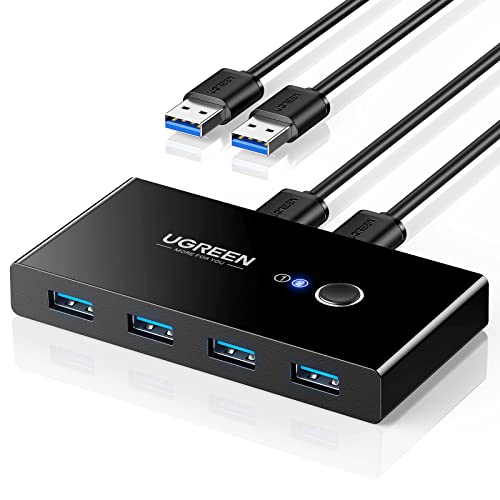
Best Value UGREEN USB 3.0 Switch Selector for 2 PCs, 4 Ports
Best for USB peripheral sharing: USB 3.0 switcher to toggle high-speed USB devices between two PCs
USB 3.0 switch lets two computers share four USB devices. Simplifies switching and setup; users report ease of use with keyboards/mice, but some issues with USB devices and connectivity noted
- 2 in 4 out USB 3.0 sharing
- one-button switch between PCs
- kit includes 2 USB 3.0 cables
-
7

TRENDnet 2-Port USB KVM Switch Kit with Audio TK-209K
Best for audio-enabled setups: two-port USB KVM kit with audio support for shared speakers and mic between PCs
2-port USB KVM switch with VGA, USB mouse/keyboard, and audio. Quick switching between two PCs with ease; praised for setup simplicity and reliable performance. Mixed feedback on wireless compatibility and cable design
- 2-port USB KVM with audio
- hot-key and auto-scan features
- dedicated manufacturer protection
-
8

TRENDnet 4-Port USB KVM Switch Kit with Audio TK-409K
Best for compact multi-station control: four-port USB KVM kit with included cables to manage several VGA systems
KVM switch kit for controlling up to four computers with one keyboard, video, and mouse. Includes separate KVM cables; supports VGA and audio jacks. Users note easy setup and good value, with mixed feedback on wireless compatibility
- 4-port control with one console
- includes 4 sets of KVM cables
- NDAA compliant
-
9

UGREEN USB-C 2-in 4-out switcher for 2 PCs
Best for USB-C device sharing: USB-C switcher designed to share peripherals between two modern USB-C computers
UGREEN USB-C 2-in 4-out switcher lets two computers share four USB devices (keyboard, mouse, headphones, etc.) with a remote switch. Users praise solid build and easy setup, though some report connectivity issues
- 2-in 4-out USB-C switcher
- remote control
- USB 3.0 data transfer
-
10

USB3.0 KVM Switch 4-Port HDMI 4K@60Hz for 4 Computers
Best for 4K@60Hz HDMI setups: four-port USB3.0 HDMI KVM that supports high-resolution displays across multiple hosts
KVM switch to share 1 monitor among 4 computers with a single keyboard/mouse. Supports 4K@60Hz and lower resolutions; quick, lag-free switching. Customers note easy setup and clear video, with some reports of no video output
- 4-port HDMI KVM with USB3.0 hubs
- 4K@60Hz display support
- fast, reliable switching