Best Laptop Docking Stations Under $50 (2026)
We ranked docks by a value score combining port variety, dual-monitor support, power delivery, brand features, and user-rated reliability
The Verdict
- Best Overall: Selore 8-in-1 USB-C hub with dual HDMI for MacBook Pro/Air — Best for MacBook users needing dual HDMI and PD passthrough in a compact 8-in-1 hub
- Best Value: NOVOO 11 in 1 USB-C docking station with dual HDMI — Best for mixed setups that want an 11‑in‑1 dock offering dual HDMI plus legacy VGA output
This roundup surveys value-focused USB-C laptop docking stations priced under $50 that add monitor, USB, storage, and power passthrough options. Picks were chosen by scoring multiport versatility, display support (HDMI/DP/VGA), power delivery capability, and overall value across current models
Top Picks
-
1

Best Overall Selore 8-in-1 USB-C hub with dual HDMI for MacBook Pro/Air
Best for MacBook users needing dual HDMI and PD passthrough in a compact 8-in-1 hub
USB-C dock extends two HDMI displays and adds 2 USB-A ports, USB-C port, SD/TF reader, and 100W PD pass-through for MacBook Pro/Air. Customers report easy, plug-and-play setup and multi-monitor support, with some fit issues depending on laptop model
- dual 4K HDMI support
- multi-port expansion (USB-A, USB-C, SD/TF)
- high-speed data transfer and PD charging
-
2

Selore 10-in-1 USB-C Docking Station for MacBook Pro/Air
pick for MacBook users wanting a 10‑port USB‑C docking option with dual HDMI support
USB-C hub expands a single port into 2 HDMI outputs, USB-C/USB-A, USB 2.0, PD 100W, and Gigabit Ethernet. Enables dual monitor setup with 4K and 1080p displays. Users note good quality, portability, and value, though some report mixed display performance
- dual HDMI 4K/1080p support
- 100 W USB-C PD charging
- multi-port expansion with Ethernet and USB options
-
3

Best Value NOVOO 11 in 1 USB-C docking station with dual HDMI
Best for mixed setups that want an 11‑in‑1 dock offering dual HDMI plus legacy VGA output
NOVOO 11-in-1 USB-C docking station adds 2 HDMI, VGA, Ethernet, USB-A 2.0/3.0, and 100W PD for laptops. Supports multi-display setups and a single hub for peripheral expansion.Customer insight notes varied functionality and heat during use
- 2 HDMI outputs
- 100W PD port
- 3+ USB ports with fast options
-
4

USB-C 15-in-1 Docking Station with 2x HDMI and DP
Best for multi-display setups that need two HDMI ports and DisplayPort in a higher‑port 15‑in‑1 dock
USB-C hub docking station converts a single USB-C/Thunderbolt 3 port into 15 ports, including 2x 4K@60Hz HDMI and 8K@30Hz/4K@144Hz DP, plus USB-A, PD, Ethernet, SD/TF, audio. Customers note easy plug-and-play use, compact design, and good value
- dual 4K HDMI support
- multiple USB-A and card slot ports
- PD passthrough and Ethernet
-
5

Baseus USB C to HDMI Adapter 7-in-1 Dock
Best budget adapter for users who need essential ports like HDMI, SD/TF card readers, and PD passthrough
USB C hub with 4K@60Hz HDMI, 3 USB-A, SD/TF card reader, and 100W PD pass-through. Customers note solid build and good functionality, with occasional HDMI/disconnect issues
- 4K@60Hz HDMI output
- 3 USB-A ports for accessories
- 100W PD pass-through charging
-
6
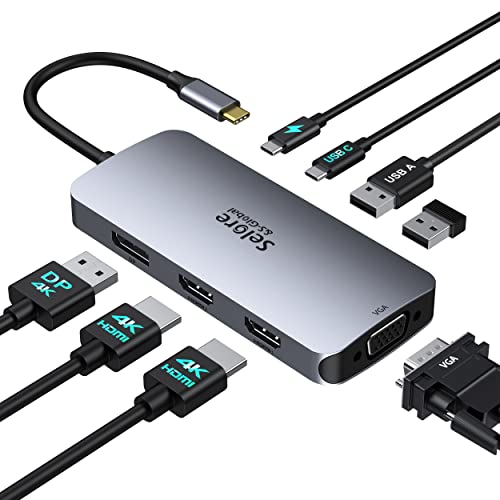
USB C Docking Station Dual HDMI Monitors Adapter
Best for dual‑monitor users seeking a mid‑range USB‑C dock focused on HDMI outputs and practical port layout
Selore USB C hub supports dual HDMI, DisplayPort, VGA with 100W PD and USB ports. Great for home office with easy plug-and-play setup; users note two HDMI outputs and charging capability, though some report charging issues
- 3-monitor capable USB C hub
- 100W PD charging support
- multi-video output options (HDMI, DP, VGA)
-
7

USB C Docking Station Dual Monitor with 2 HDMI
Best basic dual‑monitor docking option offering two HDMI outputs and standard hub connectivity for laptops
USB C hub converts a USB-C port into 6 ports with 2 HDMI outputs and USB-A. Plug and play; supports extended or split screen modes. Customer insight highlights ease of use and mixed compatibility concerns
- dual HDMI display capability
- 100W power delivery support
- compact 6-in-1 hub with multiple ports
-
8

USB C Docking Station with 4K HDMI, DP, VGA, Ethernet, SD/TF
Best for users who need diverse legacy and modern ports including 4K HDMI, DisplayPort, VGA, Ethernet, and card readers
USB-C 14‑in‑1 docking station with dual HDMI, DP, VGA, USB, SD/TF, and Ethernet for multi‑screen setups. Includes 100W PD power and 4K60Hz capability; easy setup and portable. Users note ample port options and solid performance
- dual HDMI and DP for extended displays
- 100W PD charging
- SD/TF card slots and Ethernet
-
9
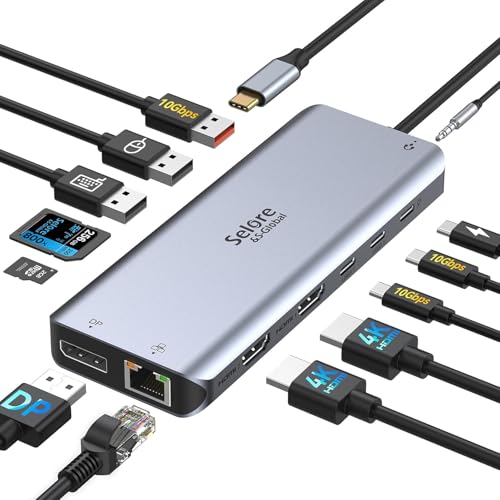
USB-C Docking Station 13-in-1 with Dual HDMI, DP, 10G USB, 100W PD
Best for power‑hungry setups that require 100W PD plus dual HDMI and DisplayPort in a compact 13‑in‑1 format
USB-C docking station drives 3 displays (2x HDMI, 1x DP) from a single USB-C/Thunderbolt 3 port. Supports 4K@60Hz on single outputs and 4K@30Hz on dual/triple setups; includes Ethernet, SD/TF, and multiple USB ports. Customers cite easy installation and good value for home office, with mixed reports on stability
- 3-display support via single USB-C connection
- includes 100W PD and SD/TF reader
- dual HDMI + DP output with high-res capability
-
10

Docking Station Dual Monitor USB-C Hub with 4K HDMI, 100W PD, SD/TF
Best for 4K dual‑monitor setups that want 100W PD, SD/TF slots, and a streamlined dual‑display USB‑C hub
Selore 8-in-1 USB-C docking station supports 4K display via USB-C or HDMI, 100W power delivery, data transfer, and SD/TF card readers. Enables multi-port connectivity for laptops. Customer insight highlights versatility
- dual video output (USB-C and HDMI)
- 5-in-1 data and media ports
- integrated SD/TF card readers