Best Laptop Replacement Screens (2026 Guide)
We selected panels based on aggregated customer ratings, review volume, explicit part-number compatibility, and clear specification listings
The Verdict
- Best Overall: Screen replacement for N156HCA-EAB, 15.6" IPS LCD (FHD 1920x1080), matte — Best for crisp visuals: 15.6" FHD IPS matte panel suited to users seeking wider viewing angles and sharper detail
- Best Value: 15.6in matte LCD screen replacement with 30-pin eDP — Best budget 15.6" option: matte LCD replacement with a 30-pin eDP connector for common mid-2010s laptops
This roundup covers top-rated replacement LCD panels and compatible assemblies for common laptop models and sizes, focused on 14–15.6" matte and non-touch displays. Selections prioritize high customer ratings, substantial review volume, and clear compatibility details to help you find the correct panel and connector type
Top Picks
-
1

Best Overall Screen replacement for N156HCA-EAB, 15.6" IPS LCD (FHD 1920x1080), matte
Best for crisp visuals: 15.6" FHD IPS matte panel suited to users seeking wider viewing angles and sharper detail
Replacement 15.6" FHD IPS LCD screen with matte finish and 30-pin connector. Includes tools and adhesive strips for installation. Customers report easy install and clear visuals, with some noting color warmth
- matches FHD 1920x1080
- matte IPS with wide viewing
- includes installation tools
-
2

SCREENARAMA LCD screen replacement for Lenovo Ideapad 320-15ABR
Best for Lenovo 320 owners: tailored replacement that matches common specs for Ideapad 320-15ABR displays
HD 1366x768 matte LCD replacement with 30-pin connector and tool kit. Provides tested compatibility and a 2-year warranty. Customers note easy installation and a precise fit
- tested and compatible
- warranty 2 years
- easy installation claims
-
3
Screen replacement for Dell Inspiron 5559 15.6" non-touch LCD
Best for Dell Inspiron 5559: direct-fit non-touch 15.6" panel that aligns with the model’s original display format
Replacement LCD for Dell Inspiron 5559 with 1366x768 resolution and 30-pin connector. Includes tools and tested compatibility. Customers note easy installation and good screen quality
- 30-pin 1366x768 resolution
- HD non-touch display
- 2-year warranty
-
4

BRIGHTFOCAL N156BGA-EA3 screen replacement C1
Best for consistent build compatibility: N156BGA-EA3 replacement noted for reliable fit and straightforward install
New BRIGHTFOCAL LCD screen replacement for N156BGA-EA3 REV. C1. Matches resolution, screen size, connector, and touch/non-touch specs. Package includes brand new LCD screen only
- exact spec compatibility
- HD 1366x768 matte display
- brand new LCD screen only
-
5

Best Value 15.6in matte LCD screen replacement with 30-pin eDP
Best budget 15.6" option: matte LCD replacement with a 30-pin eDP connector for common mid-2010s laptops
Matte 15.6-inch LCD replacement with 30-pin eDP connector and top/bottom mounting brackets. Provides sharp images and easy installation. customers note easy repair and clear display
- anti-glare matte finish
- 15.6-inch diagonal size
- top and bottom mounting brackets
-
6

Screen replacement for NT156WHM-N34 15.6" matte LCD display
Best for exact part matching: NT156WHM-N34 15.6" matte panel that mirrors original specifications for easy swap
Screen replacement for NT156WHM-N34 with 1366x768 resolution, 30-pin connector, non-touch, matte finish. Includes tools and tested for compatibility; customers cited easy installation and good quality
- 1366x768 30-pin compatibility
- matte finish reduces glare
- includes tools for installation
-
7
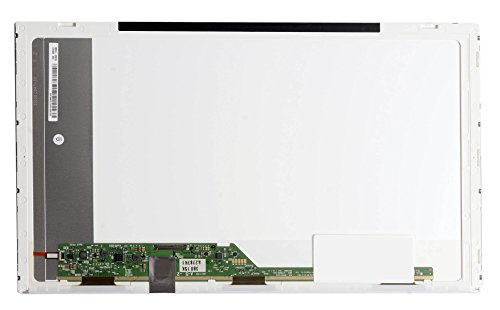
15.6" WXGA LCD screen for LG LP156WH4 replacement
Best for WXGA LG replacements: 15.6" WXGA panel engineered to replace LP156WH4-series screens
Generic 15.6" LCD screen replacement with 40-pin LED connector and 1366x768 WXGA HD resolution. Includes the LCD screen only; no control board or bezel. Customers note easy installation and good value for money
- 1366x768 WXGA HD resolution
- 40-pin LED connector
- screen size 15.6 inches
-
8

BRIGHTFOCAL HP Stream 14-CB171WM 14.0" LCD Screen Replacement (Non-Touch) with Tool
Best for HP Stream 14 replacements: 14.0" non-touch WXGA panel designed for direct compatibility with Stream models
Replacement 14.0" WXGA HD screen for HP Stream 14-CB171WM. Includes new LCD panel; requires matching resolution, screen size, connector, and touch type. Customer note: good screen quality with no dead pixels
- includes installation tool
- exact-spec compatibility
- new LED LCD panel
-
9

BRIGHTFOCAL HP Chromebook 14 G6/G7 14.0" Screen 1366x768 Non-Touch
Best for Chromebooks: 14.0" 1366x768 non-touch panel tailored to HP Chromebook 14 G6/G7 form factors
BRIGHTFOCAL replacement screen for HP Chromebook 14 G6/G7, 14.0" HD 1366x768, non-touch, 30PIN, matte slim LED with tape and tool. Ensures exact match of resolution, backlight, screen size, and touch type for compatibility
- HD 1366x768 resolution
- matte anti-glare surface
- comprehensive install kit included
-
10

SCREENARAMA Screen Replacement for Dell Latitude E5540
Best for Dell Latitude E5540: replacement panel specified for a direct fit with the Latitude E5540 display assembly
Replacement LCD screen with 1366x768 resolution and 40-pin connector. Includes tools and tested compatibility. Customers note easy installation and functional screen
- warranty 2 years
- tested for compatibility
- includes tools