Best Mac Gaming Mice Under $200 (2026)
We ranked mice under $200 by a composite value score combining macOS compatibility, feature set (buttons, sensor, connectivity), build quality, and user ratings
The Verdict
- Best Overall: Razer Basilisk V3 Ergonomic Gaming Mouse — Best for ergonomic play: reliable ergonomic shape with gaming-focused controls for extended Mac sessions
- Best Value: Redragon MMO Gaming Mouse M901K — Best for MMO key mapping: many macro buttons and high-DPI range suited to complex control layouts
This roundup helps Mac users find high-value gaming mice under $200, ranked by a value score that balances compatibility, features, and user feedback. Selections prioritized macOS compatibility, programmable buttons, wireless/dual-mode options, and overall build quality
Top Picks
-
1

Best Overall Razer Basilisk V3 Ergonomic Gaming Mouse
Best for ergonomic play: reliable ergonomic shape with gaming-focused controls for extended Mac sessions
Ergonomic gaming mouse with 11 programmable buttons and customizable RGB lighting. Sells on comfort and customization, with user praise for feel and config options
- 11 programmable buttons
- hyperscroll tilt wheel
- 16.8 million rgb colors
-
2

Best Value Redragon MMO Gaming Mouse M901K
Best for MMO key mapping: many macro buttons and high-DPI range suited to complex control layouts
High-sensitivity gaming mouse with up to 12400 DPI and 19 programmable buttons. Remap buttons via macro editing with 5 memory profiles and 2 working modes. Customizable weight balance with eight 2.4g weights
- 19 programmable buttons
- customizable weight system
- multi-profile memory
-
3

DAREU Pink Wireless Gaming Mouse with 7 programmable buttons
Best for style-conscious users: wireless, pink design with 7 programmable buttons and macOS-friendly operation
Wireless gaming mouse with dual-mode rechargeable power, 7 programmable buttons and adjustable DPI. Features vibrant RGB lighting and responsive performance, suitable for PC, notebook and Mac. Customers note smooth clicks and design appeal, with some mixed feedback on battery life
- 7 programmable buttons
- dual-mode rechargeable
- high DPI & 1000Hz polling
-
4

Redragon M801 Wireless Gaming Mouse
Best budget wireless MMO option: multiple programmable buttons and wireless freedom for extended play
Wireless gaming mouse with 9 programmable buttons, up to 16000 DPI, and RGB lighting. Customers note good comfort and value, with mixed opinions on battery life and remapping the buttons
- 9 programmable buttons
- up to 16000 adjustable dpi
- long battery life (RGB off)
-
5

Redragon M810 Pro Wireless Gaming Mouse
Best balanced wireless choice: programmable keys and solid DPI range for everyday gaming utility
Wireless gaming mouse with 10000 DPI, 8 programmable buttons, and 2.4 GHz nano receiver for responsive control. Customers note solid build and customizable buttons, with mixed feedback on battery life
- on-board DPI up to 10000
- 8 programmable buttons
- 2.4 GHz wireless + wired option
-
6

DAREU Wireless/Wired Gaming Mouse with 7 programmable buttons
Best dual-mode flexibility: wired and wireless operation with 7 programmable buttons for mixed workflows
Dual-mode gaming mouse with 7 programmable buttons, 10K DPI, and RGB lighting. Praised for quality and design, with mixed feedback on battery life and durability
- dual-mode connectivity
- programmable buttons
- high DPI and RGB lighting
-
7
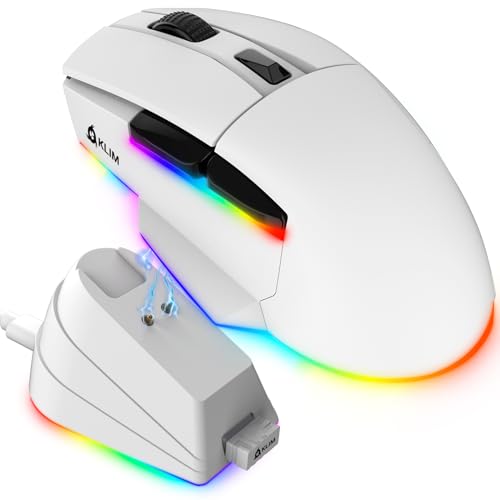
KLIM Blaze X RGB Wireless Gaming Mouse
Best RGB wireless with USB-C: wireless convenience plus RGB and modern USB-C charging for desktop flair
Wireless gaming mouse with rechargeable battery and charging dock; Precise sensor for responsive tracking and customizable RGB lighting. Customers note long battery life and comfort, with some lag concerns during fast-paced play
- wireless + charging dock
- up to high DPI sensor
- ergonomic design
-
8

KLIM Blaze X RGB Wireless Gaming Mouse
Best Mac-focused RGB pick: wireless RGB lighting and advertised Mac compatibility for game and general use
Wireless gaming mouse with rechargeable battery and RGB lighting. Responsive sensor for precise tracking. One customer notes long battery life and comfortable design
- wireless + wired flexibility
- long-lasting battery
- customizable RGB lighting
-
9

DeLUX Wireless Ergonomic Mouse with 4000DPI and 6 Buttons
Best ergonomic wireless work/gaming hybrid: ergonomic design with multidevice connectivity for mixed tasks
Ergonomic wireless mouse with 4000DPI, multi-device BT1/BT2 and USB connection. Helps reduce wrist strain with a removable palm rest. One user notes it’s suitable for professional video editing
- multi-device wireless connectivity
- ergonomic design for large hands
- removable palm rest
-
10

DAREU Sakura Pink Wireless Gaming Mouse
Best pink dual-connectivity pick: compact Sakura styling with wired and Bluetooth options and RGB accents
Pink gaming mouse with dual-mode wireless/wired capability, 6 programmable buttons, and 10K DPI. Stable latency and RGB lighting enhance aesthetics and performance. Customers note good quality and value, with mixed reviews on battery life and connectivity
- dual-mode wireless and wired
- high DPI range up to 10000
- 6 lighting modes + RGB aesthetic