Best Mac Gaming Mice (2026 Guide)
We selected products by aggregated star ratings and review volume, then confirmed Mac-compatible features, ergonomics, connectivity, and programmable controls
The Verdict
- Best Overall: Razer Basilisk V3 Ergonomic Gaming Mouse — Best ergonomic pick: comfortable right-handed shape with programmable controls suited to extended Mac gaming sessions
- Best Value: Redragon MMO Gaming Mouse M901K — Best for MMO layouts: extra programmable buttons and wide DPI range for complex macro mapping on Mac setups
This guide covers top-rated gaming mice that work well with Mac systems, focusing on ergonomic builds, wireless options, programmable buttons, and RGB features favored by Mac gamers. Picks were chosen by aggregated reviewer ratings and review volume, prioritizing Mac compatibility, button programmability, and ergonomic or wireless design
Top Picks
-
1

Best Overall Razer Basilisk V3 Ergonomic Gaming Mouse
Best ergonomic pick: comfortable right-handed shape with programmable controls suited to extended Mac gaming sessions
Ergonomic gaming mouse with 11 programmable buttons and customizable RGB lighting. Sells on comfort and customization, with user praise for feel and config options
- 11 programmable buttons
- hyperscroll tilt wheel
- 16.8 million rgb colors
-
2

Best Value Redragon MMO Gaming Mouse M901K
Best for MMO layouts: extra programmable buttons and wide DPI range for complex macro mapping on Mac setups
High-sensitivity gaming mouse with up to 12400 DPI and 19 programmable buttons. Remap buttons via macro editing with 5 memory profiles and 2 working modes. Customizable weight balance with eight 2.4g weights
- 19 programmable buttons
- customizable weight system
- multi-profile memory
-
3

DAREU Pink Wireless Gaming Mouse with 7 programmable buttons
Best wireless style option: compact pink wireless mouse with seven programmable buttons and RGB for Mac-friendly setups
Wireless gaming mouse with dual-mode rechargeable power, 7 programmable buttons and adjustable DPI. Features vibrant RGB lighting and responsive performance, suitable for PC, notebook and Mac. Customers note smooth clicks and design appeal, with some mixed feedback on battery life
- 7 programmable buttons
- dual-mode rechargeable
- high DPI & 1000Hz polling
-
4

Redragon M801 Wireless Gaming Mouse
Best wireless MMO value: wireless connectivity with multiple programmable buttons designed for extended macro use
Wireless gaming mouse with 9 programmable buttons, up to 16000 DPI, and RGB lighting. Customers note good comfort and value, with mixed opinions on battery life and remapping the buttons
- 9 programmable buttons
- up to 16000 adjustable dpi
- long battery life (RGB off)
-
5

Redragon M810 Pro Wireless Gaming Mouse
Best programmable wireless choice: multiple programmable keys and high-DPI capability for customizable Mac gaming
Wireless gaming mouse with 10000 DPI, 8 programmable buttons, and 2.4 GHz nano receiver for responsive control. Customers note solid build and customizable buttons, with mixed feedback on battery life
- on-board DPI up to 10000
- 8 programmable buttons
- 2.4 GHz wireless + wired option
-
6

DAREU Wireless/Wired Gaming Mouse with 7 programmable buttons
Best dual-mode flexibility: wired and wireless operation plus seven programmable buttons for varied Mac use
Dual-mode gaming mouse with 7 programmable buttons, 10K DPI, and RGB lighting. Praised for quality and design, with mixed feedback on battery life and durability
- dual-mode connectivity
- programmable buttons
- high DPI and RGB lighting
-
7
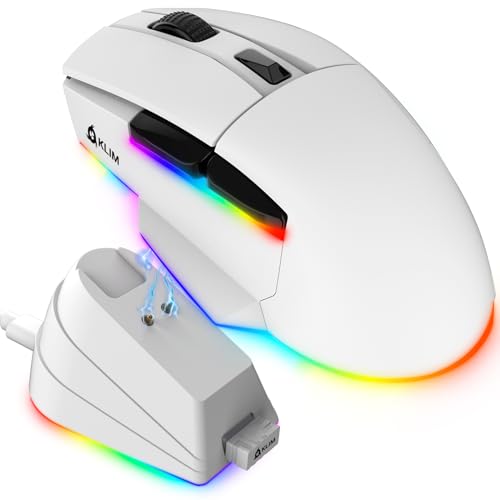
KLIM Blaze X RGB Wireless Gaming Mouse
Best RGB wireless with modern charging: wireless mouse with RGB lighting and USB-C connectivity for Mac users
Wireless gaming mouse with rechargeable battery and charging dock; Precise sensor for responsive tracking and customizable RGB lighting. Customers note long battery life and comfort, with some lag concerns during fast-paced play
- wireless + charging dock
- up to high DPI sensor
- ergonomic design
-
8

KLIM Blaze X RGB Wireless Gaming Mouse
Best Mac-oriented RGB option: wireless mouse with RGB lighting and stated compatibility aimed at Mac gaming
Wireless gaming mouse with rechargeable battery and RGB lighting. Responsive sensor for precise tracking. One customer notes long battery life and comfortable design
- wireless + wired flexibility
- long-lasting battery
- customizable RGB lighting
-
9

DeLUX Wireless Ergonomic Mouse with 4000DPI and 6 Buttons
Best ergonomic wireless pick: sculpted shape with multidevice support and a 4000 DPI sensor for comfortable use
Ergonomic wireless mouse with 4000DPI, multi-device BT1/BT2 and USB connection. Helps reduce wrist strain with a removable palm rest. One user notes it’s suitable for professional video editing
- multi-device wireless connectivity
- ergonomic design for large hands
- removable palm rest
-
10

DAREU Sakura Pink Wireless Gaming Mouse
Best style-focused pick: pink Sakura design with dual connectivity and RGB lighting for aesthetic Mac setups
Pink gaming mouse with dual-mode wireless/wired capability, 6 programmable buttons, and 10K DPI. Stable latency and RGB lighting enhance aesthetics and performance. Customers note good quality and value, with mixed reviews on battery life and connectivity
- dual-mode wireless and wired
- high DPI range up to 10000
- 6 lighting modes + RGB aesthetic