Best SATA Cables Under $50 (2026)
We ranked options under $50 by compatibility (interfaces supported), build quality, useful features (clone/power), and overall value score
The Verdict
- Best Overall: SABRENT USB 3.2 to SATA/U.2 SSD Adapter Cable — Best for U.2 and SATA drive access: USB 3.2 link with U.2 support for high‑speed SSDs and versatile connectors
- Best Value: Alxum SATA IDE to USB 3.0 Adapter — Best budget IDE-to-SATA reader: USB 3.0 adapter that simplifies legacy IDE and modern SATA drive recovery and transfers
Top Picks
-
1

Best Overall SABRENT USB 3.2 to SATA/U.2 SSD Adapter Cable
Best for U.2 and SATA drive access: USB 3.2 link with U.2 support for high‑speed SSDs and versatile connectors
USB 3.2 Gen 2x1 adapter for 2.5/3.5 SATA drives and U.2 SSDs with power supply. Includes LED indicator and tool-free setup. Users note easy use and solid build quality
- supports TRIM and UASP
- power adapter included
- integrated USB cable with status LED
-
2

USB C to SATA IDE adapter for 2.5/3.5 HDD/SSD and optical drives
Best for mixed-drive support: USB‑C adapter that handles 2.5"/3.5" HDDs, SSDs and IDE optical drives with broad compatibility
USB C to SATA/IDE adapter supporting 6Gbps SATA and up to 5Gbps IDE transfers. Compatible with a wide range of 2.5/3.5 HDDs/SSDs and optical drives. Customers note easy setup and broad compatibility, with occasional Windows recognition issues
- SATA 6Gbps transfer capability
- IDE 5Gbps transfer capability
- Broad drive compatibility (SATA/IDE, 2.5/3.5, optical drives)
-
3

Best Value Alxum SATA IDE to USB 3.0 Adapter
Best budget IDE-to-SATA reader: USB 3.0 adapter that simplifies legacy IDE and modern SATA drive recovery and transfers
External hard drive adapter from Alxum connects SATA/IDE drives to USB 3.0. Supports 2.5"/3.5" IDE/SATA drives and optical media; includes One Touch Backup software. Note: OTB may not work on Mac OS or Linux
- USB 3.0 external interface
- Supports 2.5"/3.5" IDE & SATA drives
- One Touch Backup function
-
4

SATA to USB 3.0 Adapter for 2.5/3.5 HDD/SSD & IDE Optical Drives
Best for HDD diagnostics: SATA-to-USB 3.0 adapter built for 2.5"/3.5" drives and optical IDE maintenance tasks
Universal SATA/IDE to USB 3.0 adapter for 2.5"/3.5" HDDs, SSDs, and optical drives. Includes power kit for 3.5" drives; supports plug-and-play use. Customer note: easy to use, with mixed connection quality feedback
- universal SATA/IDE to USB 3.0
- power kit included for 3.5" drives
- supports multiple drive types
-
5

Alxum USB 3.0 to IDE/SATA Converter
Best simple converter: USB 3.0 adapter offering straightforward IDE and SATA connectivity for quick data access
USB 3.0 external adapter for 2.5"/3.5" SATA and IDE drives. Includes power adapter and USB-C/USB-A cable. Customers note easy setup and value, with mixed compatibility feedback
- USB 3.0 up to 5Gbps
- supports 1 IDE + 1 SATA drive simultaneously
- on/off switch for HDD protection
-
6

USB 3.0 to eSATA adapter (3 ft) for HDD/SSD/ODD
Best for eSATA hosts: USB 3.0 to eSATA cable option for connecting eSATA drives to modern USB ports
USB 3.0 to eSATA adapter connects external eSATA drives to a USB port. Noted for ease of use and transfer speeds around USB 3.0 performance, with mixed compatibility reports
- USB 3.0 interface
- eSATA drive compatibility
- 3 ft / 1 m cable length
-
7
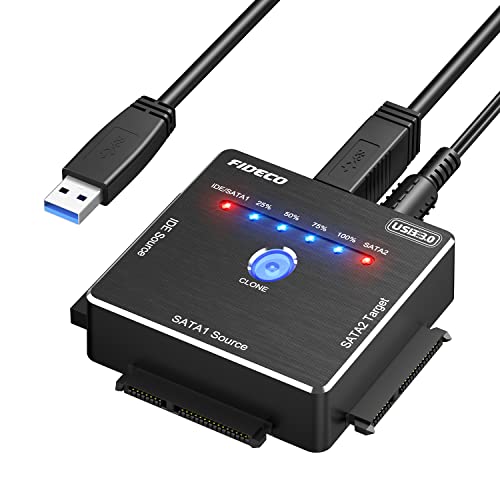
FIDECO SATA/IDE to USB 3.0 Adapter (2.5/3.5 IDE/SATA) with Offline Clone
Best for cloning: USB 3.0 adapter with offline clone capability for direct disk-to-disk duplication without a PC
FIDECO USB 3.0 adapter supports 2.5/3.5 inch SATA or IDE drives, with offline clone capability. Customers note easy plug-and-play use and reliable cloning for data recovery, though some report power connector interference
- offline clone capability
- USB 3.0 high-speed data transfer
- broad drive compatibility (IDE/SATA)
-
8

USB 3.0 to IDE/SATA Converter with 12V/2A Power Adapter
Best with included power: USB 3.0 to IDE/SATA converter that ships with a 12V/2A adapter for 3.5" drive support
External USB 3.0 adapter supports 2.5/3.5-inch SATA HDD/SSD and IDE drives via USB. Enables easy data access across HDDs, DVDs, and CD drives. customer insight: None
- usb 3.0 interface
- supports multiple drive types
- includes dedicated power adapter
-
9

M.2 NVMe to 6-port SATA Adapter (ASM1166) by RIITOP
Best for expanding SATA from M.2: M.2 NVMe-to-SATA adapter (ASM1166) offering multiple SATA ports for additional drives
RIITOP M.2 NVMe to SATA adapter expands 6x SATA ports from M.2 slots with ASM1166 chipset. Stable operation with heatsink and backboard design; no driver installation required
- 6x SATA ports from M.2
- ASM1166 chipset for compatibility
- heat dissipation via heatsink
-
10

PCIe x8 to x8 extension cable riser
Best for PCIe extension needs: PCIe x8-to-x8 riser cable providing reliable extension for cards in constrained builds
PCIe x8 to x8 extension cable for PCIe slots. Enables relocating or extending PCIe x8 connections with customizable length. customer insight: text: None | keywords: {'mixed': None, 'negative': None, 'positive': None}
- PCIe 3.0 x8 support
- extension up to customizable length
- x8 to x8 compatibility