Best Styluses Under $50 (2026)
We ranked styluses under $50 by a composite value score weighing compatibility, input performance (pressure/tilt/latency), battery/charging, and feature set like palm rejection or Bluetooth shortcuts
The Verdict
- Best Overall: Stylus Pen for iPad Pro Air Mini (Blue) JAMJAKE — Best for simple iPad use: straightforward palm rejection and basic pressure control for sketching and note-taking
- Best Value: MEKO Stylus Pen for iPad (Palm Rejection, Tilt Sensor) – Apple Pencil Compatible — Best balanced pick: compatible with iPad, offers palm rejection and tilt sensing for more natural drawing
This roundup identifies styluses under $50 that deliver reliable drawing, note-taking, and navigation for tablets and touch devices. Picks were selected by scoring value across compatibility, input precision, battery and charging, and useful features like palm rejection and Bluetooth shortcuts
Top Picks
-
1
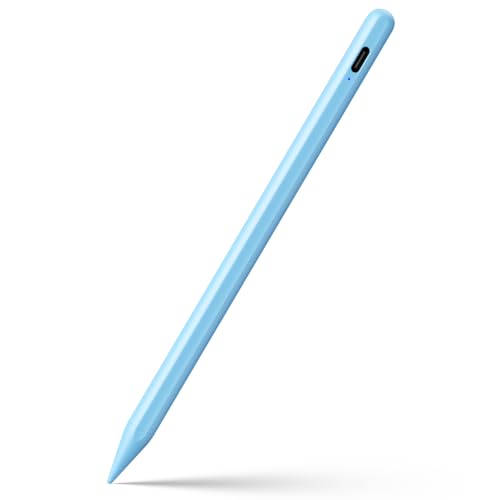
Best Overall Stylus Pen for iPad Pro Air Mini (Blue) JAMJAKE
Best for simple iPad use: straightforward palm rejection and basic pressure control for sketching and note-taking
Stylus pen compatible with 2018-2025 iPad models, featuring palm rejection and quick charging. Users report smooth writing speed and ease of use, especially with Procreate
- palm rejection
- wide iPad compatibility
- quick charging
-
2
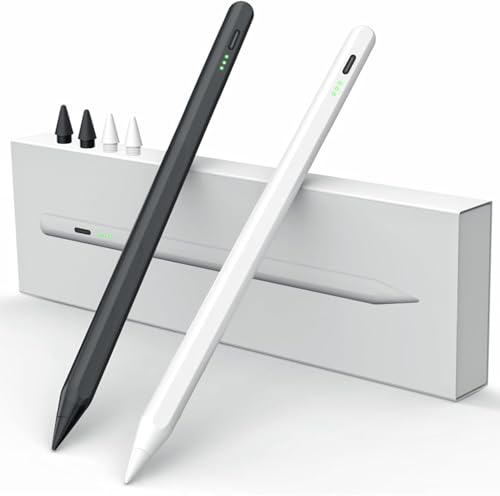
Best Value MEKO Stylus Pen for iPad (Palm Rejection, Tilt Sensor) – Apple Pencil Compatible
Best balanced pick: compatible with iPad, offers palm rejection and tilt sensing for more natural drawing
Stylus pen with palm rejection and tilt sensor for iPad, quick 10–13 minute charge for up to 9 hours of use. Easy on/off without Bluetooth; compatible with iPad models 2018 and later. Customers note smooth writing and good value
- palm rejection and tilt support
- quick-charge, long use time
- no Bluetooth required
-
3

Metapen M1 Stylus Pen for Surface and more
Best for Surface users: USB-C charging and long battery life tailored to Windows tablet workflows
Metapen M1 stylus with fast charge and long standby for Surface family and other laptops. Notable for smooth feel and rechargeable battery; some users report connectivity variability
- 55+ hours of use from 5-minute charge
- 40-minute full charge
- works with Surface family and more
-
4

ESR Geo Digital iPad Pencil for iPad models (Bluetooth, magnetic)
Best for magnetic attachment: Bluetooth pairing and magnetic mounting simplify daily iPad use
ESR Geo Digital stylus compatible with multiple iPad generations; supports Bluetooth connection and magnetic attachment for side storage
- Apple Pencil alternative
- magnetic attachment
- broad iPad compatibility
-
5

Pen for Surface Pro with Palm Rejection and 260H Battery
Best Surface pen alternative: palm rejection and extended battery runtime for long sessions on Surface devices
Stylus compatible with Surface devices, 4096 pressure sensitivity, palm rejection, and rechargeable with long battery life. Customers note good quality and ease of use, but mixed feedback on writing consistency
- palm rejection for natural writing
- long battery life
- broad Surface compatibility
-
6

ESR Geo Digital iPad Pencil with Find My, shortcuts, pink
Best with Find My support: Bluetooth shortcuts plus locating capability for users who misplace accessories
ESR Geo Digital stylus compatible with multiple iPad models, supports Find My and Bluetooth shortcuts for quick task switching. Good writing and drawing performance with easy charging via Type-C; mixed opinions on battery life
- Find My locating feature
- Quick task manager via double-tap
- Fast Type-C charging ~20 minutes
-
7

Penoval Stylus Pen for iPad - magnetic, palm rejection
Best magnetic convenience: secure magnetic attachment and palm rejection for stable iPad note-taking
Stylus pen for iPad series with palm rejection and magnetic features. Smooth writing and good value as an Apple Pencil alternative, with compatibility across multiple iPad models. Some users note mixed battery life and durability concerns
- palm rejection
- iPad compatibility
- writing smoothness
-
8

ESR Geo Digital iPad Pencil (FindMy) - Bluetooth shortcuts, 20min fast charge, white
Best fast-charge option: quick top-ups plus Bluetooth shortcuts for on-the-fly iPad productivity
ESR Geo Digital stylus for iPad with Find My support and Bluetooth shortcuts. Fast USB-C charging ~20 minutes; note: does not support wireless charging. Customer says it offers accurate writing/drawing and good value, with mixed battery life feedback
- Find My locating capability
- 20-minute fast charge
- Bluetooth shortcuts
-
9

Raphael N520C Stylus Pen for Surface
Best for pressure-sensitive drawing: USB-C charging and pressure sensitivity aimed at artists using Surface tablets
Renaisser Raphael N520C stylus with USB-C charging, 4096 pressure & tilt sensitivity for Surface Pro and other Surface devices. Users note long battery life and comfortable grip, with some eraser and button usability mixed
- usb-c charging with long use
- 4096 pressure sensitivity
- wide compatibility across surface line
-
10

S Pen replacement with 0.7mm fine tip for Galaxy S24 Ultra
Best for Galaxy phones: fine 0.7mm tip and replacement S Pen functions tuned to Galaxy device gestures
S Pen replacement for Galaxy S24 Ultra with 0.7mm fine tip for precise notes and sketches. Air actions enable touch-free control and quick access via Air Command; flexible use with fast pairing and compatibility noted
- 0.7mm precision tip
- air actions remote control
- collapsible quick-access menu