Best Tablet Keyboards Under $100 (2026)
Selections were limited to keyboards under $100 and scored by value using features (trackpad, backlight, case), cross-device compatibility, and consistent user feedback
The Verdict
- Best Overall: Harvopu iPad keyboard case for iPad 11th/10th gen with trackpad — Best for budget iPad users: combines a case with an integrated trackpad and decorative backlit keys for everyday typing
- Best Value: Arteck Surface Go Type Cover with touchpad (Ultra-Slim, Bluetooth) — Best for Surface Go owners who want a slim Bluetooth type cover with an integrated touchpad for touch-first workflows
This roundup covers tablet keyboards under $100 that maximize typing comfort, portability, and accessory value for popular tablets. Picks were ranked by a value score combining feature set (trackpad, backlight, case integration), device compatibility, and user-rated reliability
Top Picks
-
1

Best Overall Harvopu iPad keyboard case for iPad 11th/10th gen with trackpad
Best for budget iPad users: combines a case with an integrated trackpad and decorative backlit keys for everyday typing
Folio case with detachable keyboard, multi-touch trackpad, and 7 color backlight for iPad (A16). Helps multi-finger gestures and typing on the go. Customers note quality and design, with mixed reviews on connectivity
- built-in trackpad for gestures
- detachable keyboard
- colorful backlit keys
-
2

Best Value Arteck Surface Go Type Cover with touchpad (Ultra-Slim, Bluetooth)
Best for Surface Go owners who want a slim Bluetooth type cover with an integrated touchpad for touch-first workflows
Compact Bluetooth keyboard with built-in touchpad that attaches magnetically to Surface Go for laptop-like use. Noted for lightweight design and value, with mixed feedback on connectivity and battery life
- built-in touchpad
- magnetic attachment to Surface Go
- ultra-slim keyboard
-
3
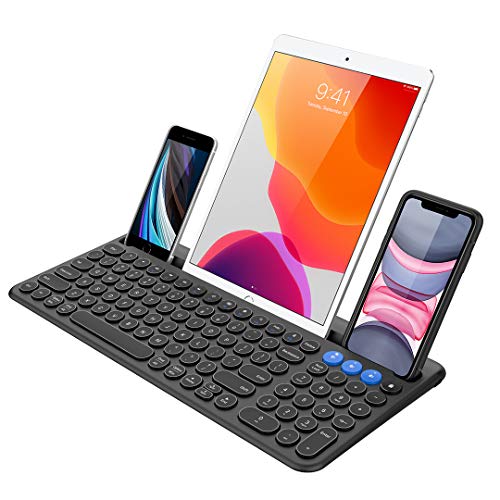
Arteck wireless Bluetooth keyboard with built-in cradle
Best for multi-device users needing a wireless Bluetooth keyboard with a built-in cradle for phones and tablets
Compact wireless keyboard for Windows, iOS, Android, Mac and more, with a built-in cradle for devices. Switch between up to three Bluetooth devices with a single key press. Customers note easy setup and multi-device connectivity
- 3-device Bluetooth switch
- built-in cradle
- broad OS compatibility
-
4
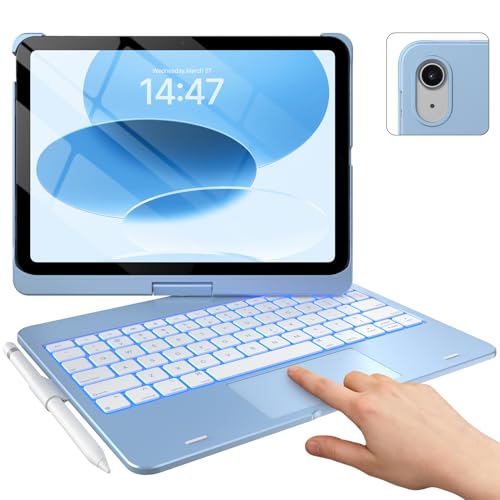
typecase Touch iPad 10th Gen Case with Keyboard + iPad A16 11th Gen
Best for iPad 10th/11th Gen value buyers seeking a keyboard case with a dedicated trackpad and protective folio design
Keyboard case with 360° rotatable stand and multi-gesture trackpad for iPad 10th Gen and 11th Gen. Provides a slim, light setup with backlit keys and 11-color lighting. Customers note good quality, easy-to-use keyboard, and durable case
- 360° rotatable stand
- precision trackpad
- backlit keyboard with 11-color options
-
5

Inateck Bluetooth keyboard with 7-color backlight for Surface Go
Best for Surface Go users who want an affordable Bluetooth keyboard with colorful backlight and built-in touchpad
Bluetooth 5.3 keyboard with trackpad designed for Surface Go series, featuring 7-color backlighting and compatibility across Surface Go 1–4. Users note good keyboard quality and backlight options, with mixed opinions on connectivity
- Bluetooth 5.3 for stability
- 7-color backlight
- Surface Go compatibility with trackpad
-
6

Arteck folding bluetooth keyboard for tablets and phones
Best portable option: a folding Bluetooth keyboard that packs small for travel and pairs with phones and tablets
Compact foldable wireless keyboard compatible with iOS, Android, MacOS and Windows tablets. Portable, easy to connect and use, with solid build. Some users note mixed performance and size varies by preference
- foldable pocket-size design
- broad OS compatibility
- built-in rechargeable battery
-
7
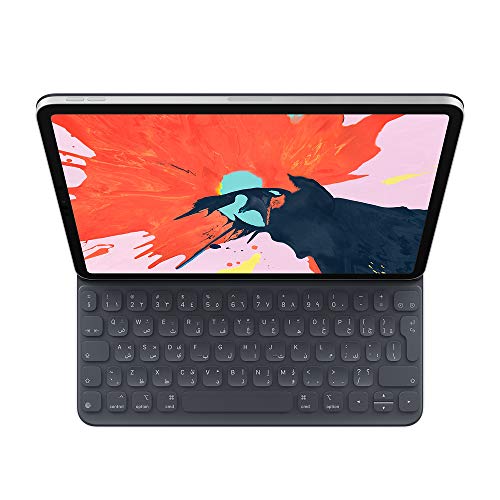
Apple Smart Keyboard Folio for 12.9" iPad Pro (3rd Gen) - Spanish
Best for 12.9" iPad Pro users seeking a slim folio keyboard cover in Spanish layout that attaches securely to the tablet
Full-size keyboard on a lightweight cover for the 12.9" iPad Pro. No batteries or pairing needed, easy magnetic attachment, protects front and back. Users praise high-quality keyboard and smooth typing, with mixed feedback on magnet strength
- no setup needed
- protective cover
- keyboard integrates with iPad Pro
-
8

FINTIE Keyboard Case for Samsung Galaxy Tab S10 Lite/S10 FE/S9 FE/S9 11 Inch
Best for Samsung Tab S9/S10 Lite owners who need a tailored keyboard case sized for 11-inch Galaxy tablets
Keyboard case for Samsung tablets with S Pen holder and detachable wireless Bluetooth keyboard. Provides protective cover and a notebook-like feel. Customer notes include strong magnetic closure and mixed build quality
- S Pen holder
- detachable Bluetooth keyboard
- magnetic closure
-
9
Apple Smart Keyboard Folio for 12.9-inch iPad Pro (3rd Gen) — Traditional Chinese
Best for 12.9" iPad Pro users who prefer a folio keyboard cover with a Traditional Chinese layout and integrated protection
Smart keyboard folio with full-size keyboard, no batteries or pairing needed, lightweight cover protects front and back. Customers highlight easy use and smooth typing experience
- no setup required
- integrated protection for front and back
- full-size keyboard experience
-
10
Smart Keyboard Folio for iPad Pro 12.9 (3rd Gen) - Chinese - Pinyin
Best for 12.9" iPad Pro users seeking a folio keyboard cover with Chinese Pinyin layout for seamless typing in Chinese
Full-size keyboard folio for iPad Pro 12.9 (3rd gen) with cover protection and instant typing. Noted for lightweight design and strong typing feel
- instant pairing-free use
- full-size keyboard experience
- protective folio cover