Best USB Computer Network Adapters (2026 Guide)
We selected adapters by combining aggregate star ratings and review volume with key technical features such as interface type, speed class (Gigabit/2.5GbE/Wi‑Fi 6/6E), and platform compatibility
The Verdict
- Best Overall: TP-Link USB 3.0 WiFi Adapter (Archer TX30U Plus) AX1800, WPA3 — Best for general Wi‑Fi 6 USB use: solid AX1800 wireless performance with a compact USB 3.0 form factor
- Best Value: TP-Link USB-C to Ethernet Adapter 2.5G for USB-C devices — Best for high‑speed wired: aluminum USB‑C to 2.5GbE adapter built for faster LAN and NAS connections
This guide compares top-rated USB network adapters for laptops, desktops, and smart-home gateways, emphasizing real-world features like Wi‑Fi 6/6E, 2.5GbE, USB‑C compatibility, and Zigbee support. Selections were based on aggregated user ratings, review volume, and feature relevance to common use cases
Top Picks
-
1

Best Overall TP-Link USB 3.0 WiFi Adapter (Archer TX30U Plus) AX1800, WPA3
Best for general Wi‑Fi 6 USB use: solid AX1800 wireless performance with a compact USB 3.0 form factor
USB 3.0 Wi-Fi 6 dual-band adapter for desktop PCs. Dual-band 2.4/5 GHz with high-gain antenna and WPA3 security. Customers note easy setup and solid speeds, though some report disconnections and durability concerns
- Wi-Fi 6 dual-band performance
- easy installation
- secure WPA3 connection
-
2

TP-Link AX1800 USB WiFi 6 Adapter (Archer TX21UH)
Best balance of features: AX1800 Wi‑Fi 6 adapter offering reliable wireless speeds in a small USB stick
USB WiFi 6 adapter offering 2.4 GHz/5 GHz dual band speeds with MU-MIMO and OFDMA for efficient multi-device use. Easy setup noted by customers and compatible with Windows 10/11
- WiFi 6 dual-band speeds
- MU-MIMO and OFDMA efficiency
- Windows 10/11 compatibility
-
3

Best Value TP-Link USB-C to Ethernet Adapter 2.5G for USB-C devices
Best for high‑speed wired: aluminum USB‑C to 2.5GbE adapter built for faster LAN and NAS connections
USB-C to RJ45 adapter delivering 2.5 Gigabit wired connectivity for USB-C laptops, desktops, tablets, and smartphones. Easy plug-and-play setup with reliable speeds; users note instant connectivity and good value, with some compatibility variations on macOS
- 2.5 Gbps wired performance
- USB-C to RJ45 with aluminum casing
- Thunderbolt 4/3 compatibility
-
4

ASUS dual-band WiFi PCIe adapter PCE-AC56
Best for legacy PCIe setups: dual‑band Wi‑Fi option suited to desktop installs needing AC‑class coverage
ASUS PCIe WiFi adapter supporting 802.11ac with 2x2 MIMO for faster desktop connectivity. Noted for quick setup and strong signal quality in reviews
- 802.11ac support
- 2x2 antenna design
- easy installation
-
5

SONOFF Zigbee 3.0 USB Dongle Plus Gateway (1 Pack)
Best for smart‑home hubs: Zigbee 3.0 USB dongle designed for Home Assistant and Zigbee2MQTT integrations
Zigbee 3.0 USB gateway pre-flashed with coordinator firmware, compatible with Home Assistant and Zigbee2MQTT. Customers note easy setup and solid range, with some mixed views on durability and firmware updates
- Zigbee 3.0 with external antenna
- pre-flashed coordinator firmware
- Home Assistant and Zigbee2MQTT compatibility
-
6
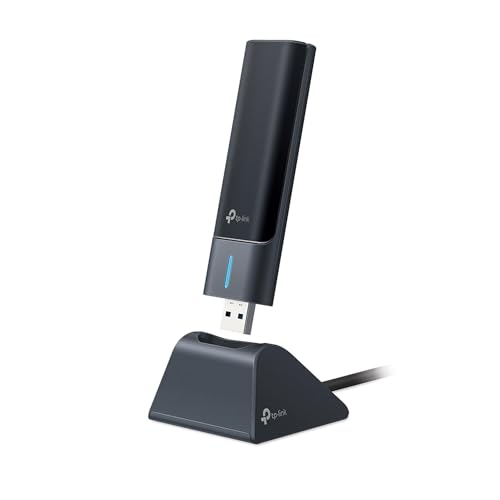
TP-Link WiFi 6E USB Adapter for Desktop PC (TXE50UH)
Best for desktop Wi‑Fi 6E: USB adapter that adds 6E band support for less congested wireless channels
USB WiFi 6E adapter for desktop PCs delivering up to 1.2 Gbps with 6 GHz, 5 GHz, and 2.4 GHz bands. Enables ultra-low latency and MU-MIMO/OFDMA support; Windows 11 required for 6 GHz access. Customer insight: easy setup and strong signal reception
- 6 GHz Wi-Fi 6E access
- ultra-low latency with tri-band speeds
- WPA3 security and Windows compatibility
-
7

StarTech USB-C to 2.5GbE Ethernet Adapter
Best portable 2.5GbE option: compact USB‑C adapter targeted at high‑throughput wired connections on modern laptops
USB-C network adapter adds 2.5GbE to laptops, tablets, or iPhones via USB-C. Improves performance on existing Cat5 cables with broad OS compatibility. One customer notes easy setup and reliable speed
- 2.5GbE USB-C to Ethernet
- broad OS auto-install
- works with USB-C devices
-
8

StarTech 2.5GbE USB-C to Ethernet Adapter with USB-A Converter
Best for mixed ports: 2.5GbE USB‑C adapter with a USB‑A converter for cross‑device compatibility
USB-C/NBASE-T adapter adds 2.5GbE via USB-C or USB-A port. Doubles network performance on Cat5 cables. Auto-installs on multiple OSes including Windows, Linux, macOS/iOS/ChromeOS
- 2.5GbE upgrade via USB
- Cross-portfolio OS compatibility
- USB-C or USB-A port flexibility
-
9

CableCreation 2.5G USB Ethernet Adapter
Best USB‑3.0 2.5G alternative: affordable 2.5GbE dongle offering faster wired speeds than standard Gigabit adapters
USB 3.0 to 2.5G RJ45 Ethernet adapter adds a standard port for network connections on laptops and devices. Users report easy installation and solid performance, with some mixed compatibility feedback
- 2.5G RJ45 Ethernet port
- USB 3.0 connectivity
- broad compatibility claims
-
10

USB-C to Ethernet Adapter with USB-A dongle, 10/100/1000 Mbps
Best simple Gigabit choice: USB‑C to Gigabit Ethernet adapter with a USB‑A dongle for basic wired networking needs
USB-C network adapter adds an Ethernet port with auto-negotiation up to gigabit speeds. Includes attached 6in cable and USB-C to USB-A dongle for broad compatibility. One customer notes easy install and true gigabit speeds
- attached cable for extended reach
- compatibility with usb-c and usb-a
- auto-negotiation 10/100/1000 Mbps