Best VGA Cables Under $100 (2026)
We selected products under $100 and ranked them by a value score that weighs length, build quality, connector type, shielding, and practical use cases
The Verdict
- Best Overall: Flat VGA Cable 100 ft, 15-pin Male to Male — Best for long flat runs: flat 100 ft design eases routing along walls and under carpets while maintaining signal
- Best Value: SVGA Monitor Cable 100FT, male to male VGA–VGA — Best budget long run: 100 ft SVGA-rated cable for basic monitor or projector connections with simple installation
This roundup highlights reliable VGA cables and adapters under $100 for connecting monitors, projectors, PCs and KVM setups, prioritizing signal integrity and build quality. Selections were ranked by a value score combining cable length, shielding, connector type, and user feedback signals
Top Picks
-
1

Best Overall Flat VGA Cable 100 ft, 15-pin Male to Male
Best for long flat runs: flat 100 ft design eases routing along walls and under carpets while maintaining signal
Flat VGA male-to-male cable for connecting PC to monitor or projector. Long 100' length offers flexible routing and reliable picture quality, with stable performance reported by users
- long-length VGA connection
- flat cable design
- positive user-rated picture quality
-
2

Best Value SVGA Monitor Cable 100FT, male to male VGA–VGA
Best budget long run: 100 ft SVGA-rated cable for basic monitor or projector connections with simple installation
High-quality monitor cable connects desktops or laptops to VGA/SVGA displays for crystal-clear video. Useful for projectors and presentations; supports home or office setups. Customers note good functionality and value, with some concerns about shielding and length
- vga to vga compatibility
- long 100ft cable
- office/home use
-
3

DTech Heavy Duty VGA Cable 150 ft, Male to Male
Best for extra length: heavy-duty 150 ft construction for installations that require extended reach and durability
Heavy-duty VGA male-to-male cable suitable for long-distance video transmission. Extends operating distance with dual ferrite beads and shielding for EMI/RFI protection. Customer feedback notes durable quality and good value, with mixed opinions on picture quality and length
- 150 ft extended VGA length
- nickel-plated connectors
- EMI/RFI shielding with ferrite beads
-
4

FEMORO HDMI to VGA Adapter 10 Pack for PC/Laptop
Best for HDMI sources: pack of HDMI-to-VGA adapters suited to convert digital HDMI outputs for analog VGA displays
HDMI-to-VGA adapter set for converting digital HDMI to analog VGA. convenient for multi-device setups and monitor connections. customers note solid picture quality and ease of use
- 10-pack value
- wide device compatibility
- HDMI to VGA conversion
-
5
DTech 100 ft VGA Cable M/M for monitor or projector
Best balanced long cable: 100 ft male-to-male option that combines length and typical durability for AV setups
DTech 100 ft VGA cable connects PC to monitor or projector with 15-pin VGA ports. Includes shielding and ferrite beads to reduce interference, aiding reliable video transmission
- 100 ft length
- nickel-plated connectors
- EMI/RFI shielding with ferrite beads
-
6

VGA Cable 6 Feet, 10-Pack, Shielded VGA Male-to-Male for Monitor/Projector
Best multi-unit monitor supply: 10-pack of 6 ft shielded VGA cables for deploying multiple PC-to-display connections
6 ft VGA male-to-male cable for connecting VGA-equipped devices. Provides video output and compatibility with 15-pin VGA ports. Customers note mixed build quality and value for money
- shielded 15-pin VGA connection
- male-to-male for flexible device pairings
- multi-pack value
-
7

HDMI to VGA Cable 10-Pack, 6ft (HDMI to VGA)
Best multi-adapter pack: 10 HDMI-to-VGA cables for bulk conversion of HDMI outputs to VGA displays in group installs
HDMI to VGA cable converts digital HDMI to analog VGA for monitor or projector display. includes built-in IC for video transmission and compatibility with multiple devices; customers note easy plug-and-play setup and good value for money
- digital-to-analog conversion
- 6ft length for flexible setup
- pack of 10 cables
-
8

MT-VIKI 2-in-1 USB VGA KVM Cable (2-pack) 15 ft
Best for KVM setups: 2-in-1 USB VGA KVM cable pair simplifying keyboard, video, and mouse connections between systems
2-in-1 VGA and USB KVM cable connecting computer to a KVM switch. Fully coated shielded PVC outer layer for durability. 15 ft length, 2-pack. Customer insight: none provided
- 2-in-1 VGA and USB connectivity
- 15 ft shielded cable
- 2-pack for multi-port setups
-
9
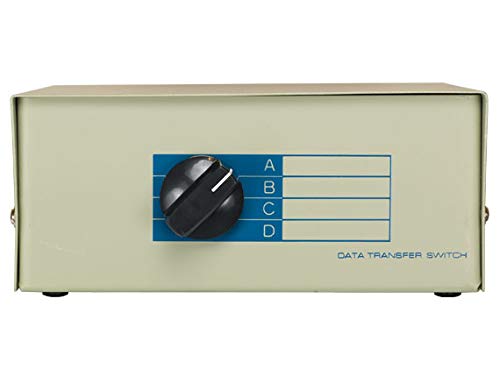
Cable Leader VGA HD15 Manual Data Switch Box (4-Way)
Best for input switching: manual 4-way VGA HD15 switch box for sharing one display among multiple VGA sources
VGA HD15 manual data switch box with 3 output ports and AB port for switching between multiple computers and a monitor. Enables easy switching between two or four computers to a single VGA monitor. customer insight: none
- 4-way manual data switch
- HD15 VGA compatibility
- AB port for additional input
-
10

TRIPP LITE 25-ft VGA M/M Low Profile Monitor Cable
Best for tight spaces: low-profile 25 ft monitor cable designed for clean routing behind desks and equipment racks
Slim, compact SVGA VGA cable, 25 ft, thinner than standard cables for easier routing. Positive user note on its compact design
- low-profile, slim design
- long 25-ft reach
- vga male-to-male compatibility