Best Webcams for Live Streaming (2026)
We selected webcams by evaluating chipset resolution, audio configuration, autofocus and privacy features, field of view, and overall value for live streaming scenarios
The Verdict
- Best Overall: Logitech C920 Pro Webcam — Best for general streaming: reliable 1080p imaging with consistent autofocus and broad software compatibility
- Best Value: EMEET 1080P Webcam with 2 mics and privacy cover — Best privacy-minded choice: 1080p video plus dual mics and a physical privacy cover for secure use
This roundup highlights webcams suited for live streaming across common setups — from solo streamers to remote interviewers — with selections based on image quality, microphone performance, and overall value. Picks were chosen by comparing resolution, field of view, audio inputs, and features like autofocus and privacy covers to match different streaming needs
Top Picks
-
1

Best Overall Logitech C920 Pro Webcam
Best for general streaming: reliable 1080p imaging with consistent autofocus and broad software compatibility
Full HD webcam for video calls and recording with clear 1080p footage. Customers note crystal clear image, easy setup, and good value for money
- crystal clear picture quality
- easy setup
- wide compatibility
-
2

Logitech Brio 101 Full HD 1080p Webcam
focused 1080p option: compact Full HD webcam with a built-in mic for simple streaming setups
Full HD 1080p webcam with built-in mic for meetings and streaming. Auto-light balance and rightlight improve brightness, reducing shadows. Built for plug-and-play on multiple platforms
- 1080p video quality
- built-in mic
- auto-light balance
-
3
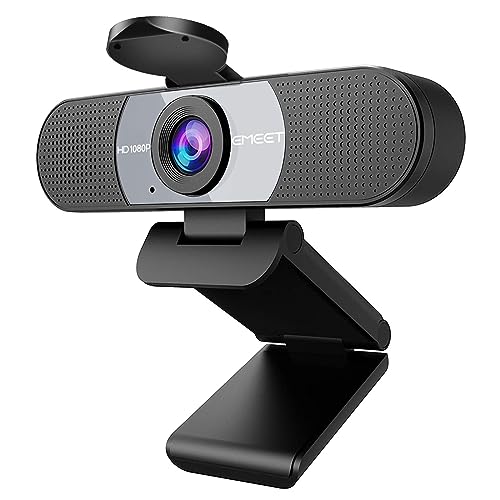
Best Value EMEET 1080P Webcam with 2 mics and privacy cover
Best privacy-minded choice: 1080p video plus dual mics and a physical privacy cover for secure use
EMEET C960 webcam delivers 1080p video with built-in noise-reduction mics and a privacy cover. Plug-and-play via USB for calls and conferencing; praised for clarity and easy setup
- 1080p video clarity
- dual noise-reduction microphones
- privacy cover with automatic removal option
-
4

Logitech C920x HD Pro Webcam
Best consistent performer: dependable 1080p output and solid autofocus for day-to-day live broadcasts
Logitech C920x HD Pro webcam with 1080p/30fps video and stereo mics for clear calls and streaming. Noted for good picture quality and easy setup, with mixed feedback on autofocus and audio
- 1080p video + stereo mics
- auto lighting correction
- easy setup and compatibility
-
5

EMEET 1080P USB Webcam with Microphone (C960) 90° FOV
Best for group or room capture: 90° field of view and dual microphones make it suitable for multi-person streams
EMEET 1080P webcam with two built-in microphones delivers clear video for calls and streaming. Users note easy setup and plug-and-play use, with some mixed opinions on microphone sensitivity
- dual noise-reduction mics
- privacy cover
- full hd 1080p with wide 90° FOV
-
6

EMEET C960 AF Webcam with 1080p autofocus
Best for motion and focus: 1080p with PDAF autofocus keeps subjects sharp as they move during streams
EMEET C960 AF webcam delivers 1080p 60fps with PDAF autofocus and a 73° field of view. Plug-and-play USB camera with privacy cover and built-in microphone for video calls, conferences, and streaming. Users note easy setup and clear video, with mixed opinions on microphone quality
- auto focus with PDAF
- full HD 1080p at 60fps
- privacy cover and built-in mic