Best Label Makers Under $200 (2026)
We ranked units by a value score combining features (connectivity, media options), usability (keyboard/app, template support), and overall user-focused design under $200
The Verdict
- Best Overall: Xyron Create-A-Sticker Mini 2.5" Sticker/Label Maker — Best for quick stickers: simple manual sticker maker ideal for crafts and fast adhesive stickers
- Best Value: Phomemo D30 label maker with 3 adhesive paper rolls — Best for mobile printing: Bluetooth label printer focused on adhesive paper rolls and app-driven templates
Top Picks
-
1

Best Overall Xyron Create-A-Sticker Mini 2.5" Sticker/Label Maker
Best for quick stickers: simple manual sticker maker ideal for crafts and fast adhesive stickers
Compact sticker/label maker with a non-electric, ready-to-use process. Ideal for photos, scrapbooking, and card making; users praise ease of use and strong adhesive quality
- ready-to-use non-electric process
- compact mini size
- pre-loaded adhesive options
-
2

Brother PT-M95 label maker bundle with 4 tapes
Best for basic home office labeling: compact handheld unit with straightforward tape support and bundled media
Compact label maker with QWERTY keyboard and easy-view display for home use. Includes 4 label tapes and various styles. Customers note ease of use and good label quality, but report battery life and tape peel issues
- QWERTY keyboard for easy typing
- easy-view display
- bundle includes 4 tapes
-
3

Brother label maker PTD220 for home office
Best for home office organization: balanced feature set with easy tape compatibility and convenient workflow features
Compact label maker for home and small office use with TZe tape compatibility. Prints ~12mm labels and runs on batteries or optional AC adapter. Customers note ease of use, with some readability concerns on the display
- prints 12mm tapes
- battery or AC powered
- easy-peel labels
-
4

Best Value Phomemo D30 label maker with 3 adhesive paper rolls
Best for mobile printing: Bluetooth label printer focused on adhesive paper rolls and app-driven templates
Compact Bluetooth label printer that works with smartphones; supports various fonts, texts, symbols and icons. Easy removal leaves no residue
- bluetooth connectivity with smartphones
- officially supports an app with diverse fonts
- 3 roll adhesive paper included
-
5

P-Touch label maker bundle with 4 tapes, white
Best for portable typing: handheld QWERTY-style labeler built for quick, on-the-go label creation with bundled tapes
Compact Brother label maker with QWERTY keyboard and preview display for clean labels. Customers praise ease of use and print quality, though battery life and tape waste are noted concerns
- 3 professional fonts
- 14 decorative frames
- over 250 symbols
-
6
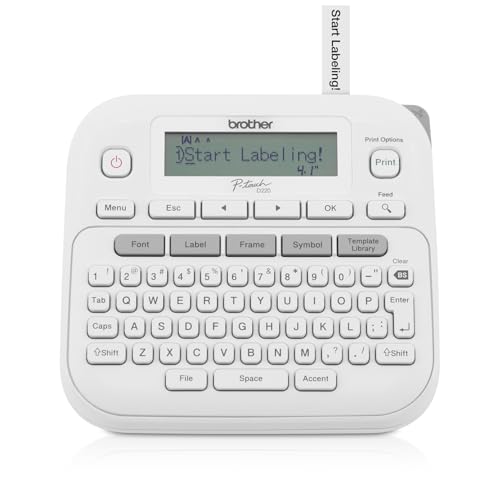
P-Touch Label Maker PTD220 (Renewed Premium) by Brother
Best budget renewal: renewed unit offering core labeler functionality and familiar formatting features for office tasks
Thermal, inkless label printer for home and office. Portable with QWERTY keyboard and 25 pre-set templates; uses 12mm tapes. Users praise ease of setup and label quality, with some noting difficult display and battery requirement
- thermal, inkless printing
- QWERTY keyboard with one-touch keys
- 25 pre-set label templates
-
7

Label Maker M100 Bluetooth Label Printer
Best template variety: Bluetooth label printer with app templates and icon support for versatile home and small-office labels
Compact label printer with Bluetooth connectivity and app support for Android, iOS, and PC. Includes 2000 icons and 300 templates for versatile labeling. Customers cite easy use and crisp print quality
- Bluetooth printing
- extensive icon/template library
- cross-platform compatibility
-
8

Brother P-touch Pro Label Maker PTH111
Best for professional-style labels: compact P-touch unit designed for durable labels and straightforward handheld use
P-touch Pro label maker prints durable laminated labels for electrical panels, cables, and various supplies. One customer notes easy setup, good print quality, and versatile labeling options
- durable laminated labels
- one-touch keys for identification
- multi-scenario labeling capability
-
9

Phomemo D30 label maker with 3 adhesive label papers
Best duplicate listing for adhesive paper users: Bluetooth labeler packaged with multiple adhesive paper rolls for repetitive tasks
Compact Bluetooth label printer for home office and school use. Supports smartphones with Print Master app and offers multiple fonts, texts, symbols, and icons. Users appreciate portability and ease of use
- bluetooth label printer for mobile devices
- 3 roll adhesive paper included
- various fonts and symbols available
-
10

P-Touch Cube Color Label Maker with Bluetooth
Best for color accents: Bluetooth cube-style labeler that adds color label capability with mobile app control
Smartphone-compatible label maker with Design&Print2 app for Android and iOS. Includes templates, symbols, frames, and fonts. Users note ease of use and quality, but mixed connectivity feedback
- smartphone-based design
- broad template library
- cross-platform app support