Best Label Makers Under $50 (2026)
We selected products under $50 and ranked them by a value score combining features, media support, connectivity, included supplies, and overall user utility
The Verdict
- Best Overall: Xyron Create-A-Sticker Mini 2.5" Sticker/Label Maker — Best for simple sticker projects: compact manual sticker-maker designed for small adhesive labels and crafts
- Best Value: Phomemo D30 label maker with 3 adhesive paper rolls — Good choice for mobile printing: Bluetooth-enabled label printer that uses adhesive paper rolls for versatile labels
This roundup covers label makers under $50 suited for home and office tasks, ranked by overall value score. Selections prioritized device versatility, tape/label compatibility, and user-friendly features to help you compare budget options quickly
Top Picks
-
1

Best Overall Xyron Create-A-Sticker Mini 2.5" Sticker/Label Maker
Best for simple sticker projects: compact manual sticker-maker designed for small adhesive labels and crafts
Compact sticker/label maker with a non-electric, ready-to-use process. Ideal for photos, scrapbooking, and card making; users praise ease of use and strong adhesive quality
- ready-to-use non-electric process
- compact mini size
- pre-loaded adhesive options
-
2

Brother PT-M95 label maker bundle with 4 tapes
Great for basic home-office labeling: dedicated handheld labeler with bundled tape options for quick organization
Compact label maker with QWERTY keyboard and easy-view display for home use. Includes 4 label tapes and various styles. Customers note ease of use and good label quality, but report battery life and tape peel issues
- QWERTY keyboard for easy typing
- easy-view display
- bundle includes 4 tapes
-
3

Brother label maker PTD220 for home office
Well-suited for home office users seeking easy-to-use label creation with support for common laminated tapes
Compact label maker for home and small office use with TZe tape compatibility. Prints ~12mm labels and runs on batteries or optional AC adapter. Customers note ease of use, with some readability concerns on the display
- prints 12mm tapes
- battery or AC powered
- easy-peel labels
-
4

Best Value Phomemo D30 label maker with 3 adhesive paper rolls
Good choice for mobile printing: Bluetooth-enabled label printer that uses adhesive paper rolls for versatile labels
Compact Bluetooth label printer that works with smartphones; supports various fonts, texts, symbols and icons. Easy removal leaves no residue
- bluetooth connectivity with smartphones
- officially supports an app with diverse fonts
- 3 roll adhesive paper included
-
5
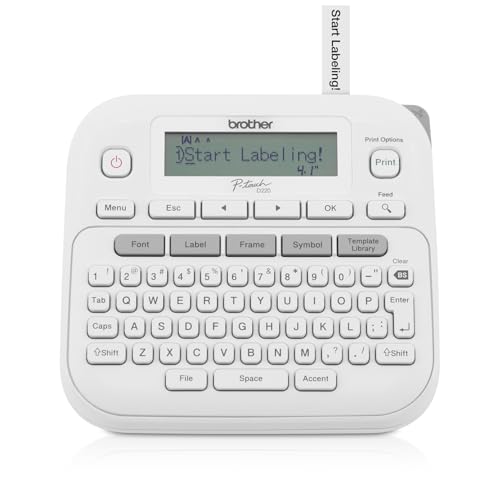
P-Touch Label Maker PTD220 (Renewed Premium) by Brother
Solid refurbished option for value-focused buyers wanting standard handheld labeling features and tape compatibility
Thermal, inkless label printer for home and office. Portable with QWERTY keyboard and 25 pre-set templates; uses 12mm tapes. Users praise ease of setup and label quality, with some noting difficult display and battery requirement
- thermal, inkless printing
- QWERTY keyboard with one-touch keys
- 25 pre-set label templates
-
6

Label Maker M100 Bluetooth Label Printer
Budget-friendly Bluetooth labeler with app templates and cross-platform support for phone and tablet design
Compact label printer with Bluetooth connectivity and app support for Android, iOS, and PC. Includes 2000 icons and 300 templates for versatile labeling. Customers cite easy use and crisp print quality
- Bluetooth printing
- extensive icon/template library
- cross-platform compatibility
-
7

Brother P-touch Pro Label Maker PTH111
Best for heavier-duty handheld use: compact pro-style labeler with support for wider professional tapes
P-touch Pro label maker prints durable laminated labels for electrical panels, cables, and various supplies. One customer notes easy setup, good print quality, and versatile labeling options
- durable laminated labels
- one-touch keys for identification
- multi-scenario labeling capability
-
8

Phomemo D30 label maker with 3 adhesive label papers
Reliable mobile label printer using adhesive paper rolls and Bluetooth for on-the-go label creation
Compact Bluetooth label printer for home office and school use. Supports smartphones with Print Master app and offers multiple fonts, texts, symbols, and icons. Users appreciate portability and ease of use
- bluetooth label printer for mobile devices
- 3 roll adhesive paper included
- various fonts and symbols available
-
9

Label Maker M100 with Bluetooth, 20x50mm labels
Versatile Bluetooth label maker that accommodates larger label sizes and simple office or kitchen organization
Compact Bluetooth label maker prints 20x50mm labels in seconds with self-adhesive backing. Ideal for small business, home use, and organization; customers note easy setup and good print quality
- bluetooth label printer
- speedy 5s printing
- self-adhesive labels
-
10

M100 label maker with 3 tapes
Value pack option combining Bluetooth labeler functionality with multiple tape supplies for varied labeling tasks
Compact label printer with 3 tape rolls and Bluetooth connectivity. Easy mobile use via Print Master app and quick label printing. Customers note crisp print quality and quick setup
- multiple tape sizes included
- seamless mobile connectivity
- clear label output