Best Office Presentation Pointers (2026 Guide)
We selected products by combined average rating and review volume, then evaluated connectivity, pointer type, power design, and presenter controls
The Verdict
- Best Overall: DinoFire Bluetooth & RF 2.4GHz Presenter Remote — Best for flexible connectivity: combines Bluetooth and 2.4GHz RF with a rechargeable green laser for versatile room setups
- Best Value: Kensington Wireless Presenter with Red Laser Pointer — Best for simple plug-and-play use: wireless presenter with a red laser and USB receiver suited to straightforward slide navigation
This guide compares top-rated office presentation pointers and remotes chosen for common presentation workflows, connectivity options, and control features. Picks were selected by aggregated average rating and review volume, emphasizing wireless range, pointer color, and rechargeability for reliable day-to-day use
Top Picks
-
1

Best Overall DinoFire Bluetooth & RF 2.4GHz Presenter Remote
Best for flexible connectivity: combines Bluetooth and 2.4GHz RF with a rechargeable green laser for versatile room setups
DinoFire presenter remote supports Bluetooth and RF 2.4 GHz dual modes, with rechargeable power and a bright green laser. Users note easy setup, compact design, and clear functionality for classroom and professional presentations
- dual wireless modes
- green laser for visibility
- rechargeable USB power
-
2

Air Mouse Green Light Presenter Remote
Best for cursor control: air-mouse functionality with a rechargeable green light makes it useful for demos that need pointer and mouse input
Rechargeable air mouse and presenter remote with wireless cursor control. 8-10 hour runtime, auto sleep, bright green indicator for visibility. Users appreciate ease of use and compact design, but durability concerns are noted
- dual function: air mouse + presenter
- green light visibility and range
- rechargeable with long working time
-
3

Rechargeable Green Laser Pointer for Presentations
Best for visibility: rechargeable green laser pointer designed to be bright and easy to spot on large screens and in bright rooms
Rechargeable wireless presenter with green laser pointer for PowerPoint and Google Slides. Easy plug-and-play design for on-stage or classroom use. One customer notes good visibility and simple setup
- green laser pointer
- compact metal build
- wide range for presentations
-
4

Best Value Kensington Wireless Presenter with Red Laser Pointer
Best for simple plug-and-play use: wireless presenter with a red laser and USB receiver suited to straightforward slide navigation
Wireless presenter with 4-button layout for slide control and a red laser pointer. Plug-and-play 2.4GHz wireless with a 65-foot range and AES 128-bit encryption. Customers note ease of use and cross-device compatibility
- 4-button control for slides and laser
- 65-foot wireless range
- AES 128-bit encryption
-
5
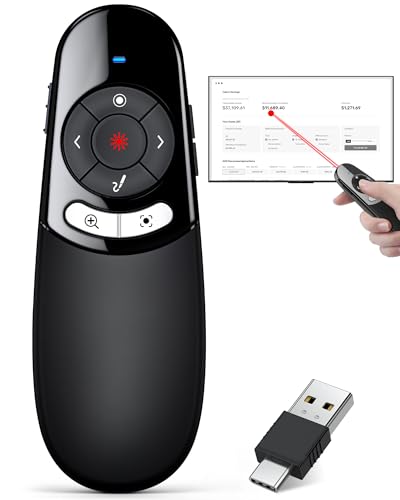
Physical and Digital Presenter Clicker with USB-C/USB-A
Best for modern ports: dual USB-C/USB-A receiver support provides direct compatibility with newer and older laptops
2-in-1 wireless presenter remote with physical laser pointer and digital highlighting/magnifying features. Compatible with USB-C and USB-A devices for broader use. Battery-powered (2x AAA, not included)
- dual-connector compatibility
- physical and digital pointer
- highlighting and magnifying capabilities
-
6

Extendable Telescopic Pointer for Classroom Presentations
Best for classroom reach: extendable telescopic pointer offers long-distance pointing for teaching and board work
Extendable pointer for teachers and speakers with a telescoping reach for chalkboards and whiteboards. Retractable for safe storage. Useful for instructors during presentations
- Telescoping pointer for precision
- Retractable for compact storage
- Classroom-friendly tool