Computer Motherboards
Computer motherboards for desktops and workstations, covering budget through premium ATX, micro‑ATX, and Mini‑ITX boards for Intel and AMD platforms. Catalog includes 299 indexed products with an average rating of 4.44 and offerings from brands like ASUS and GIGABYTE. Prices span roughly $37 to $1,250 (average about (price varies))
Top Products

Raspberry Pi 3 B+ motherboard
Raspberry Pi
Mid-Range
ASUS Prime B550M-A WiFi II Micro ATX motherboard
ASUS
Mid-Range
ASUS TUF Gaming B550-PLUS WiFi II AMD AM4 Motherboard
ASUS
Mid-Range
ASUS Prime B550-PLUS AC-HES AM4 motherboard
ASUS
Mid-Range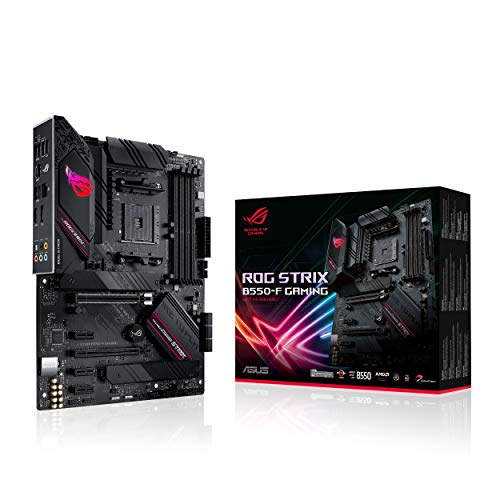
ASUS ROG Strix B550-F Gaming motherboard
ASUS
Premium
MSI B550-A PRO ProSeries Motherboard
msi
Mid-Range
ASUS ROG Strix B550-F Gaming WiFi II motherboard
ASUS
Premium
MSI MPG B550 Gaming Plus V1 Motherboard
msi
Mid-Range
GIGABYTE B550M K motherboard for AMD AM4 Ryzen
GIGABYTE
Mid-Range
GIGABYTE B650 AORUS Elite AX AM5 motherboard
GIGABYTE
Premium
Gigabyte B550 Gaming X V2 Motherboard
GIGABYTE
Mid-Range
ASUS Prime B760M-A AX motherboard
ASUS
Mid-Range
ASUS M5A78L-M LX3 AM3+ motherboard
ASUS
Mid-Range
GIGABYTE B650 AORUS Elite AX V2 motherboard
GIGABYTE
Premium
MSI A520M-A PRO V1 Gaming Motherboard
msi
Mid-Range
ASUS TUF Gaming AMD AM4 MicroATX Motherboard (Wi‑Fi, 3rd Gen Ryzen)
ASUS
Mid-Range
ASUS Prime B760M-A D4-CSM motherboard
ASUS
Mid-Range
MSI PRO H610M-G DDR4 Micro ATX Motherboard
msi
Mid-Range
ASUS Pro B760M PCIe 4.0 mATX motherboard
ASUS
Mid-Range
MSI PRO B760-P WiFi ProSeries Motherboard
msi
Premium
MSI MAG B550 TOMAHAWK Gaming Motherboard
msi
Premium
ASUS Prime B760M-A-CSM motherboard for LGA1700
ASUS
Mid-Range
Gigabyte B550 Gaming X V2 motherboard
GIGABYTE
Mid-Range
GIGABYTE B650M Gaming Plus WiFi AM5 Motherboard
GIGABYTE
Mid-RangeRoundups
Frequently Asked Questions
How do I choose the right motherboard form factor for my build?
Select the form factor (ATX, Micro-ATX, Mini-ITX, E-ATX) that matches your case size and expansion needs: ATX offers the most PCIe slots, Micro-ATX and Mini-ITX are for compact builds with fewer slots, and E-ATX is for high-end motherboards that require larger cases
Which CPU socket and chipset should I match to my processor?
Match the motherboard socket and chipset to your CPU family (for example current Intel or AMD socket types) and choose a chipset that supports the features you need (PCIe lane count, overclocking, multi-GPU, I/O options); check the motherboard manufacturer's CPU compatibility list for specific supported models
What memory (RAM) specifications and capacity should I look for?
Pick a motherboard that supports the RAM type and speed you want (DDR4 or DDR5), the number of DIMM slots you need, and the maximum capacity per slot; dual- or quad-channel configurations improve performance, and check the QVL or specs for supported speeds and configurations
How important are connectivity and expansion options on a motherboard?
Prioritize the number and type of PCIe slots, M.2 and SATA ports for storage, USB headers and rear I/O ports, and networking options (Ethernet speed, Wi‑Fi) based on your peripherals and upgrade plans; insufficient ports can limit future expansion
What power delivery and cooling features should I consider for overclocking or high-performance CPUs?
Look for robust VRM design, quality heatsinks on VRMs and chipset, adequate fan headers and thermal sensor support, and clear manufacturer specs for power phases if you plan to overclock or run high-core-count processors to ensure stable power and cooling
Are there reliability or warranty considerations when choosing a motherboard brand?
Compare brands’ warranty lengths and support policies, read reviews for long-term reliability and firmware update frequency, and consider features like BIOS flashback or dual BIOS for recovery options
How do I maintain and care for a motherboard after installation?
Keep the system dust-free, ensure proper case airflow, use compatible components and correct torque on mounting screws to avoid PCB stress, and update BIOS/firmware from the manufacturer when necessary to address stability or compatibility fixes