Computer Trackballs
Computer trackballs: stationary pointing devices featuring a large ball for thumb- or finger-controlled cursor movement, available in wired and wireless models for desktops and specialized workstations. This category includes 43 indexed products, averaging a 4.26 rating and priced roughly $34–$120 (avg ~(price varies)); notable brands include ELECOM and Kensington
Top Products

Nulea M501 Wireless Trackball Mouse
Nulea
Budget
Nulea M501 Wireless Trackball Mouse
Nulea
Budget
Nulea M501 Wireless Trackball Mouse with rechargeable ergonomic design
Nulea
Budget
Nulea M501 Wireless Trackball Mouse – Ergonomic, Rechargeable
Nulea
Budget
Nulea M501 Wireless Trackball Mouse
Nulea
Budget
Kensington Orbit Trackball Mouse with Scroll Ring (K75327WW), Black-Grey
Kensington
Budget
Nulea M501 Wireless Trackball Mouse with USB/Bluetooth
Nulea
Budget
Nulea M501 Wireless Trackball Mouse, Ergonomic & Rechargeable
Nulea
Budget
Nulea M501 Wireless Trackball Mouse
Nulea
Budget
Kensington Orbit Trackball Mouse with Scroll Ring
Kensington
Mid-Range
Kensington Orbit Trackball Mouse with Scroll Ring (White)
Kensington
Mid-Range
ELECOM EX-G wired trackball mouse
ELECOM
Budget
ELECOM EX-G Trackball Mouse with 2.4GHz wireless
ELECOM
Budget
ELECOM EX-G Wired Trackball Mouse
ELECOM
Mid-Range
ELECOM EX-G Left-Handed Trackball Mouse
ELECOM
Mid-Range
Wireless Trackball Mouse with 44mm ball, Bluetooth & USB
PORLEI
Budget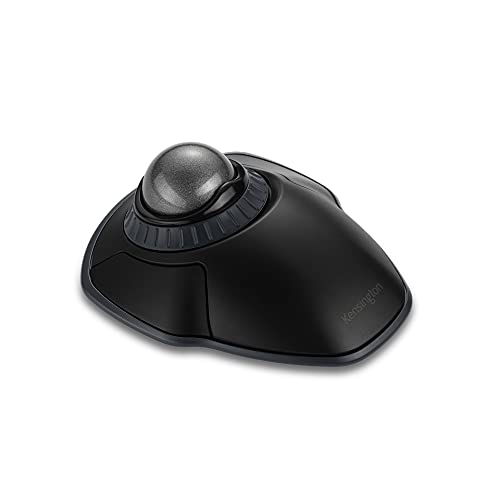
Orbit Wireless Trackball with Scroll Ring
Kensington
Mid-Range
Kensington Orbit Wireless Trackball (K70990WW) in Black-Red
Kensington
Mid-Range
ELECOM M-HT1DRBK huge trackball with 2.4GHz wireless
ELECOM
Mid-Range
ELECOM Ergonomic Trackball IST Wired USB-A
ELECOM
Budget
ELECOM wired trackball mouse with 8 buttons
ELECOM
Mid-Range
ELECOM Ergonomic Trackball IST wireless (36mm ball) M-IT10DRWH
ELECOM
Budget
ELECOM Ergonomic Trackball IST Wired USB-A, 36mm Ruby Ball Movable
ELECOM
Budget
Kensington Orbit Wireless Trackball with Scroll Ring
Kensington
Mid-RangeRoundups
- Best Computer Trackballs for Office Productivity (2026)
- Best Computer Trackballs for Pc, Laptop, And Mac Compatibility (2026)
- Best Computer Trackballs for On-The-Go Productivity (2026)
- Best Computer Trackballs Under $200 (2026)
- Best Computer Trackballs Under $100 (2026)
- Best Computer Trackballs Under $50 (2026)
- Best Computer Trackballs (2026 Guide)
Frequently Asked Questions
How do I choose the right trackball for comfort and hand size?
Choose a trackball with a shape and button layout that matches your dominant hand and hand size; larger, sculpted designs suit bigger hands and prolonged use, while compact, ambidextrous models fit smaller hands or shared setups. Check dimensions and whether the ball is positioned for thumb or finger control to match your preferred motion
What are the main connection types and which should I pick?
Trackballs typically connect via USB wired, Bluetooth, or a 2.4 GHz wireless dongle; wired offers lowest latency, Bluetooth saves a USB port and pairs with multiple devices, and 2.4 GHz provides a balance of low latency and stable connection for a single host. Choose based on your need for mobility, number of devices, and sensitivity to input delay
What performance features matter for productivity or design work?
Look for adjustable DPI/sensitivity, programmable buttons, and smooth ball movement; higher DPI and precise sensor tracking improve cursor control for fine tasks, while customizable buttons and profiles let you assign shortcuts for productivity or CAD applications. Also consider whether software drivers are available for macros and profile switching
Are trackballs suitable for people with wrist or forearm pain?
Yes—trackballs reduce wrist and forearm movement since the device remains stationary; models with ergonomic shapes and distinct thumb- or finger-operated balls can further reduce strain. Consult an ergonomic professional for persistent pain and pair a trackball with proper desk and chair setup
How do I maintain and clean a trackball to keep it responsive?
Remove the ball periodically and clean the ball and sensor housing with a soft, lint-free cloth; use compressed air or a cotton swab for sensor rollers or optical sensors and avoid liquid inside the housing. Regular cleaning prevents buildup that causes jitter or reduced responsiveness
What should I expect in terms of price and quality for trackballs?
Trackballs range from budget models under $50 to higher-end ergonomic or programmable units above that; lower-priced options often provide basic functionality, while mid-to-high-tier devices add ergonomic shaping, programmable features, and better sensors. Consider user reviews and average ratings (around 4.2 in this category) to gauge reliability
Does trackball compatibility differ across operating systems?
Basic cursor movement and standard buttons work across major OSes, but advanced features like programmable buttons, custom DPI, or profile software may require OS-specific drivers or third-party utilities. Verify that the manufacturer provides drivers or confirms compatibility with your operating system before purchasing