External Hard Drives
External hard drives for portable and desktop storage, including USB and Thunderbolt models for backup, media, and expanded capacity. The category spans budget to premium options (about $32–$4,239, average $245) with 292 products indexed and a 4.38 average rating. Top brands include WD, Seagate, TOSHIBA, Avolusion, and Oyen Digital
Top Products

WD 2TB Elements Portable External Hard Drive
WD
Mid-Range
WD Elements 4TB Portable External HD for Windows & Mac
Western Digital
Mid-Range
WD 1TB My Passport external hard drive
WD
Mid-Range
Seagate Portable 4TB External Drive
Seagate
Mid-Range
WD 5TB external hard drive for Windows/mac
Western Digital
Mid-Range
Seagate 5TB Portable External Hard Drive USB 3.0
Seagate
Mid-Range
WD 1TB My Passport portable external hard drive
WD
Mid-Range
Seagate Portable 2TB External Hard Drive HDD
Seagate
Mid-Range
WD 2TB My Passport external hard drive (blue) with ransomware defense
WD
Mid-Range
WD 8TB Elements Desktop External Hard Drive
WD
Premium
WD 6TB Elements Portable External HDD
WD
Premium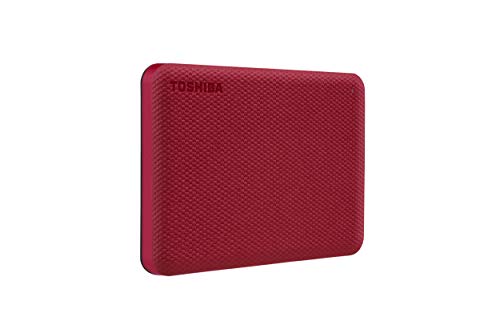
Toshiba Canvio Advance 1TB Portable External Hard Drive
TOSHIBA
Mid-Range
ADATA HD710 Pro 1TB Rugged External Drive
ADATA
Mid-Range
Toshiba Canvio Advance 1TB Portable External Hard Drive
TOSHIBA
Mid-Range
Toshiba Canvio Advance 1TB External Hard Drive
TOSHIBA
Mid-Range
WD 2TB My Passport external hard drive
WD
Mid-Range
WD 1TB portable external hard drive
WD
Mid-Range
Toshiba 2TB Canvio Advance Portable External Hard Drive
TOSHIBA
Mid-Range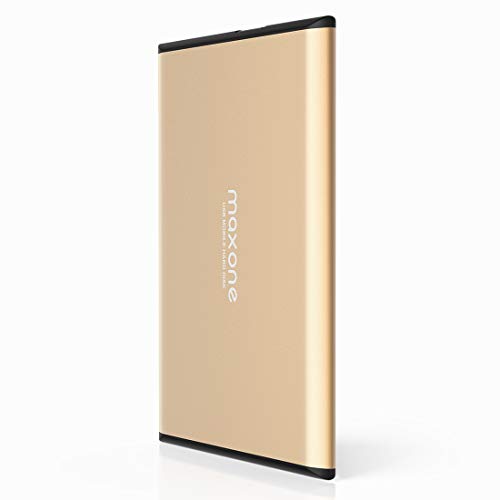
Maxone 1TB Ultra Slim Portable External HDD
Maxone
Mid-Range
UnionSine 500GB 2.5" Ultra Slim External HDD USB 3.0
UnionSine
Budget
WD 4TB My Passport Portable Hard Drive (USB-C/USB-A)
WD
Mid-Range
Seagate Expansion 8TB External HDD with USB 3.0
Seagate
Premium
Toshiba Canvio Advance 2TB Portable External Hard Drive
TOSHIBA
Mid-Range
Toshiba Canvio Advance 2TB Portable External HDD
TOSHIBA
Mid-RangeRoundups
- Best External Hard Drives for Portable Media Library (2026)
- Best External Hard Drives for Xbox One Storage (2026)
- Best External Hard Drives for Ps4 Storage (2026)
- Best External Hard Drives Under $200 (2026)
- Best External Hard Drives Under $100 (2026)
- Best External Hard Drives Under $50 (2026)
- Best External Hard Drives (2026 Guide)
Frequently Asked Questions
How do I choose the right capacity for an external hard drive?
Estimate your storage needs by totaling current files (photos, videos, backups) and adding growth; common capacities range from 500 GB to multiple terabytes, with 1–4 TB suitable for general use and 8 TB+ for large media libraries or extended backups
Should I buy an HDD or an SSD external drive?
HDDs (spinning disks) offer higher capacities at lower cost per gigabyte and are fine for backups and mass storage; SSDs are faster, more durable, and use less power but cost more per gigabyte, making them better for editing, frequent transfers, or portability
What interface and speed should I look for?
Choose interfaces supported by your device: USB 3.0/3.1 Gen1 provides good general performance, USB 3.2/3.2 Gen2 and Thunderbolt offer significantly higher transfer speeds for SSDs; check both the drive’s rated throughput and the cable/port on your computer for best results
How important is durability and portability?
If you plan to carry the drive often, prioritize compact, shock-resistant models or SSDs with solid-state construction; desktop external drives are larger and often require external power but offer higher capacities for stationary use
What backup and security features should I expect?
Look for built-in backup software or compatibility with common backup tools, and consider hardware or software encryption (AES-256 or similar) and password protection if storing sensitive data; note that encryption may affect compatibility with different operating systems
How do I maintain and prolong the lifespan of an external hard drive?
Keep the drive in a cool, dry place, safely eject before disconnecting, avoid physical shocks (especially for HDDs), and maintain regular backups; for drives used as long-term archives, verify and refresh data periodically
Are external drives compatible across Windows, macOS, and Linux?
Compatibility depends on the drive’s filesystem: exFAT is widely supported across Windows and modern macOS without file-size limits, HFS+ or APFS are macOS-native, and ext4 is common on Linux; reformatting is often required to change compatibility and will erase existing data