USB Cables
This category covers USB-C cables for charging, data transfer, and video connectivity across devices, with options from budget to premium. Listings average a 4.51 rating across 157 products and include brands such as Belkin and StarTech. Price range spans about $32 to $524 (average ~(price varies))
Top Products

USB-A to USB-B 2.0 cable set, 24-pack, 6 ft, gold-plated connectors
Amazon Basics
Mid-Range
BlueRigger USB Extension Cable 50ft USB2.0
BlueRigger
Mid-Range
Anker USB C to USB C Cable 240W, 6 ft
Anker
Budget
10ft USB-C to USB-C fast charging cable with 20W charger block
Vagavo
Budget
USB C to USB C Cable 100W 15ft 2-pack, 20Gbps, 4K video
UseBean
Budget
6 inch USB-C to USB-A braided cable
CableCreation
Mid-Range
BlueRigger USB Extension Cable 75ft USB 2.0 extender
BlueRigger
Mid-Range
Belkin USB-C to USB-C braided charger cable 6.6ft two-pack
Belkin
Mid-Range
UseBean USB C to USB C Cable 100W 15ft (2-pack) 20Gbps 4K video
UseBean
Budget
Ventev USB-C Braided Cable 10ft, alloy housing
Ventev
Mid-Range
Belkin USB-C to USB-C Charger Cable 1M/3.3ft 2-Pack
Belkin
Budget
Belkin USB-C to USB-A braided cable 6.6ft (2m) 2-pack
Belkin
Budget
Silkland USB-C to Thunderbolt 4 Cable 10ft/3m, 40Gbps, 240W
Silkland
Mid-Range
Plugable Thunderbolt 4 Cable with 240W charging 1M
Plugable
Budget
Belkin USB-A to USB-C Cable with Thunderbolt 3 tech
Belkin
Budget
Nuance PowerMic III compatible replacement cable, 9 ft
ECS
Budget
Spektrum USB programming cable for laptop
Spektrum
Budget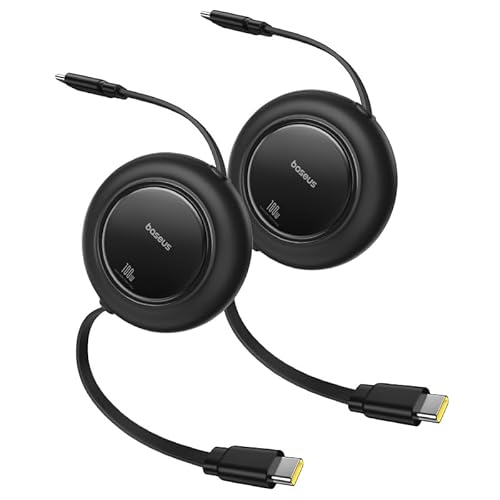
Baseus USB C Cable 100W Retractable 6.6ft (2-Pack)
Baseus
Budget
Escort SmartCord Coiled Wire for radar detectors
Escort
Mid-Range
GRS USB Button Hole Spinner
ThunderStick
Mid-Range
USB 2.0 Active Repeater Extension Cable 60ft, A male to A female
LDKCOK
Budget
USB to Ethernet Adapter 30FT USB-A to RJ45 Cable 1Gbps
Thzzhnno
Budget
USB 2.0 active extension repeater cable A M/F 10m
Tripp Lite
Budget
USB C to USB C Cable 100W 20ft, 2Pack – 4K Video & Fast Charge
UseBean
Mid-RangeRoundups
Frequently Asked Questions
How do I choose the right USB cable type for my device?
Check your device's port (USB-C, Micro-USB, or USB-A) and the port on the host (laptop, charger, or hub). Match connector types and verify the cable supports the data transfer or power delivery standard you need (e.g., USB 2.0, USB 3.x, or USB4)
What does USB cable data speed notation (USB 2.0, 3.0, 3.1, 3.2, USB4) mean for everyday use?
These labels indicate maximum theoretical transfer rates and protocol features: USB 2.0 is suitable for charging and basic data, USB 3.x offers higher speeds for file transfers and external drives, and USB4 supports the fastest data and display tunneling; choose based on the device's supported protocol for full performance
How important is power delivery (PD) rating in a USB-C cable and how do I pick one?
Power Delivery rating determines how much wattage a cable can safely carry; common ratings are 60W and 100W for USB-C. Match or exceed your charger's and device's PD requirement—laptops and some fast chargers typically need higher-wattage cables
Are longer USB cables slower or less safe than shorter ones?
Longer cables can incur more voltage drop and signal attenuation, which may reduce charging speed or maximum data rate for high-speed standards; choose a cable length appropriate for the use case and look for specifications that guarantee performance at that length
How can I tell if a cable supports video output (DisplayPort/Alt Mode)?
Check the cable or product specifications for 'Alt Mode,' 'DisplayPort over USB-C,' or explicit mention of video/monitor support; not all USB-C cables carry video even if they charge and transfer data
What materials or build features should I look for for durability?
Seek cables with reinforced connectors, strain relief, braided jackets, and gold- or nickel-plated contacts; these features reduce fraying and connector wear but verify the manufacturer’s durability claims in specs or reviews
How should I care for and store USB cables to maximize lifespan?
Avoid tight bends near the connectors, unplug by gripping the plug rather than the cable, store coiled loosely without sharp kinks, and keep cables away from heat, moisture, and pets to reduce wear and failure