StarTech PEX4SFF8639 U.2 to PCIe Adapter vs USB C to IDE/SATA external adapter kit for 2.5/3.5 HDD/SSD
Overall winner: StarTech PEX4SFF8639 U.2 to PCIe Adapter
Key Differences
Pick the Unitek (A) if you need broad legacy support for 2.5"/3.5" IDE and SATA drives with USB connectivity and a more affordable listed price tier. Pick the StarTech (B) if you need a U.2 to PCIe solution for NVMe drives with PCIe 4.0 x4 support and easier installation without extra cables, though some users noted thermal and sturdiness concerns

StarTech PEX4SFF8639 U.2 to PCIe Adapter
Mount a 2.5" U.2 NVMe SSD into a desktop or server via a PCIe expansion slot. Provides PCIe NVMe performance with no cables. Customers note easy installation and reliable speed
Pros
- easy to install
- no adapter cables needed
- supports PCIe 4.0 x4 (backward compatible)
- mounts U.2 NVMe SSD directly
Cons
- thermal/sturdiness concerns from some users
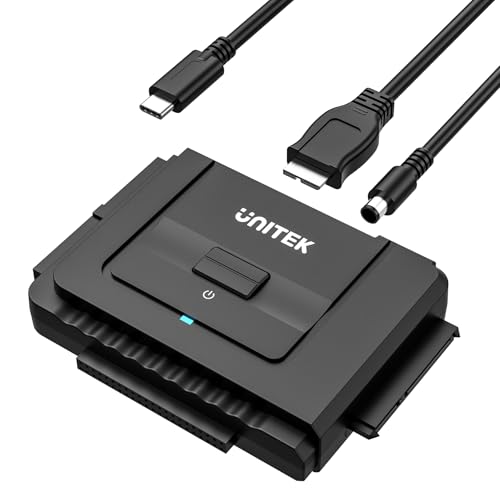
USB C to IDE/SATA external adapter kit for 2.5/3.5 HDD/SSD
External hard drive adapter supporting 2.5/3.5 HDD/SSD with USB 3.0 data transfer. One touch backup and dual IDE connectors plus a SATA II port for versatile drives. Customers note easy setup and solid performance, though compatibility may vary
Pros
- universal IDE and SATA compatibility
- dual IDE connectors plus SATA II
- usb 3.0 transfer speeds
- one touch backup function
Cons
- mixed compatibility with some systems
- some Windows PCs may not recognize the device
- requires external power for certain drives
Head-to-Head
| Criteria | Winner |
|---|---|
| Price | Unitek |
| Durability | StarTech |
| Versatility | Unitek |
| User Reviews | Unitek |