KVM Switches
KVM switches for Electronics & Gadgets let users control multiple computers from one keyboard, video display and mouse; offerings include USB, HDMI/DisplayPort and enterprise-grade units. Sixty‑plus brands are represented across budget to premium price tiers, with Tripp Lite, ATEN and IOGEAR among top sellers and an average rating of about 4.45
Top Products

IOGEAR 4-Port USB KVM Switch with Cables
IOGEAR
Mid-Range
IOGEAR 2-Port USB DisplayPort KVM Switch (4K 30Hz) GCS52DP
IOGEAR
Mid-Range
IOGEAR 2-Port USB HDMI KVM Switch GCS62HU
IOGEAR
Mid-Range
AV Access USB Extender Over Cat5e/6 196ft, 4 USB 2.0 Ports
v AV Access
Mid-Range
IOGEAR 2-Port USB VGA KVM Switch GCS72U
IOGEAR
Mid-Range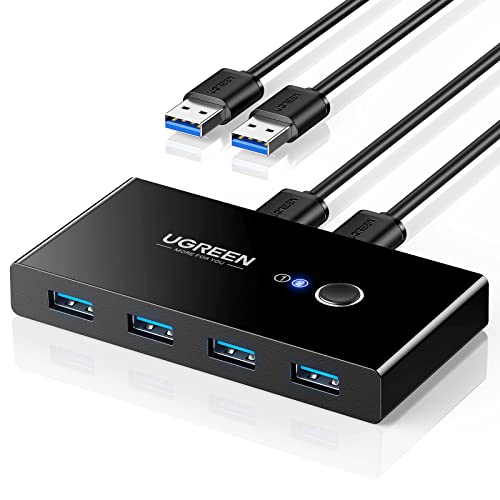
UGREEN USB 3.0 Switch Selector for 2 PCs, 4 Ports
UGREEN
Budget
TRENDnet 2-Port USB KVM Switch Kit with Audio TK-209K
TRENDnet
Mid-Range
TRENDnet 4-Port USB KVM Switch Kit with Audio TK-409K
TRENDnet
Mid-Range
UGREEN USB-C 2-in 4-out switcher for 2 PCs
UGREEN
Mid-Range
USB3.0 KVM Switch 4-Port HDMI 4K@60Hz for 4 Computers
GREATHTEK
Mid-Range
GREATHTEK 2-Port HDMI KVM Switch with USB 3.0 Hubs
GREATHTEK
Mid-Range
GL.iNet Comet GL-RM1 Remote KVM Over Internet
GL.iNet
Mid-Range
Cable Matters 4-Port USB 3.0 Switch with RF Remote
Cable Matters
Mid-Range
HDMI KVM Switch for 2 Monitors and 2 Computers
EVATEK
Mid-Range
USB-C Bi-Directional Switch 2-in 1-out, 8K@60Hz, 10Gbps, 100W PD
SUIDEK
Mid-Range
eKL USB 3.0 4-Port KVM Switch
eKL
Mid-Range
KVM Switch for 2 Computers with 1 Monitor, USB Hub, HDMI (Viagkiki)
Viagkiki
Budget
Unitek HDMI KVM Switch for 2 computers and dual monitors
Unitek
Mid-Range
Anker USB 3.0 Switch with 2-device switching
Anker
Mid-Range
UGREEN DisplayPort KVM Switch for 2 computers and 2 monitors
UGREEN
Mid-Range
4-port HDMI USB KVM Switch 4K@30Hz with cables
DGODRT
Budget
Minisopuru Dual Monitor KVM Docking Station
minisopuru
Mid-Range
Alxum DP 1.4 KVM Switch: 2 Computers, 1 Monitor
Alxum
Mid-Range
AV Access USB 3.0 Extender over Ethernet (100m) with 4 USB 3.2 Ports
v AV Access
PremiumRoundups
Frequently Asked Questions
How do I choose the right KVM switch for my setup?
Match the number of computers and the type of video/audio/USB connections you need, confirm supported resolutions and refresh rates, choose between desktop vs. rackmount form factors, and check whether you need features like multi-monitor support, hotkey switching, or remote access
What video and USB standards should I look for?
Select a KVM that supports the video interface your systems use (HDMI, DisplayPort, DVI, VGA) and the resolution/refresh rate required; for peripherals, check USB versions (USB 2.0 vs. 3.0/3.1) and whether the KVM supports USB keyboard/mouse HID passthrough or full USB device sharing
Are there different types of KVM switches for different budgets?
Yes: basic desktop KVMs for 2–4 systems with VGA or HDMI are typically low-cost, mid-range models add multi-monitor, higher resolutions, or USB 3.0 support, and enterprise/rackmount units with many ports, IP remote access, or advanced management cost more; average category prices vary around a few hundred dollars
Will a KVM switch work with my wireless keyboard and mouse?
Most KVMs support wireless keyboards/mice that use a USB receiver by presenting it as a standard HID device, but some advanced USB sharing or power-hungry receivers may require active USB ports or explicit compatibility—check product specs for wireless HID support
How do I ensure compatibility with multi-monitor or high-refresh systems?
Choose a KVM that explicitly lists multi-monitor/multi-head support and the maximum per-channel resolution and refresh rate; for high-refresh gaming or professional displays, confirm the KVM supports the required bandwidth and cables (DisplayPort 1.4, HDMI 2.0/2.1, etc.)
What features affect latency or responsiveness when switching?
Switching method (hotkey, button, remote, or IP), USB emulation quality, and whether the KVM maintains active connections to all hosts can affect latency; lower-end units may have brief delays, while models with continuous USB emulation reduce peripheral dropouts
How should I maintain and troubleshoot a KVM switch?
Keep firmware up to date if the vendor offers updates, use high-quality certified cables, test connections one at a time when troubleshooting, and consult the manual for reset or firmware-reflash procedures; power-cycle the KVM and hosts if devices fail to enumerate