Computer DisplayPort Cables
This category covers Computer DisplayPort cables for connecting PCs, monitors, and graphics cards, with options across budget to mid-range price points (avg $58). Twelve products are indexed with an average rating of 4.64; notable manufacturers include Capshi among others
Top Products

Capshi 8K/4K DisplayPort Cable 1.4, 25FT, VESA Certified, 32.4Gbps
Capshi
Mid-Range
IVANKY DisplayPort 2.1 Cable 15ft
IVANKY
Mid-Range
DisplayPort 1.2 cable 10-pack, 6 ft, gold-plated plugs
Amazon Basics
Mid-Range
Capshi 8K/4K DisplayPort Cable 1.4, 30FT, VESA Certified
Capshi
Mid-Range
DisplayPort to HDMI cable, uni-directional, 6 ft (pack of 10)
Amazon Basics
Mid-Range
Capshi 8K/4K DisplayPort Cable 1.4, 35ft, DP 1.4, VESA Certified
Capshi
Mid-Range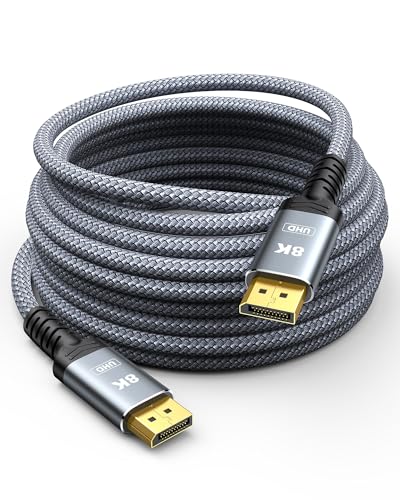
Capshi Fiber Optic DisplayPort Cable 1.4, 50FT, 8K/4K/2K, HDR
Capshi
Mid-Range
DisplayPort to DisplayPort Cable 6 Ft, Gold Plated DP to DP 4K@60HZ (Male to Male) for Desktops and Laptops
Anbear
Mid-Range
DisplayPort Cables 10-Pack braided 6ft
UV-CABLE
Mid-Range
BENFEI 4K DP to HDMI Cable 6ft, 5 Pack
BENFEI
Mid-Range
DisplayPort to HDMI Adapter 4K (10-pack) UV-CABLE
UV-CABLE
Mid-Range
DisplayPort to HDMI Adapter 4K (20-Pack) UV-CABLE
UV-CABLE
Mid-RangeRoundups
Frequently Asked Questions
How do I choose the right DisplayPort cable for my monitor and GPU?
Match the cable's DisplayPort version and bandwidth to your monitor/GPU capabilities: DP 1.2 supports up to 4K@60Hz, DP 1.4 supports up to 4K@120Hz or 8K@60Hz with DSC, and DP 2.0 supports higher resolutions and refresh rates. Also check connector type (full-size DisplayPort vs. mini DisplayPort) and the cable length you need to avoid excessive signal loss
What cable length should I buy and how does length affect signal quality?
Choose the shortest cable that fits your setup; shorter cables generally provide more reliable high-bandwidth performance. For high resolutions/refresh rates, prefer lengths under 2–3 meters for passive cables, or look for active/optical DisplayPort cables for longer runs to maintain signal integrity
Do I need an active or passive DisplayPort cable?
Passive cables work well for common lengths and moderate resolutions (e.g., 4K@60Hz). Active cables or optical DisplayPort cables are required for longer distances or when you need the higher bandwidth necessary for 4K@120Hz, 8K, or multi-monitor daisy-chaining where passive cables cannot sustain the signal
Can one DisplayPort cable support HDR, variable refresh rate (VRR), and adaptive sync features?
Yes — these features are supported if the cable and connected devices implement the required DisplayPort version and bandwidth. Ensure both monitor and GPU support HDR/VRR and choose a cable rated for the DisplayPort standard that carries the needed data rate
Are there compatibility issues between different DisplayPort versions?
DisplayPort is largely backward and forward compatible: newer GPUs and monitors can negotiate lower modes with older cables. However, a lower-version cable may limit maximum resolution, refresh rate, or features compared with what newer devices can achieve
What should I look for regarding build quality and connectors?
Look for solid strain relief, gold- or nickel-plated contacts, and sturdy connector shells to reduce wear and maintain contact. Shielding and braided jackets help reduce interference and improve durability for frequent handling
How can I care for and maintain my DisplayPort cable to extend its life?
Avoid sharp bends and kinks, secure cables with Velcro or cable ties rather than tight knots, unplug by gripping the connector not the cable, and keep connectors clean and dry to prevent corrosion and intermittent connections